

Tag: product updates

Introducing Messages, A New Way To Share What You Love on Spotify with Friends and Family

Recommendations have always been at the heart of the Spotify experience. Friends and family share their favorite music, podcasts, audiobooks, and more from Spotify millions of times each month. That’s because word of mouth is one of the most powerful ways for people to discover their next favorite track. 

Spotify users have told us they want a dedicated space within the app to share songs, podcasts, or audiobooks they’re excited about with friends and family, and an easy way to keep track of recommendations. For artists, authors, and creators, easier sharing means more word-of-mouth recommendations and helps create new fans. Our goal is to give users what they want and make those moments of connection more seamless and streamlined in the Spotify app.

That’s why, beginning this week, Messages will start rolling out to Free and Premium users in select markets on mobile devices. In order to access Messages, users must be aged 16 years and older.

The Spotify content you’re already sharing, now all in one convenient place

Whether you’re sharing a new audiobook with a friend for book club, bonding over your new favorite song, or swapping history podcasts with Dad, the right recommendation can spark a great conversation with those closest to you. Messages are a fast and convenient way to share and chat about what you’re listening to with the people you care about.

Messages also open up new opportunities for artists, authors, and creators—more users can spread the word about an artist’s track or creator’s podcast with their friends and family, helping drive discovery.

Here’s how Messages work

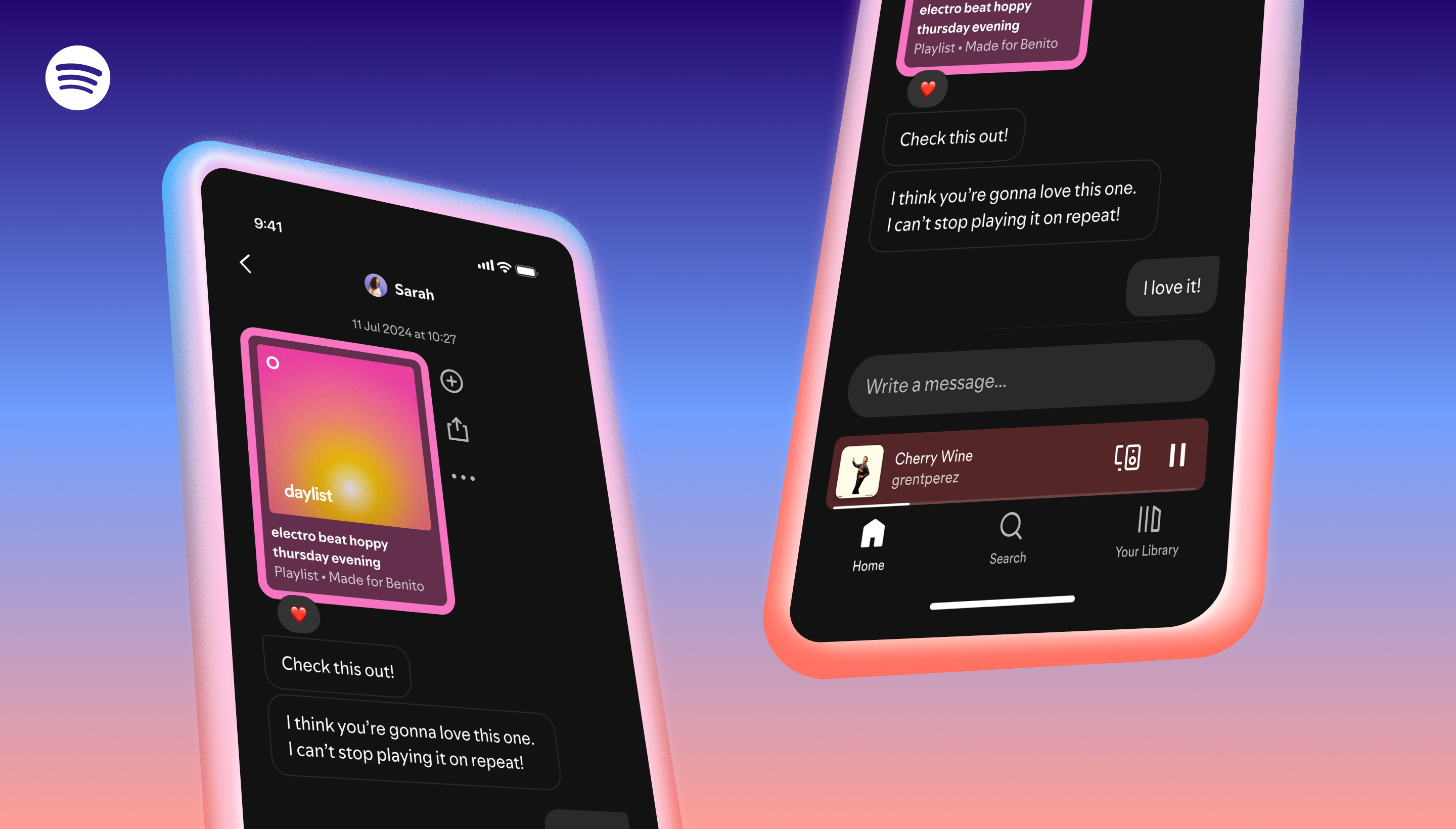
Messages are one-on-one conversations where you can share Spotify content and react with text and emojis. 

  • Share Spotify content and start a message in-app with people you’ve interacted with before through Spotify. 
  • When listening to a song, podcast, or audiobook in the Now Playing View, tap the share icon, select a friend, and hit send.
  • Once you accept a message request, you’ll be able to react with emojis, send texts, and seamlessly share Spotify content back and forth. Access Messages by going to your profile photo in the top left corner. 

Messages are for the conversations you’re already having about music, podcasts and audiobooks with your friends and family. It’s easy to start a chat in the app with people you know and have previously shared Spotify content with. You’ll also see suggested people to message based on things like whether you’ve previously shared Spotify content with them, joined Jams, Blends, or collaborative playlists together, or if you share a Family or Duo plan.

As always, you should continue sharing Spotify content directly through your favorite platforms like Instagram, Facebook, WhatsApp, Snapchat, TikTok, and more. Messages on Spotify are designed to complement these integrations, not replace them, and we’re excited to continue offering more ways to drive hype for the Spotify content you love, wherever you are.

Messages put you in control of the conversation with the people you care about

With Messages on Spotify, users are always in the driver’s seat. Users have the choice to accept or reject message requests from friends and family. Spotify’s Terms of Use and Platform Rules against illegal and harmful content still apply to Messages, so if something doesn’t feel right, you can easily report that content or account. You can report by holding down on the message in question, selecting “Report,” and choosing how the message violates our Terms of Use and/or Platform Rules. You are also able to block other users and opt out of Messages entirely through Settings. 

To help ensure a secure sharing experience, conversations are protected with industry-standard encryption in transit and at rest. This means your data is protected by encryption when it’s stored and when it’s on the move. In keeping with our platform best practices, Spotify will utilize proactive detection technology to scan messages for certain unlawful and harmful content, and our moderators will review reported content. This two-pronged approach helps us offer a safer environment while respecting user privacy.  

This is just the beginning. We’re excited to continue building and refining the experience for more Spotify users around the globe in the months ahead.

*Update as of January 28, 2026: We love all the feedback on Messages. That’s why, starting today, you can now share to a group through Spotify Messages. Share the podcasts, playlists, and audiobooks you’re listening to with up to 10 friends and family members per chat, and keep the conversation going directly on Spotify. The same user controls and safety functions for 1:1 messages are available for group chats. To learn more, check out the information below.
The Top Five Just-Debuted Spotify Enhancements That Creators Can’t Miss

Today, during our Now Playing event, we unveiled a series of new offerings to help creators grow their audiences and better monetize their video podcasts on Spotify. Let’s explore each of these enhancements to the Spotify platform and better understand what they mean for creators.

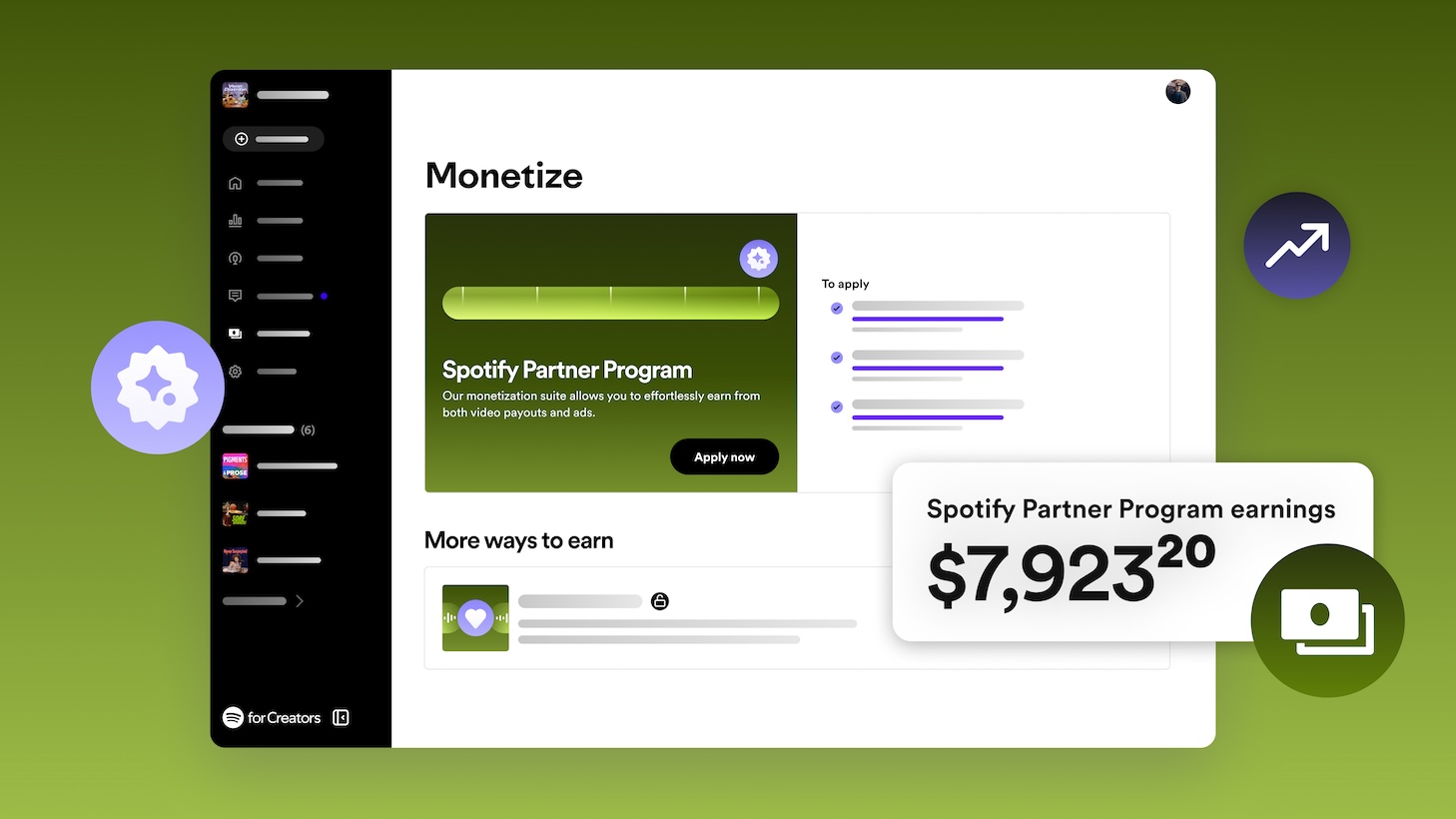
1. Introducing new ways to monetize with the Spotify Partner Program

Starting today, qualified creators can sign up to participate in our new monetization program, the Spotify Partner Program, available to creators in the United States, Canada, Australia, and the United Kingdom. This new program gives creators who host with us and meet our monetization criteria access to multiple revenue streams to help them transform their shows into sustainable businesses, all backed by the power of our teams and technology at Spotify.

Creators in the Spotify Partner Program earn a share of revenue every time an ad (monetized by Spotify) plays in an episode on and off the platform. All a creator has to do is tell us where they want the ads to play, and we’ll take care of the rest.

If you’re a creator who publishes videos on Spotify, you can also earn Premium video revenue through the Spotify Partner Program. With this new revenue stream, when Spotify Premium subscribers in select markets stream video episodes, we’ll serve content to them without dynamic ads to ensure they have an uninterrupted viewing experience. And instead of earning ad revenue for those streams, creators can earn based on how much their fans stream their content. The greater the number of fans who watch or listen to your podcast, the more creators can earn. 

The new Spotify Partner Program can support creators who want to start earning more consistently for their audio or video work.

2. Reach new audiences on Spotify with video clips and thumbnails 

We’re continuing to invest in new ways to manage a show’s presence on Spotify so creators can capture the attention of potential fans or followers. These features will help creators stand out with videos, show up in more places on Spotify, and look their best once they are there.

Get discovered by uploading short-form video clips

Whether a creator is making an audio or video podcast, they’re probably already creating short-form video content to promote their show across social media platforms like TikTok, Shorts, Reels, or all of the above. We know that these clips are great at driving engagement, but they don’t necessarily translate to more streams of a show. 

That’s why we’re thrilled to share that creators can now upload clips directly to Spotify, where audiences already are. To start, clips can be up to 90 seconds long, and creators can upload one clip per episode. Episode clips can then be recommended across Spotify app surfaces like the Home feed, Podcasts feed, Browse, the Now Playing view, and more. Clips will also always be visible on show pages, allowing potential audiences to preview your latest episodes. 

Our goal is not to make our platform yet another place to watch short-form content. We want to help people find their next favorite shows where they are ready to immediately listen or watch, ultimately driving more streams of full-length episodes. 

Clips are now in beta on Spotify for Creators in select markets, including the U.S., U.K., Canada, and Australia (see full list here). 

Customize video thumbnails for every episode 

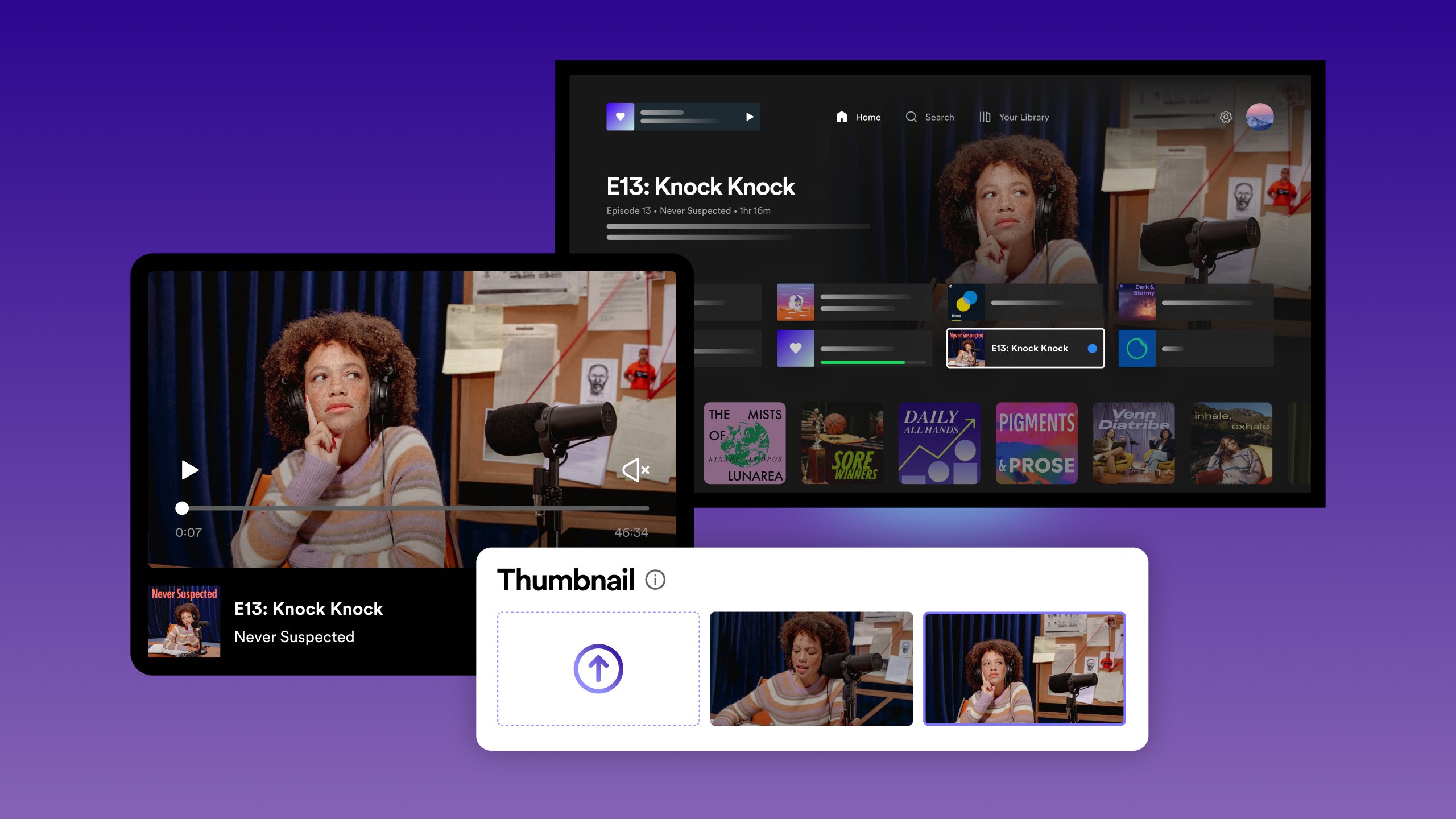
Creators have always been able to set episode-level podcast art for audio episodes on Spotify, but now they can upload video thumbnails too. Creators can choose a Spotify-generated 16:9 thumbnail or replace our suggestion by uploading their own. Video thumbnails are displayed and optimized across our mobile, desktop, and TV app experiences to help grab the attention of potential viewers. 

All creators can now upload thumbnails for new episodes and their entire back catalogs. 

3. New analytics to help you learn and grow

We know how critical it is for creators to understand their performance and have as much data as possible to help make decisions about their shows. For creators hosted on Spotify, we’ve redesigned our dashboard on the web to bring these key metrics to the forefront. Creators can always get a quick pulse check of how a show is performing and navigate directly to the right parts of our app to take action. 

At a glance, creators will be able to: 

  • See how many Spotify followers they have and how that growth rate changes over time. 
  • Track the performance of their latest episodes, including how many streams, consumption hours, and comments they have.
  • Visualize their audiences’ journeys to discovering content, including the number of people they are reaching, the number showing interest, and the number converted to streams on Spotify. 
  • View the latest comments so they can like and reply to favorites to build fan community on Spotify.

4. Elevating the video discovery and viewing experiences on Spotify

We’re excited to highlight several improvements to the video experience itself on Spotify, including:

  • Personalized video recommendations throughout the app
  • Playback improvements like thumbnail scrubbing, pinch-to-zoom, video chapters, and a toggle to make it easy to switch between the video and audio experiences
  • Comments that make it easy for audiences to share feedback and for creators to build fan community on Spotify
  • A following filter on the Podcasts feed so audiences can quickly find content they already know and love 

5. The future is bright (and multiformat)

Regardless of where a podcast is hosted (or if a show isn’t yet on Spotify), it’s easy for creators to get up and running with these great new features. Suppose you’re a creator who is already making videos. In that case, we encourage you to start uploading your video episodes through our newly refreshed hub for creators, Spotify for Creators, and check your eligibility for the Spotify Partner Program. If video isn’t for you, that’s okay too—we offer free podcast hosting, distribution to all major podcast listening platforms, and ad monetization in select markets.

We’re excited to see how Spotify can be a launchpad for your creativity and how it can provide creators with the right tools to tap into over 600 million listeners around the world.

Check out more coverage from Spotify’s Now Playing event.

Stream On Returns March 8, 2023

On March 8, Stream On is back! 


During our
inaugural Stream On in 2021, Spotify pulled back the curtain to demonstrate how we connect creators and fans and empower creators to live off of their art. We shared company announcements—like how we’re reaching new audiences in markets around the world—unveiled new creator tools, showcased product updates, and touted podcast exclusives.

This year’s Stream On will build on our vertical-defining creator tools, features, and programming in an event streamed live from the Arts District in Los Angeles. We want creators across the world and across disciplines—whether that’s music, podcast, audiobooks, you name it—to experience the event as it happens, so you’re invited to watch the event virtually on For the Record.

During Stream On, we’ll share how Spotify is unlocking new possibilities for more creators than ever before so they can better connect with and build a truly global audience. We’ll also share the latest developments and tools to help more creators chart their pathways to success, get discovered by new audiences, build an engaged community, and connect with fans worldwide. 

So save the date for March 8, bookmark For the Record, follow @Spotify and @SpotifyNews on social media, and stay tuned for much more to come as we create the future together.