


Tag: page match

How to Use Page Match to Seamlessly Switch Between a Book and Its Audiobook on Spotify

Today, Spotify announced two new updates to give book lovers a more personalized and flexible way to enjoy stories: the ability to purchase physical books via a partnership with Bookshop.org and our new Page Match feature. Here, we’re diving deeper into how you can use Page Match to bridge physical and audio reading.

This first-of-its-kind feature lets you switch between a print book or e-book and its audiobook counterpart with a quick scan of your mobile phone camera. It’s designed to help books adapt to your schedule, not the other way around, turning more moments throughout the day into opportunities to stay engaged with a great story.
How it works

Page Match is currently rolling out and will be available on most English-language titles by the end of February for all Spotify audiobook listeners on iOS and Android.

    • Premium subscribers and Audiobook+ plan members can use the feature with their monthly allocation of audiobook listening hours.
    • Free users can use it with individual audiobooks they’ve purchased through Spotify.

To get started with Page Match on supported titles, just make sure your Spotify app is updated.

From book to audiobook

When you’re so engrossed in a story that you don’t want to put your book or e-reader down, Page Match lets you continue listening right where you left off reading.

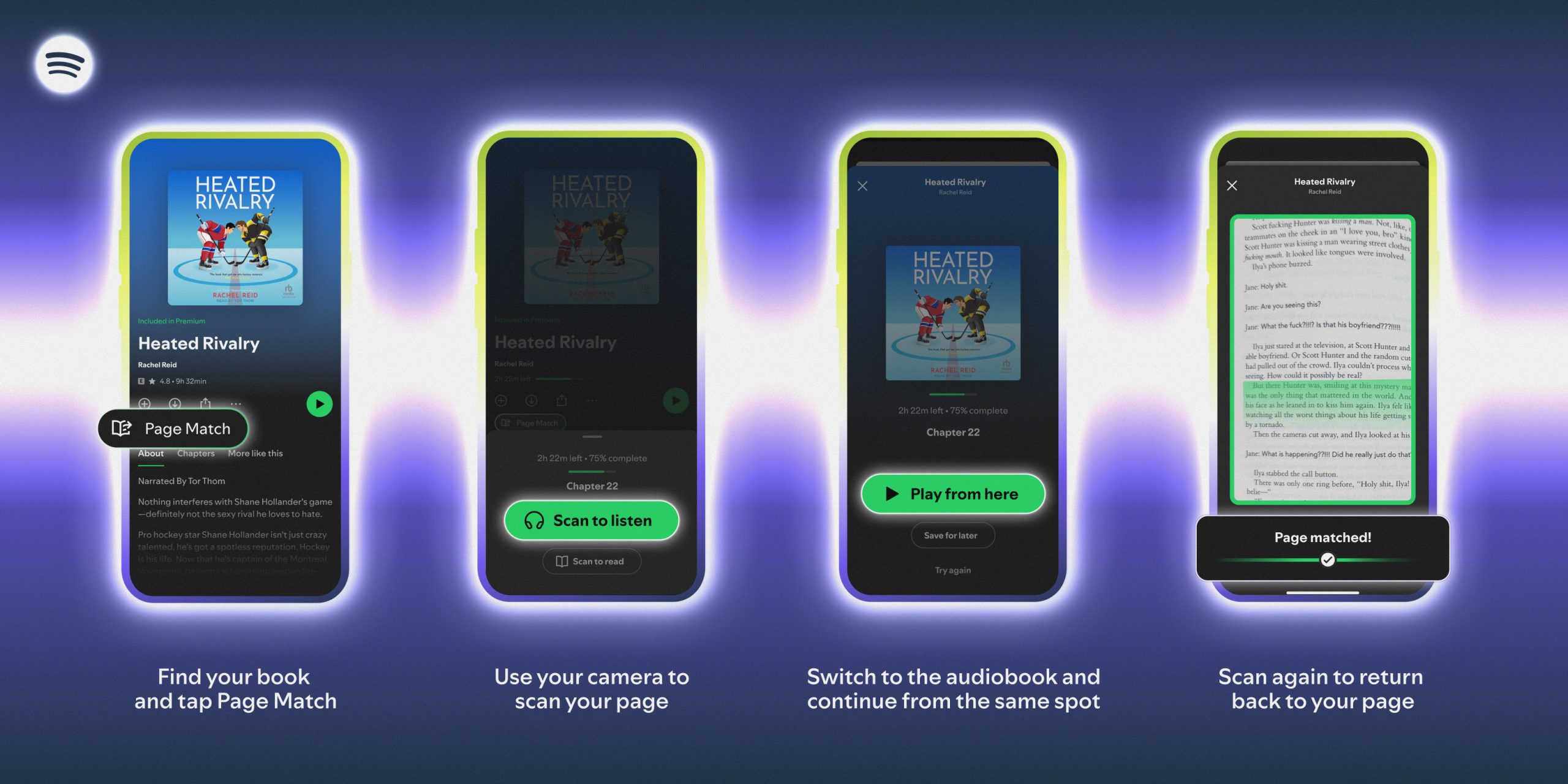
    1. For supported titles, find the audiobook in the Spotify mobile app and tap the Page Match button.
    2. Press Scan to listen.
    3. Allow camera access in the app and simply scan the page you’re currently reading.
    4. Spotify will match the page to the corresponding moment in the audiobook and give you the option to Play from here or Save for later. 
    5. If the page can’t be matched, the app will prompt you to try again.

If the title has audiobook Recaps enabled (you’ll see a Recap button), Page Match and Recaps are available to work together. Recaps offer short audio summaries tailored to your most recent listening point to give you a refresher on the story so far.

From audiobook to book

When you want to switch from listening to reading, the process is just as easy.

    1. Open the audiobook in the Spotify mobile app and tap the Page Match button.
    2. Select Scan to read.
    3. Scan any page in your book or e-reader so Spotify can orient itself.
    4. Spotify will then guide you to the correct spot based on where you stopped listening, telling you whether to flip forward or backward to find the exact passage where you should resume reading.

By removing the friction between reading and listening, Page Match is the latest way Spotify is reimagining the book experience—helping you stay lost in a story, no matter how or when you choose to engage.

Spotify Partners With Bookshop.org and Debuts Page Match Feature to Bridge Physical, E-book, and Audio Formats

Since bringing audiobooks to Spotify in 2022, we’ve helped listeners discover thousands of new favorite titles and authors while driving growth in the publishing industry. Today, we’re turning the page with two new updates that will give book lovers an even more personalized and flexible way to enjoy stories on Spotify.

First, we’re announcing a partnership with Bookshop.org, allowing users to purchase physical books through the Spotify app. We’re also introducing Page Match, a first-of-its-kind feature that lets readers seamlessly switch between the printed (or e-book) and audiobook versions of a title.

“We believe the future of reading or listening needs to be flexible and fit more seamlessly into people’s lives,” said Owen Smith, Spotify’s Global Head of Audiobooks. “Since launching Audiobooks in Premium, we’ve seen that when books are easier to discover and enjoy, demand grows, making Spotify a real growth engine for the publishing industry and changing how people find their next great read. Now we’re extending Spotify’s discovery and engagement strengths across both audio and physical formats, so authors can build deeper connections with their audiences and books can follow readers wherever they go.”

Shop Bookshop on Spotify

Physical books remain the go-to format for most readers, accounting for nearly 73% of trade publishing revenue last year. To support how people read, we want to make it easier to engage with titles in whichever format works best.

Launching later this spring, Spotify users in the U.S. and U.K. will be able to purchase physical books via the Spotify app through Bookshop.org, an organization that connects readers to independent bookshops. This partnership is designed to connect discovery on Spotify with physical ownership, making it easier for readers to move from finding a book they’re interested in to enjoying it in the format that feels right. Purchases made on Spotify will directly support those bookshops and the authors who brought that story to life.

“We are excited to see the impact Spotify’s scale will have for local bookstores,” said Andy Hunter, Founder and CEO of Bookshop.org. “By meeting readers where they are and linking to Bookshop.org, Spotify is financially supporting indie booksellers with each purchase.”

Introducing Page Match

We believe that when you find a book that has you completely hooked, you shouldn’t have to put it down. Instead of stopping or losing momentum when you need to hop in the car or go for a run, now you can keep the story going. Page Match is an industry-first feature that lets you move between physical books or e-books and their audiobook counterparts with just a quick scan.

“This is the most exciting development in reading technology I’ve heard about in years because it will get more people reading and listening to books,” said author Harlan Coben.

Available to audiobook listeners on iOS and Android on most English-language titles by the end of February, Page Match ensures your book picks up right where you left off, whether you’re turning pages or pressing play.

Here’s how it works:

    1. Open the Spotify mobile app and find the title you’re reading.
    2. Tap the Page Match button. 
    3. Use your camera to scan a page in your physical book.
    4. Spotify finds your spot in the audiobook.
    5. Ready to return to print? Scan again to find the right place in the text.

Page Match builds on the successful beta launch of Recaps last year. It’s the latest way Spotify is reimagining the reading experience to bring readers back into stories and help them stay with books longer.

We see the future of reading as one that’s personalized, flexible, and built to move fluidly across formats and moments. Together, these updates will make it easier for hundreds of millions of Spotify users to discover books and enjoy them in any way they choose. For authors and publishers, it’s a new opportunity to reach new audiences while deepening connections across audio and print.

Find your next great read in the Audiobooks hub on Spotify.