

Tag: product release

Spotify Expands Music Videos in Beta to Premium Users in the US and Canada

images of artists and music videos across a dark green background.

For decades, music videos have done more than just accompany a song; they’ve shaped style, started conversations, and helped us fall in love with our favorite artists. Now, music videos in beta are rolling out to Premium users in the U.S. and Canada, bringing fans even closer to the music they love.

This expansion gives millions more listeners access to a catalog of official music videos, from studio versions to live performances and covers. The initial video catalog is limited for now while the feature is in beta, but stay tuned as availability will grow quickly over the coming months.

When we introduced music videos in beta to nearly 100 markets last year, we saw how video can elevate the listening experience—and users agree. A recent Burson survey* found that more than 70% of users say more video content would enhance their experience on Spotify.

Music videos join a suite of features like Countdown Pages, Canvas, and Clips that help artists connect with their fans on Spotify. Artists and their teams can learn more on our brand-new music videos landing page on the Spotify for Artists site. And with this launch, fans can continue experiencing the full world of an artist, beyond just their sound.

How to watch music videos on Spotify

With this rollout, Premium users in the U.S. and Canada can begin exploring an initially limited catalog of music videos from artists like Ariana Grande, Olivia Dean, BABYMONSTER, Addison Rae, Tyler Childers, Natanael Cano, and Carín León.

Here’s how it works:

    • Premium subscribers in our beta markets can open Spotify on their TV, desktop, iOS, and Android device, select a supported track, and tap “Switch to video.”
    • The music video will start playing right where the song left off. To return to background listening, simply press “Switch to audio.”
    • For a full-screen experience on mobile, turn your device to landscape mode.


To find additional music videos—including live and cover videos—scroll down to explore Related Music Videos, or go to an artist’s profile and look under the Music tab. You can also watch by genre and era via playlists like 90s Video Hits, Hip-Hop Throwbacks, and Latin Party Hits. Music videos will be available to all Premium subscribers in the U.S. and Canada by the end of the month.

Music videos are a proven way to help build fandom. After a fan engages with an artist’s music video, they’re more likely to dive deeper into their artistry. We’ve seen that when fans discover a track with a music video on Spotify, they’re 34% more likely to stream it again and 24% more likely to save or share it in the following week. This is especially true for super listeners, who go on to actively stream the artist 85% more in the next month, on average.

*According to a survey by Burson conducted with 8,400 respondents across 19 markets around the world between August 27-October 3, 2025.

*Update as of December 10, 2025: Music videos in beta are now available for all Premium users in the U.S. and Canada.

*Update as of June 15, 2026: Our first personalized video playlist, Videos for You, is now available to Premium users in the U.S and Canada, as well as in most markets where music videos are available. Videos for You is refreshed daily with a mix of music videos, live performances, and covers tailored to your taste. You can find it by searching for “Videos for You” or by tapping Search and exploring the playlist highlights shelf.
Lossless Listening Arrives on Spotify Premium With a Richer, More Detailed Listening Experience

The Spotify bug appearing on a purple background. The background moves as if it was part of a booming speaker

Lossless on Spotify Premium is here. 

Lossless audio has been one of the most anticipated features on Spotify and now, finally, it’s started rolling out to Premium listeners in select markets. Premium subscribers will receive a notification in Spotify once Lossless becomes available to them. Whether you’re diving into a new album or revisiting old favorites, lossless delivers the highest music audio quality on Spotify.

“The wait is finally over; we’re so excited lossless sound is rolling out to Premium subscribers,” said Gustav Gyllenhammar, VP Subscriptions, Spotify. “We’ve taken time to build this feature in a way that prioritizes quality, ease of use, and clarity at every step, so you always know what’s happening under the hood. With Lossless, our premium users will now have an even better listening experience.”

Lossless is part of our commitment to continually improve Spotify Premium so fans can discover and enjoy the music they love. This highly requested feature takes your Premium experience to the next level. Together with popular features like DJ, Jam, AI Playlist, brand-new Mix, and daylist, as well as playlists curated by our leading global music editorial team, the world’s most popular audio streaming subscription service continues to get better.

With Lossless, you can now stream tracks in up to 24-bit/44.1 kHz FLAC, unlocking greater detail across nearly every song available on Spotify. So you can enjoy new releases and your favorite tracks, in the highest quality, while being immersed in the music.

Your device, your music, your listening experience, your choice

We know everyone listens differently, so we’re giving you custom settings for Wi-Fi, cellular, and downloads. Choose between Low, Normal, High, Very High, and now Lossless music quality to provide maximum flexibility and control. You’ll be able to see how much data each of these requires to make choosing easier.

Lossless is available on mobile, desktop, and tablet, as well as on many devices that support Spotify Connect, including Sony, Bose, Samsung, Sennheiser, and more. Support for additional devices, including those from Sonos and Amazon, arrives next month.

How to enable Lossless

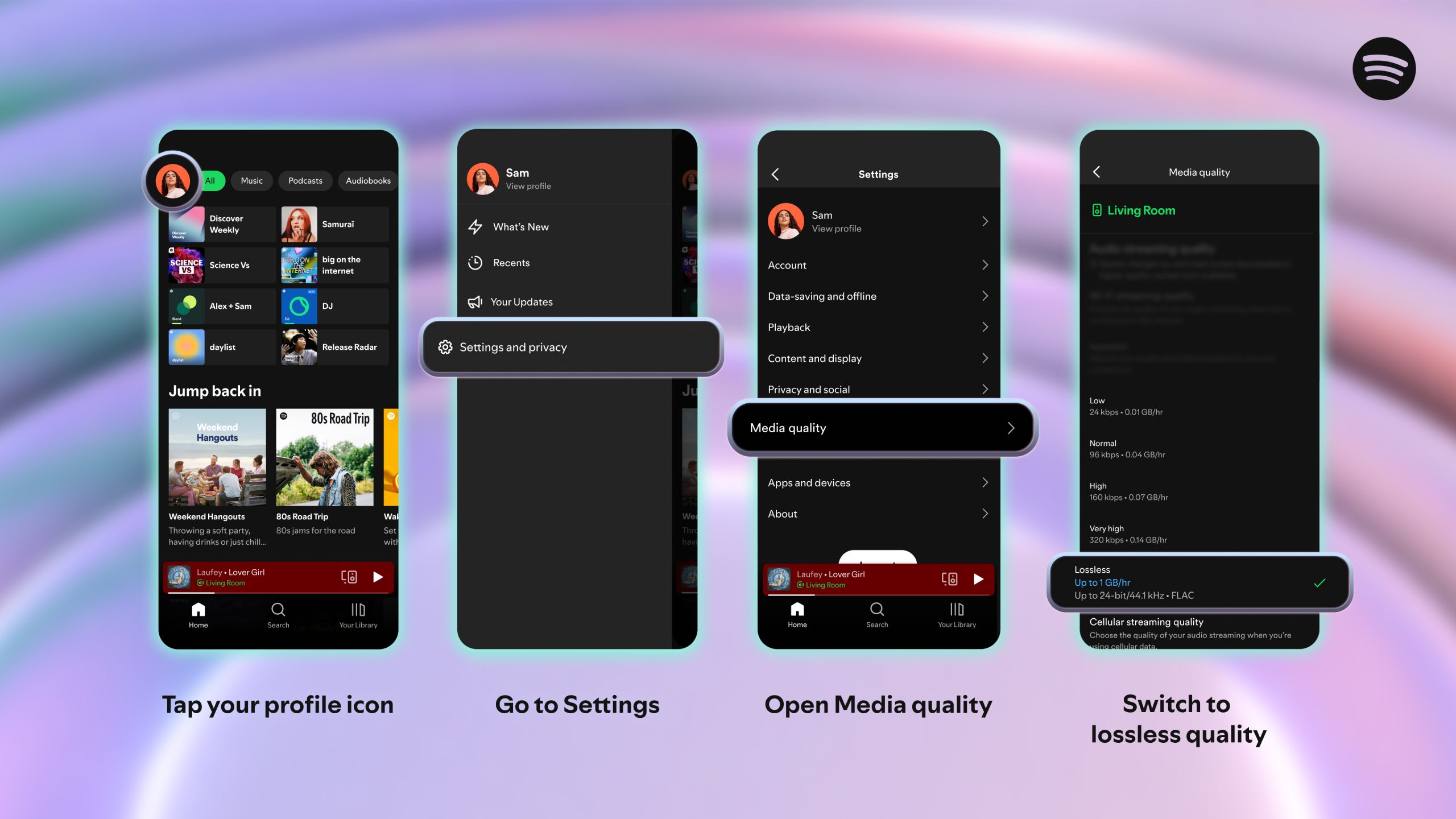
To turn on lossless audio in the Spotify app:

    1. Tap your profile icon in the top left.
    2. Go to Settings & Privacy → Media Quality.
    3. Select where you want to enable lossless audio: Wi-Fi, cellular, downloads.

And just to note: You’ll need to enable Lossless manually on each device. You’ll know Lossless is on because the Lossless indicator will appear in the Now Playing view or bar, and via the Connect Picker.

For the smoothest and best listening experience, we recommend streaming lossless music on Wi-Fi using wired headphones or speakers on a non-Bluetooth connection, like Spotify Connect. Currently, Bluetooth doesn’t provide enough bandwidth to transmit lossless audio, so the signal has to be compressed before being sent.

Lossless gives listeners every detail of the music, which means the audio files can be larger. As users enable lossless on their devices, it may take a moment for the track to play. But once it’s cached and loaded, you are ready to listen.

When can I start listening?

Lossless is rolling out gradually to more than 50 markets through October. Premium subscribers in Australia, Austria, Czechia, Denmark, Germany, Japan, New Zealand, the Netherlands, Portugal, Sweden, the US, and the UK have already started to get access.

*Update as of October 6, 2025: Lossless is now available to Premium users in more than 50 markets.