

Tag: new product

Il DJ personalizzato di Spotify è ora disponibile in 4 nuove lingue e in più Paesi

A hand holding a phone displaying the AI DJ UI screen on a gradient background

Da quando è stata presentata nel 2023, DJ (beta) ha aiutato a definire un’esperienza d’ascolto più personalizzata per 94 milioni di utenti Spotify Premium. Oggi, portiamo questa popolare funzionalità in nuovi Paesi, introducendo l’opzione di averla in quattro nuove lingue: francese, tedesco, italiano, e portoghese brasiliano.

Se non avessi ancora avuto occasione di provarla, DJ offre una selezione musicale personalizzata e commenti che aiutano a scoprire nuovi brani preferiti e a connettersi più profondamente con gli artisti amati. DJ propone brani che potrebbero piacere sulla base della cronologia di ascolto, mettendo insieme brani preferiti, canzoni inascoltate da anni e nuove uscite, non rendendo la sessione mai monotona.

Quando hai in mente una vibe specifica o vuoi solo cambiare un po’ ritmo, DJ requests alza il livello. Puoi chiedere di aggiornare la tua sessione di ascolto personalizzata in base a ciò che vuoi in quel momento, che sia l’atmosfera per una serata romantica o l’energia adatta a una festa.

Introduciamo ora DJ agli utenti Premium in Austria, Brasile, Francia, Germania, Italia, Portogallo, Corea del Sud, Svizzera, e altri Paesi, raggiungendo oltre 75 Stati del mondo.

Conosci i tuoi nuovi DJ

Per un’esperienza autentica nelle diverse lingue e culture, abbiamo lavorato con i nostri team situati in diverse parti del mondo per creare voci uniche ed espressive in ogni lingua. Questi nuovi DJ sono dotati ciascuno di proprie caratteristiche distintive:

Alex (italiano)

Caldo e sincero: la voce che colma la distanza fra conoscere la musica e sentirla davvero.

Maïa (francese)

Disinvolta e naturalmente affascinante, tratta ogni ascoltatore come un amico che ha già ottimi gusti.

Ben (tedesco)

Quel tipo di voce che ti invoglia all’ascolto: calda e presente, senza mai essere forzata.

Dani (portoghese brasiliano)

Sempre un pezzo avanti a tutti: eclettico e genuinamente entusiasta di farti conoscere ciò che sta arrivando

Come accedere e personalizzare DJ

DJ è disponibile direttamente nella schermata Home di Spotify: basta un tap per avviare una sessione personalizzata oppure cercare “DJ” per accedere rapidamente alla funzione. Durante l’ascolto, è possibile inviare richieste specifiche tramite voce o testo, utilizzando l’apposito pulsante, oppure lasciare che DJ guidi l’esperienza. Per cambiare lingua, è sufficiente aprire il menù con i tre puntini (…) nella card DJ e selezionare la lingua desiderata.

La funzionalità è attualmente in beta e continuerà a evolversi nel tempo: per accedere alle ultime novità, si consiglia di mantenere l’app sempre aggiornata.

Deine persönliche Spotify DJ Experience ist jetzt in vier neuen Sprachen und weiteren Märkten verfügbar

A hand holding a phone displaying the AI DJ UI screen on a gradient background

Seit dem Start im Jahr 2023 hat DJ (Beta) das personalisierte Hörerlebnis von 94 Millionen Spotify Premium-Nutzer*innen bereichert. Ab sofort ist das beliebte Feature in weiteren Märkten verfügbar – ergänzt um vier neue Sprachen: Deutsch, Französisch, Italienisch und Brasilianisches Portugiesisch.

Das Feature bietet eine kuratierte Auswahl an Songs sowie Kommentare zu Künstler*innen und Tracks – alles auf deinen persönlichen Musikgeschmack zugeschnitten. Es hilft dir, neue Lieblinge zu entdecken und eine tiefere Verbindung zu den Künstler*innen aufzubauen, die du liebst. Auf Basis deines Hörverlaufs stellt DJ eine Mischung aus deinen Lieblingstracks, länger nicht gehörten Songs und neuen Releases zusammen. So bleibt deine Spotify Erfahrung immer abwechslungsreich.

DJ Requests geht noch einen Schritt weiter: Hast du eine bestimmte Stimmung im Kopf oder möchtest einfach etwas Neues ausprobieren, kannst du deinen DJ direkt bitten, deine Session anzupassen – ob für einen Abend zu zweit oder energiegeladene Tracks für die nächste Party.

DJ ist nun auch für Premium-Nutzer*innen in Brasilien, Deutschland, Frankreich, Israel, Italien, Österreich, Portugal, der Schweiz und Südkorea verfügbar. Insgesamt ist das Feature damit in über 75 Märkten vertreten. 

Triff deine neuen DJs

Um ein authentisches Erlebnis in jeder Sprache und Kultur zu schaffen, hat Spotify gemeinsam mit lokalen Teams einzigartige, ausdrucksstarke Stimmen entwickelt. Jede der vier neuen DJ-Personas bringt dabei ihre ganz eigene Persönlichkeit mit:

Ben (Deutsch) 

Eine Stimme, die dich im Moment ankommen lässt: warm, präsent und angenehm locker.

Maïa (Französisch) 

Mühelos cool – und behandelt jede*n Hörer*in wie ein*e Freund*in mit ohnehin gutem Musikgeschmack.

Alex (Italienisch) 

Warm und geerdet: eine Stimme, die Musikwissen und Hörerlebnis miteinander verbindet.

Dani (Brasilianisches Portugiesisch)

Dem Moment immer einen Song voraus: vielseitig in der Auswahl und aufrichtig begeistert, dir den nächsten Track vorzustellen.

So findest du deinen DJ und passt ihn an

DJ ist auf deiner Spotify Startseite verfügbar – tippe einfach darauf, um eine personalisierte Session zu starten, oder gib DJ“ in der Suchleiste ein. Von dort aus kannst du dich von DJ leiten lassen oder den DJ-Button antippen, um eine Anfrage per Sprache oder Text zu stellen. Um zwischen den Sprachen zu wechseln, tippe auf das Drei-Punkte-Menü (…) in der DJ-Karte und wähle deine bevorzugte Sprache aus.

Das Feature befindet sich weiterhin in der Beta-Phase – wir entwickeln es kontinuierlich weiter. Halte deine App aktuell, um immer die neueste Version zu nutzen.

3 New Ways to Dive Deeper Into the Music You Love

spotify logo

A song that captures a moment can feel like magic. But when you uncover the story behind it—who made it, what inspired it, and the meaning woven into the lyrics—it becomes something even deeper. That’s why we’ve been building new ways to help you go beyond the surface of your favorite tracks. Here are three new features designed to bring you closer to the music you love.

About the Song: The stories behind the music

Every track has a story, and About the Song brings that context right into your listening experience. This beta feature delivers short, swipeable story cards—summarized from third-party sources—that cover the inspiration behind a track, behind-the-scenes moments, and the cultural context around it. It’s available to Premium users in U.S., U.K., Canada, Ireland, Australia, New Zealand, Indonesia, Singapore, Nigeria, and South Africa.

How to find About the Song:

    • Open the Now Playing view while listening in the Spotify mobile app
    • Scroll down to find the About the Song card on supported tracks
    • Swipe through to explore

Ask DJ: Your personal music expert, now even smarter

DJ is one of our most popular features, built around personalized listening sessions and music requests. Now you can have a conversation with DJ as you listen, getting recommendations, music facts, or context about what’s playing, right from your Spotify homepage. The rollout begins in English for Premium users ages 18 and over in the U.S., Ireland, and Sweden.

Need inspiration? Try asking things like “Start a session with new releases for my Sunday” or “When was this song first released?”

This updated DJ experience is in beta and won’t always get it right, and responses may not always be accurate or complete. We’re continuing to improve the experience over time, and listener feedback will help shape what comes next.

SongDNA: Trace a song’s creative roots

Every track is connected to the songs, samples, and artists that came before it. SongDNA makes those connections visible in an interactive map inside your Now Playing view.

Powered by WhoSampled (now part of Spotify), SongDNA lets Premium listeners explore the creative network behind a track while helping ensure the people who contributed get recognized. Follow the thread from a sample to its source, discover a cover you didn’t know existed, or trace a producer’s fingerprint across decades of recordings.

These three features are part of our ongoing work to bring you closer to the music, podcasts, and audiobooks you love. We’ll keep building on each experience based on how listeners use the features, and continue exploring new ways to unlock discovery.

Level Up Your Playlists’ Transitions With Smart Reorder

It’s never been easier to customize your Spotify listening experience. Last year, we introduced more control over the way your playlist sounds, giving Premium users the ability to create seamless transitions between tracks. Since launch, Premium users around the world have streamed over 220 million hours of their mixed playlists.

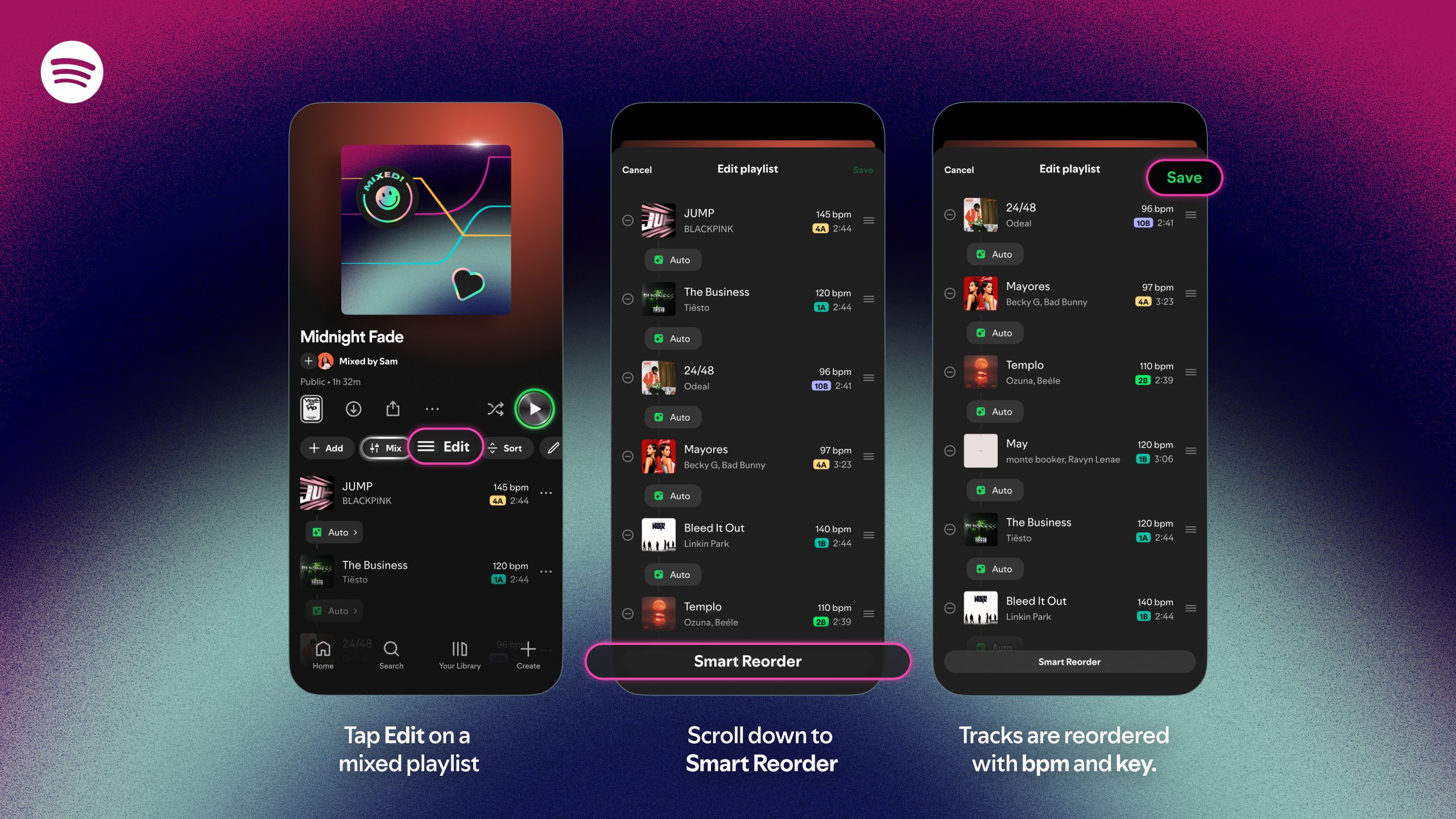
Now, mixing great transitions is even smoother with Smart Reorder. With one tap, this upgrade gives Premium users an easy way to rearrange mixed playlists with BPM and key. This helps your tracks flow even more seamlessly, never missing a beat.

How does it work? It’s simple:

    1. Tap Mix on one of your playlists and then tap Edit to find Smart Reorder.
    2. Tracks are now reordered with BPM and key so that your transitions sound better.

For some inspiration, head to the Mixed By hub on Spotify for new playlists from artists including John Summit, Becky G, Normani, Beéle, Mike Shinoda + Joe Hahn of Linkin Park, Odeal, GroovyRoom, and monte booker.

Introducing About the Song, a New Way to Explore the Stories Behind the Music

Spotify Bug on a gradient background

Music fans know the feeling: A song stops you in your tracks, and you immediately want to know more. What inspired it, and what’s the meaning behind it? We believe that understanding the craft and context behind a song can deepen your connection to the music you love.

That’s why Spotify is introducing About the Song, a new feature currently in beta that brings stories and context directly into your listening experience. Available in the Now Playing View, About the Song features short, swipeable story cards that explore the meaning behind the music you’re hearing. These stories are summarized from third-party sources to surface interesting details and behind-the-scenes moments.

About the Song (beta) is available on mobile (iOS and Android) in English for Premium users in the U.S., U.K., Canada, Ireland, New Zealand, Australia, India, Nigeria, South Africa, Indonesia, and Singapore.

Ready to explore the stories behind the music? Here’s how to find them.

    1. While listening in the Spotify mobile app, open the Now Playing View.
    2. Scroll down to find the About the Song card on supported tracks.
    3. Swipe through to explore the stories behind the track. We’re always looking for ways to improve, and both artists and listeners can share feedback directly via the card to help shape the experience.

About the Song is another step in our mission to bring you closer to the artists you love. Keep an eye out for the feature, and get ready to connect with music on a new level.

Spotify Updates Shuffle to Keep Your Playlists Feeling Fresh

This year, Spotify has introduced even more ways for users to take control of their listening experience. Whether you’re refreshing your Discover Weekly with genre deep dives, excluding specific songs from your Taste Profile, or using the Snooze feature, these updates make it easier to listen the way you want.

We’ve also been making improvements to Shuffle. Premium users can toggle off Smart Shuffle, and both Free and Premium users can tap any song while shuffling to play it next without reshuffling the queue. We’ve also updated our default Shuffle so you’ll get Fewer Repeats when you listen. This version takes your recent listening into account, so songs you heard recently are less likely to repeat soon, helping your playlists stay fresh and surprising.

Premium users who prefer our previous version of Shuffle can switch to Standard Shuffle in their settings. Just remember: More randomness in your playlist can mean hearing the same tracks more often. That’s why we recommend sticking with the Fewer Repeats default, which is designed to keep your listening experience more varied and engaging.

How to adjust your Shuffle settings

Premium users’ Shuffle will be set to Fewer Repeats, but if you’d like to switch back to Standard Shuffle, you can follow these steps:

    1. Go to your Spotify Settings.
    2. Select Playback.
    3. Choose your preferred Shuffle mode: Fewer Repeats or Standard.

We’re always working to improve Shuffle so you have the best possible listening experience, helping you discover more music, enjoy more variety, and get the most out of every playlist.

Search and Follow Your Favorite Venues on Spotify

In March, we launched Concerts Near You to help listeners find concerts from their favorite artists. Since then, more than 3 million people have used it to discover nearby events. But great live music isn’t just about the artist you see—it’s also about where you see them.

Starting today, Spotify listeners (Free and Premium) can follow their favorite venues, discover new spots nearby, and explore upcoming lineups, all without leaving the app. Plus, the Live Events feed now has a fresh new look, with smarter recommendations and daily updates that make finding the next concert easier and more personal than ever.

A concert feed that’s always in tune

While Concerts Near You updates weekly, the new Live Events feed refreshes daily, surfacing the most relevant concerts in each listener’s area, from this weekend’s intimate gigs to just-announced global tours. It brings together what listeners are streaming, where they live, and the genres they love, all in one personalized destination. When a listener follows a venue, it’s saved to their Library and easy to find, alongside tailored suggestions for other venues they might enjoy.

A new stage for live music, right inside Spotify

Once listeners find a concert they’re interested in, they can just tap through to the event’s official ticketing partner to complete their purchase. They’ll receive a confirmation with all the event details and can return to Spotify anytime to revisit the event page or explore more concerts. With more than 20,000 venues listed worldwide, from iconic arenas to beloved independent clubs, Spotify is helping fans connect to live music wherever they are.

Fueling your city’s music scene 

Live music is the heartbeat of every community. It’s what brings people together and keeps local culture thriving. From historic theaters to basement stages, these are the places where artists grow, fans unite, and lifelong memories take shape. By following your favorite venues on Spotify, you’re not just discovering upcoming shows, you’re supporting the spaces that make live music possible.

So whether it’s catching a set at Brooklyn Paramount in New York, an unforgettable night at Bataclan in Paris, or a live performance at Oxford Art Factory in Sydney, your next great concert experience is just a tap away—right inside Spotify.

Spotify Expands Managed Accounts for Young Listeners on Premium Family Plans

Spotify is committed to bringing the best listening experience to all our users, and that includes parents and families. That’s why we’re expanding managed accounts—our Premium music account for young listeners—into seven new markets. Launching in the US, UK, Canada, Australia, Germany, France, and Netherlands, managed accounts are a way for Premium Family plan managers to give young listeners (under 13 or market equivalent) their own space to explore music, with parents and guardians still in control.

This expansion follows successful pilots in 10 markets: New Zealand, Sweden, Denmark, Spain, Italy, Portugal, Brazil, Mexico, Argentina, and Colombia. Available exclusively as part of a Premium Family plan, managed accounts offer additional value to plan managers by providing a music listening experience designed for younger listeners to create playlists, receive Spotify’s personalized recommendations, and enjoy features that Spotify users know and love, like daylist and Discover Weekly.

Each managed account comes with its own experience, so it’s a much-requested win for parents, who won’t have to worry about their Wrapped results getting hijacked. And for young listeners, it means their favorites stay their own, too. 

At Spotify, we want to give parents and kids the ability to explore music together, from introducing children to the same songs you loved at their age, to helping guide their individual discovery. Every child is different, and every family’s journey is unique, so we’ve been evolving our tools to help caregivers share music in a way that feels right for them. 

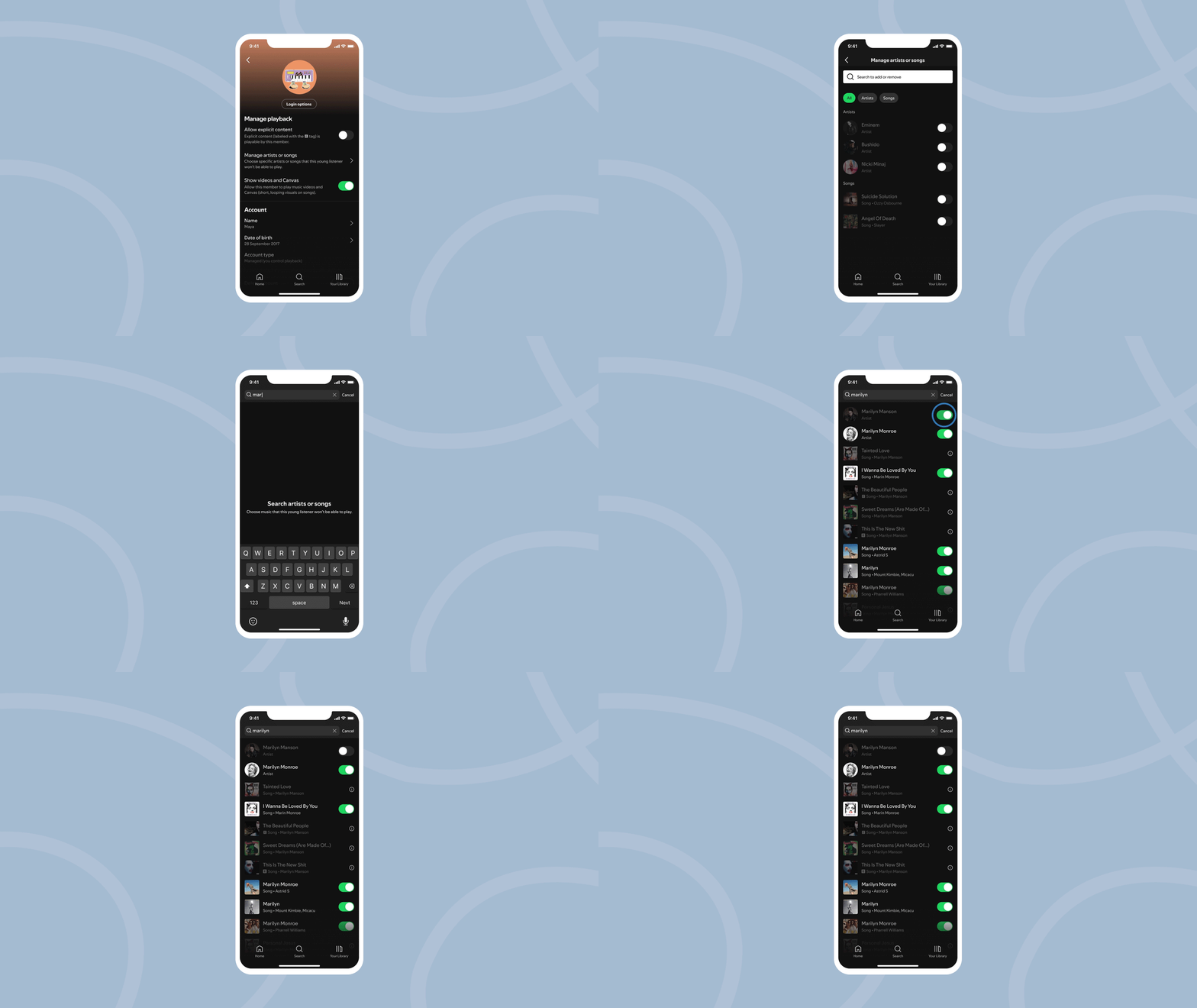
Managed accounts provide a music-only listening experience that Family Plan managers can control via their settings in several ways. These currently include: 

    • the Explicit Content Filter, 
    • the ability to control and restrict the playback of specific artists and songs, and 
    • a toggle to hide video and Canvas (short looping videos accompanying songs).

Interactivity features are also limited on managed accounts, with no access to age-gated features like Messages.

For more tips on how parents and guardians can support and shape their children’s listening journeys, check out the Spotify Parental Guide.

To set up the managed account, Family Plan owners can head to their account pages in the app, select “Add a Member,” and then select the option to “Add a listener aged under 13 (or local market equivalent),” then follow further instructions. Learn more here.

Mezcla tus playlists favoritas sin interrupciones agregando tus propias transiciones

Los usuarios de Spotify en todo el mundo han creado casi 9 mil millones de playlists para acompañar sus momentos del día a día. Ahora, los usuarios Premium pueden llevar su creatividad al siguiente nivel con la posibilidad de añadir y personalizar transiciones entre canciones.

Esta nueva función, actualmente en versión beta, brinda aún más control a los usuarios, permitiéndoles crear playlists únicas de forma sencilla, ya sean amantes de la música o expertos en curaduría. Pasa de una canción a otra de forma fluida, personaliza cómo se conectan y mejora tu mezcla con ajustes como volumen, ecualización y curvas de efectos.

¿Listo para darle un giro a tu música? Personaliza tu playlist con transiciones fluidas.

    1. Abre una playlist que ya hayas creado o empieza una nueva.
    2. Selecciona “Mezclar” en la barra de herramientas y mira cómo se transforma tu playlist.
    3. Elige “Automático” para una mezcla al instante o “Personaliza tu mezcla” para crear transiciones únicas que se ajusten a tu estilo.
    4. Al personalizar, puedes elegir un estilo preestablecido como “Desvanecer” o “Ascender” para aplicar diferentes tipos de transiciones.
    5. Experimenta con configuraciones específicas de volumen, EQ y efectos, y usa la forma de onda y el análisis de beats para encontrar el mejor punto de transición en cada canción.
    6. Pulsa “Guardar”, luego escucha tu playlist única. Compártela o incluso colabora con amigos Premium en una playlist mezclada.
    7. Puedes activar o desactivar la mezcla en cualquier momento presionando el botón “Mezclar”.

¿Nuevo en el mundo del mixing? Estos consejos te ayudarán a mejorar tus playlists:

    • Empareja tempos y tonalidades: Para lograr transiciones más naturales, elige canciones con tempos y tonalidades similares (clave Camelot). Al tocar “Mezclar”, verás automáticamente la tonalidad y BPM (beats por minuto) de cada canción, lo que te facilitará reordenarlas para una mejor fluidez.
    • Empieza con géneros amigables para mezclar: La mezcla funciona mejor con géneros pensados para transiciones suaves. Estilos como house y techno suelen integrarse más fácilmente.
    • Ten en cuenta la energía: Piensa en el ambiente que quieres crear. Ordena las canciones para subir o bajar la intensidad poco a poco, guiando al oyente a través de un recorrido emocional.
    • Aprovecha tus mejores playlists: Las mezclas son ideales para evitar silencios incómodos. Por ejemplo, mejora tu playlist para correr con BPM constantes que marquen tu ritmo o crea la playlist perfecta para un road trip o una fiesta sin que decaiga el ambiente.
    • Dale estilo visual: Haz que tu playlist sea aún más especial creando tu propia portada con nuevas etiquetas y stickers, disponibles solo para playlists mezcladas.

Spotify Premium es el lugar ideal para disfrutar de la música que más te gusta, y siempre estamos mejorando para ofrecer una experiencia aún más completa. Con las transiciones personalizadas, buscamos que cada usuario pueda moldear su manera de escuchar y expresarse a través de la música.

Esta nueva función se está activando de forma progresiva para usuarios Premium elegibles, así que asegúrate de tener tu app de Spotify actualizada.

Mix Your Favorite Playlists Seamlessly by Adding Your Own Transitions

Spotify users around the world have soundtracked their everyday moments by creating nearly 9 billion playlists. Now, Premium users can take their creativity to the next level with the ability to add and customize transitions between tracks. 

The feature, now in beta, gives users even more control—allowing music lovers and playlist experts alike to easily create unique playlists. Seamlessly transition between tracks, customize how they flow together, and enhance your mix with features like volume, EQ, and effect curves.

Ready to mix things up? Make your playlist your own with seamless transitions.

    1. Open a playlist you’ve already created, or make a new one.
    2. Select “Mix” from the toolbar and see your playlist change. 
    3. Start with “Auto” for an instant blend, or tap to customize your mix and create unique transitions that fit your style. 
    4. When customizing, choose a preset like “Fade” or “Rise” to easily apply different transition styles.
    5. Experiment with specific settings for volume, EQ, and effects, and use the waveform and beat data to find the best spot in each track for your transition.
    6. Hit “Save,” then listen to your unique playlist. Share it, or even collaborate on a mixed playlist with friends who are also Premium users.
    7. You can toggle the mix on and off at any time by pressing the “Mix” button. 

New to audio mixing? These simple tips will help you level up your playlist.

    • Match tempos and keys: For the most natural-sounding transitions, choose songs with similar tempos and Camelot keys. When you tap “Mix,” we’ll automatically show the key and BPM (beats per minute) for each track, so you can easily scan and reorder to help your playlist flow more smoothly.
    • Start with transition-friendly genres: Mixing works best with music produced for seamless transitions. Dance genres like house and techno tend to blend more smoothly.
    • Consider the energy: Think about the mood and energy you want your playlist to have. Plan your song order to gradually build up or wind down the energy, guiding listeners through an emotional journey.
    • Tap into your best playlists: Mixing is perfect for moments when you want to avoid awkward pauses. For example, upgrade your running playlist for consistent BPMs to set your pace, or curate the ideal road trip or party playlist to keep the vibe going.
    • Visualize it: Make your playlist even more unique by creating your own cover art with new stickers and labels, available only for mixed playlists. 

Spotify Premium is the ultimate destination for fans to enjoy the music they love, and we’re always evolving to make it even better. With custom transitions in playlists, we hope to empower users to shape their listening experience and express themselves through the music they love.

This new feature is rolling out to eligible Premium users, so please make sure your Spotify app is up to date.