

Tag: product release

Ring In the New Year With New Playlists Mixed by Artists, and More Spotify Hacks

Featured musical artists on a purple background

The right playlist is essential on New Year’s Eve, building the energy as you get ready and keeping it high as you count down to midnight. This year, Spotify has your every moment covered. From pro-level party mixes to your own customized creations, here’s how to make your soundtrack unforgettable.

Set the vibe with new mixed playlists

Looking for the perfect party starter? We tapped some of your favorite artists to mix their own New Year’s Eve playlists on Spotify. Head to our Mixed By hub to find and save these new playlists from Anyma and Solomun, Rawayana, Amaarae, Cash Cobain, Jessie Ware, SG Lewis, Rochelle Jordan, Jim E-Stack, and Tiësto.

Celebrate Taylor Swift’s Record-Breaking Year and New Docuseries with Exclusive Playlist Cover Art Stickers

Stickers (Taylor's Version)

It’s been a big year for Taylor Swift. Her highly anticipated album The Life of a Showgirl broke several Spotify records, both before and after its release, including most-streamed song in a single day in platform history. Now, she’s following that up with her “The End of an Era” docuseries and “Taylor Swift | The Eras Tour | The Final Show” concert film, coming out this Friday, December 12.

To celebrate, Spotify is dropping an eras-themed playlist sticker collection. Featuring visuals from across Taylor’s discography, these limited-edition digital stickers let Swifties around the world bring the spirit of her albums to life.

Here’s how it works:

    1. Make or find a playlist: In the Spotify mobile app, select any playlist you’ve created, or make a new one.
    2. Create cover art: Tap the three dots (…) under the playlist name and select “Create cover art.” 
    3. Pick out your TS stickers: Tap “stickers” to explore the new sticker pack, dragging and dropping as many as you’d like onto your playlist cover. Look out for “Keep it 100” from The Life of a Showgirl, the heart hands of Fearless, the folklore cabin, and many more.
    4. Customize your cover: From there, listeners can add or update other elements like text, background colors, and their very own images.

Taylor’s record-breaking year

Ahead of its release, Taylor’s 12th album The Life of a Showgirl became the most pre-saved album Countdown Page in Spotify history with over 6 million pre-saves. When it dropped October 3, Swifties everywhere pressed play again…and again…and again, making it 2025’s most-streamed album in a single day, after hitting the milestone in under 11 hours.

The most popular track was “The Fate of Ophelia,” which became Spotify’s most-streamed song in a single day on its release, and later also claimed the title of most-streamed song in a week.

Head over to the Spotify mobile app now to celebrate Taylor’s big year and check out our eras-themed playlist sticker collection.

You’re in Control: Spotify Lets You Steer the Algorithm

Spotify bug on a purple background

For the first time, Spotify is giving users the power to steer the algorithm. Gustav Söderström, Spotify’s Co-President, CPO, and CTO, shares the vision behind Prompted Playlists, and how a new era of listener control is taking shape.

Spotify is entering its next chapter, and it felt worth pausing for a moment to look at how far we’ve come and what comes next. With 713 million listeners, 90% of whom say Spotify is essential to their day, we’re standing on the edge of something big. Equally important is our dedication to delivering real innovation and growth for the artists who leverage the power of Spotify to connect with their fans.

That means pushing ourselves again. Stretching the boundaries of what listening can be. And moving into a new era: one that gives you – the user – more control than ever before.

The next evolution of your Spotify

From the start, we’ve tried to make listening feel personal. You’ve seen that in Discover Weekly and Release Radar, which quietly predict what you might love. You’ve also seen it in the tools that let you shape and refresh your own playlists with precision, such as Smart Shuffle, Playlist song suggestions, and Mixing Tools.

But now we’re entering a moment where you don’t just listen to Spotify, you control it.

Imagine a Spotify that doesn’t just passively learn from you but literally listens to you. One you can steer and shape with your own words. For the first time, your ideas, your logic, and your creativity can actually power the Spotify algorithm, directing how it thinks, adapts, and responds to you.

Introducing Prompted Playlist, where your words bring your playlist to life

Starting December 11, Premium listeners in New Zealand will get early access to our latest beta feature: Prompted Playlist. It’s the first feature that puts control of the algorithm and the broader Spotify experience directly in your hands.

Prompted Playlists let you describe exactly what you want to hear and set the rules for your personalized playlist. And unlike anything before it, this feature taps into your entire Spotify listening history, all the way back to day one. Each playlist reflects not only what you love today, but the full arc of your taste. Spotify then curates and keeps it fresh based on your listening patterns and world knowledge.

You could ask for “music from my top artists from the last five years,” then push it further with “and feature deep cuts I haven’t heard yet.” Or you could request “high-energy pop and hip-hop for a 30-minute 5K run that keeps a steady pace before easing into relaxing songs for a cool-down,” and layer on something like “include music from this year’s biggest films and most-talked-about TV shows that match my taste.” You choose how broad or specific you want to go.

You can fine-tune the results by editing the prompt, or start fresh whenever you want. And for each song, we’ll include descriptions and context that tell you the story behind the recommendation so the playlist feels alive and crafted specifically for your prompt and your taste.

You can also set it to refresh daily or weekly so your playlist always stays new and in sync with your world. Consider this your chance to curate your next Discover Weekly, exactly the way you want it. Need a little help getting started? Tap “Ideas” to pick from prompts like “songs from artists who are headlining major tours right now,” and get a playlist tailored to your taste.

For even more inspiration, our music editors and culture experts have crafted a set of fun and inventive prompts and English language algorithms that will show up as personalized playlists on Home. And because this is a beta, the experience will evolve as we scale to more listeners. We’re excited to see what we learn along the way.

Why it matters

We believe that technology is only as good as the humans behind it. Spotify listeners have created nearly 9 billion playlists, which is proof that human curation is still the heartbeat of the platform. But until now, unless you were a developer at Spotify and could write your own playlist algorithm, your best ideas might have stayed in your head.

Prompted Playlist brings those ideas to life using just the English language. There’s no longer a tradeoff between control and convenience. You finally get both.

And for artists, this unlocks smarter, more inspired discovery, surfacing their music for the right listeners and opening new ways to deepen their fan bases. 

What’s next: More control for you

This new feature is part of a broader shift in how we think about personalization and what we think consumers will expect from their services in the future. Our goal is to make Spotify more personal, more responsive, more intelligent, and more aware of the world and culture around it, in order to bring greater value to listeners, artists, and creators.

This is just the beginning of a new phase where listeners take the lead and make even more of every minute.

2026 is going to be epic for fans and artists alike. We can’t wait to share what’s coming next. Stay tuned.

Spotify Expands Music Videos in Beta to Premium Users in the US and Canada

images of artists and music videos across a dark green background.

For decades, music videos have done more than just accompany a song; they’ve shaped style, started conversations, and helped us fall in love with our favorite artists. Now, music videos in beta are rolling out to Premium users in the U.S. and Canada, bringing fans even closer to the music they love.

This expansion gives millions more listeners access to a catalog of official music videos, from studio versions to live performances and covers. The initial video catalog is limited for now while the feature is in beta, but stay tuned as availability will grow quickly over the coming months.

When we introduced music videos in beta to nearly 100 markets last year, we saw how video can elevate the listening experience—and users agree. A recent Burson survey* found that more than 70% of users say more video content would enhance their experience on Spotify.

Music videos join a suite of features like Countdown Pages, Canvas, and Clips that help artists connect with their fans on Spotify. Artists and their teams can learn more on our brand-new music videos landing page on the Spotify for Artists site. And with this launch, fans can continue experiencing the full world of an artist, beyond just their sound.

How to watch music videos on Spotify

With this rollout, Premium users in the U.S. and Canada can begin exploring an initially limited catalog of music videos from artists like Ariana Grande, Olivia Dean, BABYMONSTER, Addison Rae, Tyler Childers, Natanael Cano, and Carín León.

Here’s how it works:

    • Premium subscribers in our beta markets can open Spotify on their TV, desktop, iOS, and Android device, select a supported track, and tap “Switch to video.”
    • The music video will start playing right where the song left off. To return to background listening, simply press “Switch to audio.”
    • For a full-screen experience on mobile, turn your device to landscape mode.


To find additional music videos—including live and cover videos—scroll down to explore Related Music Videos, or go to an artist’s profile and look under the Music tab. You can also watch by genre and era via playlists like 90s Video Hits, Hip-Hop Throwbacks, and Latin Party Hits. Music videos will be available to all Premium subscribers in the U.S. and Canada by the end of the month.

Music videos are a proven way to help build fandom. After a fan engages with an artist’s music video, they’re more likely to dive deeper into their artistry. We’ve seen that when fans discover a track with a music video on Spotify, they’re 34% more likely to stream it again and 24% more likely to save or share it in the following week. This is especially true for super listeners, who go on to actively stream the artist 85% more in the next month, on average.

*According to a survey by Burson conducted with 8,400 respondents across 19 markets around the world between August 27-October 3, 2025.

*Update as of December 10: Music videos in beta are now available for all Premium users in the U.S. and Canada.

Lossless Listening Arrives on Spotify Premium With a Richer, More Detailed Listening Experience

Lossless on Spotify Premium is here. 

Lossless audio has been one of the most anticipated features on Spotify and now, finally, it’s started rolling out to Premium listeners in select markets. Premium subscribers will receive a notification in Spotify once Lossless becomes available to them. Whether you’re diving into a new album or revisiting old favorites, lossless delivers the highest music audio quality on Spotify.

“The wait is finally over; we’re so excited lossless sound is rolling out to Premium subscribers,” said Gustav Gyllenhammar, VP Subscriptions, Spotify. “We’ve taken time to build this feature in a way that prioritizes quality, ease of use, and clarity at every step, so you always know what’s happening under the hood. With Lossless, our premium users will now have an even better listening experience.”

Lossless is part of our commitment to continually improve Spotify Premium so fans can discover and enjoy the music they love. This highly requested feature takes your Premium experience to the next level. Together with popular features like DJ, Jam, AI Playlist, brand-new Mix, and daylist, as well as playlists curated by our leading global music editorial team, the world’s most popular audio streaming subscription service continues to get better.

With Lossless, you can now stream tracks in up to 24-bit/44.1 kHz FLAC, unlocking greater detail across nearly every song available on Spotify. So you can enjoy new releases and your favorite tracks, in the highest quality, while being immersed in the music.

Your device, your music, your listening experience, your choice

We know everyone listens differently, so we’re giving you custom settings for Wi-Fi, cellular, and downloads. Choose between Low, Normal, High, Very High, and now Lossless music quality to provide maximum flexibility and control. You’ll be able to see how much data each of these requires to make choosing easier.

Lossless is available on mobile, desktop, and tablet, as well as on many devices that support Spotify Connect, including Sony, Bose, Samsung, Sennheiser, and more. Support for additional devices, including those from Sonos and Amazon, arrives next month.

How to enable Lossless

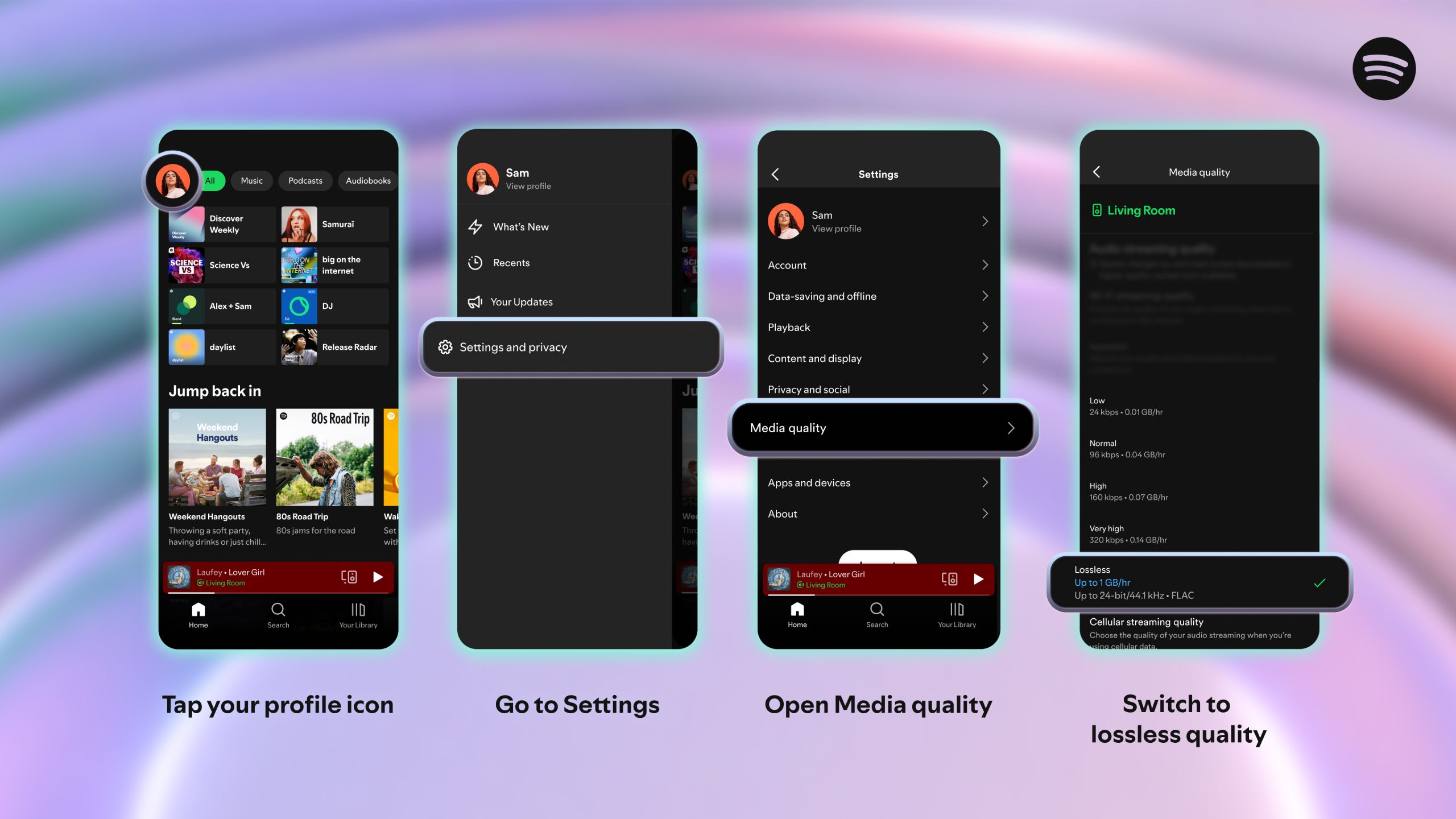
To turn on lossless audio in the Spotify app:

    1. Tap your profile icon in the top left.
    2. Go to Settings & Privacy → Media Quality.
    3. Select where you want to enable lossless audio: Wi-Fi, cellular, downloads.

And just to note: You’ll need to enable Lossless manually on each device. You’ll know Lossless is on because the Lossless indicator will appear in the Now Playing view or bar, and via the Connect Picker.

For the smoothest and best listening experience, we recommend streaming lossless music on Wi-Fi using wired headphones or speakers on a non-Bluetooth connection, like Spotify Connect. Currently, Bluetooth doesn’t provide enough bandwidth to transmit lossless audio, so the signal has to be compressed before being sent.

Lossless gives listeners every detail of the music, which means the audio files can be larger. As users enable lossless on their devices, it may take a moment for the track to play. But once it’s cached and loaded, you are ready to listen.

When can I start listening?

Lossless is rolling out gradually to more than 50 markets through October. Premium subscribers in Australia, Austria, Czechia, Denmark, Germany, Japan, New Zealand, the Netherlands, Portugal, Sweden, the US, and the UK have already started to get access.

*Update as of October 6, 2025: Lossless is now available to Premium users in more than 50 markets.