

Tag: product

How To Get Straight to the Music With Spotify Tap™

If you’re on the go, you’re likely putting in your headphones so you can soak up your favorite playlist. And we all know the drill: You turn on your phone’s Bluetooth, place it in your pocket, shove the buds in your ear, juggle your coffee to the other hand, and finally, reach back into your pocket to grab your phone again to open up your Spotify app and press play. 

But the days of this overture are becoming a thing of the past. More and more headphones and earbuds are now supporting Spotify Tap—the simplest way to jump back in where you left off or get served something new and fresh based on your personal taste.


Spotify Tap allows you to launch your next listening session with a single tap of a button. It’s an effortless experience that brings all listeners one step closer to smart, easeful listening. Simply put on your headphones and get your tunes playing with a tap. Your music will start streaming from wherever you left off. Not feeling that song? Another tap plays a different recommendation just for you. 

You can find Spotify Tap on headphones and earbuds from the likes of Samsung, Microsoft Surface, Bose, Skullcandy, and Jabra, with even more brands coming later this year and in 2022. Head over to Explore Spotify to find the right pair for you.

Many brands support Spotify Tap right out of the box. While on some models, you do need to configure Spotify Tap in order to get going. Here’s how:

  1. Download the companion app for your headphones or earbuds, then open the app and navigate to settings to configure the shortcut button.
  2. Select “Spotify Tap.”
  3. Out of the app, simply tap the headphone shortcut button and Spotify will immediately resume from where you last left off. 

With Spotify Tap, we’re helping our listeners jump instantly into the music they love—all with a simple tap of a button. Spotify Tap will continue to evolve and move to even more surfaces in the future, so stay tuned for updates down the road.

Head over to Explore Spotify to find the perfect pair of Spotify-integrated headphones or earbuds. P.S. Once there, you can also flip through other hardware—like smart speakers, phones, and watches—with Spotify integrated.

Share What You’re Listening to on Spotify with Snapchat

With Spotify, you can listen to your favorite music and podcasts anytime, anywhere. With Snapchat, you can share what you’re up to instantaneously. Soon you’ll be able to combine the two seamlessly and share what you’re listening to in a Snap [story].  

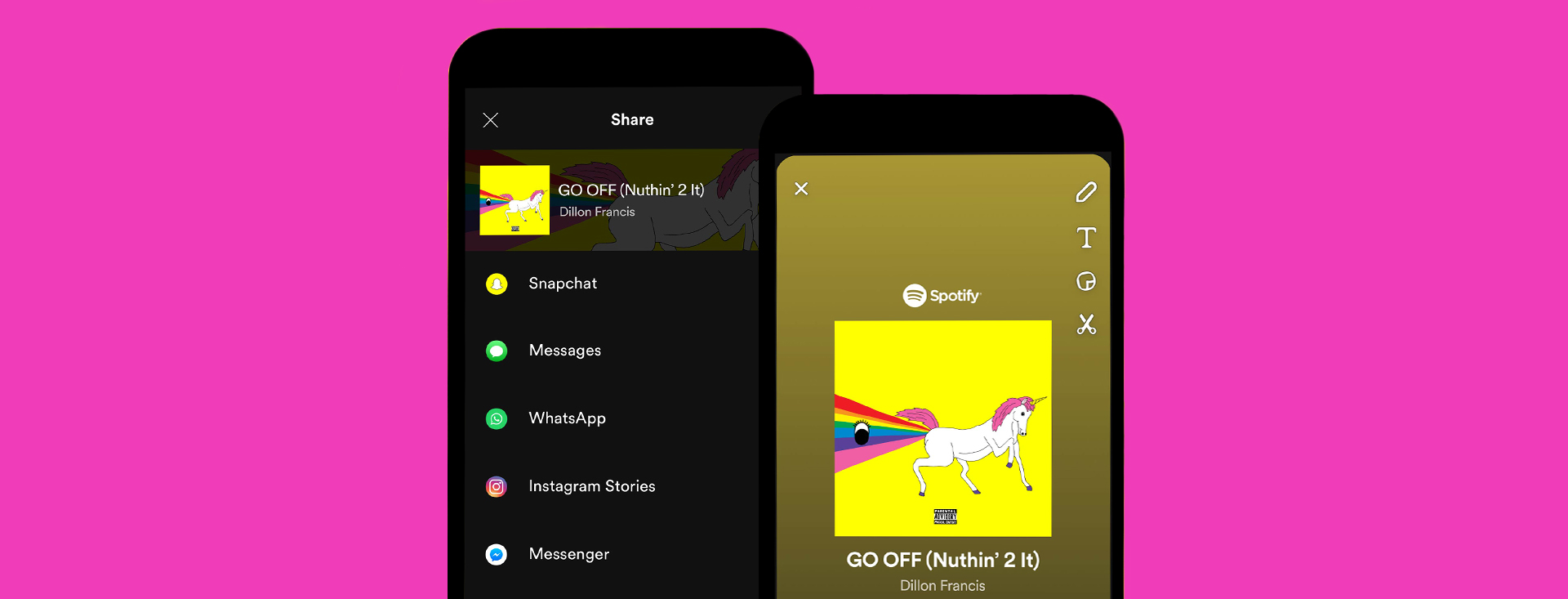
As part of a new integration, all Spotify users who have the Snapchat app installed will be able to share your favorite tracks, playlists, albums, and podcasts right to Snapchat for sharing with friends directly or posting to your Story. Here’s how: 

  1. Tap the “share” menu (three dots on the right of the screen) while you’re listening to any song, album, artist, or podcast.
  2. Select “Snapchat” from the dropdown list.
  3. Snapchat will open a new Snap with the full album art included.
  4. Edit and send—whether to a few people or to your Story!

If a friend sends you a Snap with a song, playlist, artist profile, or podcast rec included, you can start streaming with a few quick steps:

  1. Swipe up from the bottom of the screen.
  2. Tap the context card with song, artist, playlist, or podcast info.
  3. Spotify will open and play away! (If you don’t have the Spotify app yet, download it for free here.)

With this new way of sharing, it’s quicker and easier for friends to share what they’re listening to — and for others to start listening.

Look out for the integration, rolling out soon across iOS and Android devices.