

Tag: product launch

How to Use Page Match to Seamlessly Switch Between a Book and Its Audiobook on Spotify

Today, Spotify announced two new updates to give book lovers a more personalized and flexible way to enjoy stories: the ability to purchase physical books via a partnership with Bookshop.org and our new Page Match feature. Here, we’re diving deeper into how you can use Page Match to bridge physical and audio reading.

This first-of-its-kind feature lets you switch between a print book or e-book and its audiobook counterpart with a quick scan of your mobile phone camera. It’s designed to help books adapt to your schedule, not the other way around, turning more moments throughout the day into opportunities to stay engaged with a great story.

How it works

Page Match is currently rolling out and will be available on most English-language titles by the end of February for all Spotify audiobook listeners on iOS and Android.

    • Premium subscribers and Audiobook+ plan members can use the feature with their monthly allocation of audiobook listening hours.
    • Free users can use it with individual audiobooks they’ve purchased through Spotify.

To get started with Page Match on supported titles, just make sure your Spotify app is updated.

From book to audiobook

When you’re so engrossed in a story that you don’t want to put your book or e-reader down, Page Match lets you continue listening right where you left off reading.

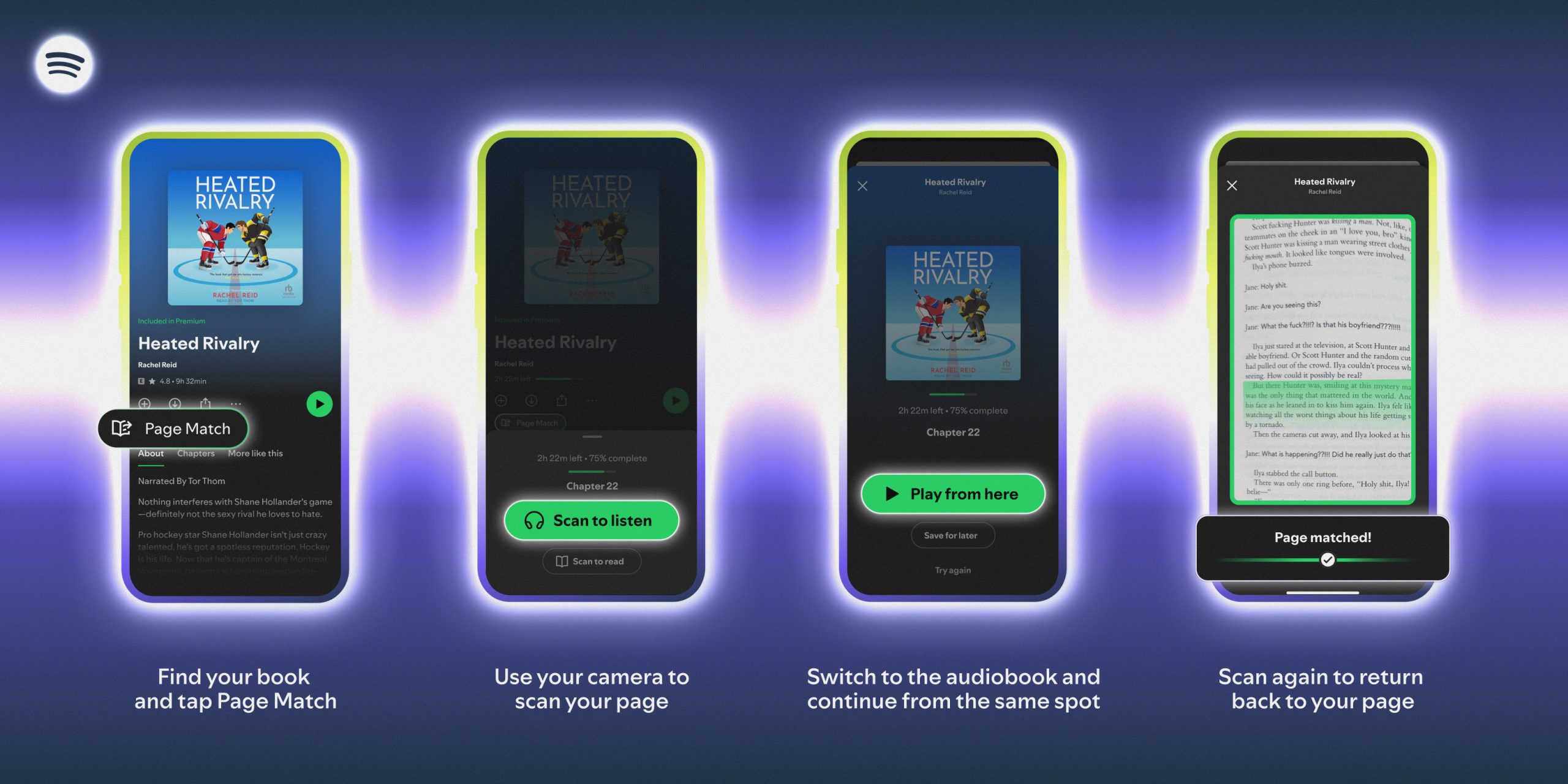
    1. For supported titles, find the audiobook in the Spotify mobile app and tap the Page Match button.
    2. Press Scan to listen.
    3. Allow camera access in the app and simply scan the page you’re currently reading.
    4. Spotify will match the page to the corresponding moment in the audiobook and give you the option to Play from here or Save for later. 
    5. If the page can’t be matched, the app will prompt you to try again.

If the title has audiobook Recaps enabled (you’ll see a Recap button), Page Match and Recaps are available to work together. Recaps offer short audio summaries tailored to your most recent listening point to give you a refresher on the story so far.

From audiobook to book

When you want to switch from listening to reading, the process is just as easy.

    1. Open the audiobook in the Spotify mobile app and tap the Page Match button.
    2. Select Scan to read.
    3. Scan any page in your book or e-reader so Spotify can orient itself.
    4. Spotify will then guide you to the correct spot based on where you stopped listening, telling you whether to flip forward or backward to find the exact passage where you should resume reading.

By removing the friction between reading and listening, Page Match is the latest way Spotify is reimagining the book experience—helping you stay lost in a story, no matter how or when you choose to engage.

Spotify Partners With Bookshop.org and Debuts Page Match Feature to Bridge Physical, E-book, and Audio Formats

Since bringing audiobooks to Spotify in 2022, we’ve helped listeners discover thousands of new favorite titles and authors while driving growth in the publishing industry. Today, we’re turning the page with two new updates that will give book lovers an even more personalized and flexible way to enjoy stories on Spotify.

First, we’re announcing a partnership with Bookshop.org, allowing users to purchase physical books through the Spotify app. We’re also introducing Page Match, a first-of-its-kind feature that lets readers seamlessly switch between the printed (or e-book) and audiobook versions of a title.

“We believe the future of reading or listening needs to be flexible and fit more seamlessly into people’s lives,” said Owen Smith, Spotify’s Global Head of Audiobooks. “Since launching Audiobooks in Premium, we’ve seen that when books are easier to discover and enjoy, demand grows, making Spotify a real growth engine for the publishing industry and changing how people find their next great read. Now we’re extending Spotify’s discovery and engagement strengths across both audio and physical formats, so authors can build deeper connections with their audiences and books can follow readers wherever they go.”

Shop Bookshop on Spotify

Physical books remain the go-to format for most readers, accounting for nearly 73% of trade publishing revenue last year. To support how people read, we want to make it easier to engage with titles in whichever format works best.

Launching later this spring, Spotify users in the U.S. and U.K. will be able to purchase physical books via the Spotify app through Bookshop.org, an organization that connects readers to independent bookshops. This partnership is designed to connect discovery on Spotify with physical ownership, making it easier for readers to move from finding a book they’re interested in to enjoying it in the format that feels right. Purchases made on Spotify will directly support those bookshops and the authors who brought that story to life.

“We are excited to see the impact Spotify’s scale will have for local bookstores,” said Andy Hunter, Founder and CEO of Bookshop.org. “By meeting readers where they are and linking to Bookshop.org, Spotify is financially supporting indie booksellers with each purchase.”

Introducing Page Match

We believe that when you find a book that has you completely hooked, you shouldn’t have to put it down. Instead of stopping or losing momentum when you need to hop in the car or go for a run, now you can keep the story going. Page Match is an industry-first feature that lets you move between physical books or e-books and their audiobook counterparts with just a quick scan.

“This is the most exciting development in reading technology I’ve heard about in years because it will get more people reading and listening to books,” said author Harlan Coben.

Available to audiobook listeners on iOS and Android on most English-language titles by the end of February, Page Match ensures your book picks up right where you left off, whether you’re turning pages or pressing play.

Here’s how it works:

    1. Open the Spotify mobile app and find the title you’re reading.
    2. Tap the Page Match button. 
    3. Use your camera to scan a page in your physical book.
    4. Spotify finds your spot in the audiobook.
    5. Ready to return to print? Scan again to find the right place in the text.

Page Match builds on the successful beta launch of Recaps last year. It’s the latest way Spotify is reimagining the reading experience to bring readers back into stories and help them stay with books longer.

We see the future of reading as one that’s personalized, flexible, and built to move fluidly across formats and moments. Together, these updates will make it easier for hundreds of millions of Spotify users to discover books and enjoy them in any way they choose. For authors and publishers, it’s a new opportunity to reach new audiences while deepening connections across audio and print.

Find your next great read in the Audiobooks hub on Spotify.

Get More From Lyrics on Spotify With These 3 Upgrades

Lyrics are one of Spotify’s most popular features, giving fans a richer way to experience the music and artists they love. They’re viewed hundreds of millions of times each day, as listeners return again and again to follow the words in real time. Today, we’re excited to share three upgrades that make it easier to understand and stay close to the lyrics of your favorite songs.

Read the lyrics in your language

Since launching in 2022, lyric translations have continued to expand to meet listener demand. After reaching more than 25 markets last year, we’re now making translations available worldwide, so more fans can unlock the meaning of songs across different languages. 

For tracks with translations available, tap the translate icon on the lyrics card to view the translation underneath the original lyrics. Translations will appear based on your device’s language, and you can easily switch back to the original lyrics at any time.

Available around the world for Free and Premium users.

Follow along from anywhere

Now, when you download your favorite tracks for offline listening, the lyrics will automatically be saved too. So whether you’re underground on your commute or flying at 30,000 feet, the words stay within reach, no service required.

Offline lyrics are rolling out around the world for Premium users.

See lyrics front and center

With lyric previews, the words now appear directly beneath the album artwork or short Canvas clip as a song plays. Early testing suggests this new layout makes it easier to engage with lyrics and can help listeners return to songs they discovered. You can still share your favorite lines directly to social platforms from the Now Playing view.

Lyric previews are rolling out globally for Free and Premium users on mobile (iOS and Android) and tablet. You can turn previews off at any time by tapping the three-dot menu and selecting “Lyrics Off.”

We believe that getting closer to the words helps you get closer to your favorite artists and their music. These updates are designed to make that connection easier and more seamless than ever.

Introducing Listening Activity and Request to Jam in Messages on Spotify

We know people use Spotify not just to listen, but to share the songs, podcasts, and audiobooks they love with their friends and family. When we launched Messages last year, we gave users a place to do that right in the app. Since then, almost 40 million users have sent nearly 340 million messages, showing that listeners are excited to share what they’re streaming.  

Today, we’re building on that experience with two new Messages features: Listening activity and Request to Jam. Listening activity gives users a real-time look at what music their friends and family are listening to, while Request to Jam makes it easy to quickly turn those moments into shared listening sessions.

Take a look…

Listening activity 

Listening activity is an opt-in feature that allows you to display what music you’re currently listening to within Messages in real time. If you’re not actively listening, your most recently played song will be displayed instead. It’s visible only to friends and family you have already connected with on Messages, and you can see others’ activity even if you haven’t turned your own activity on, as long as they’ve opted in.

Here’s how it works:

    • Users can turn on listening activity via Privacy and social settings, accessible through the side drawer next to the “View profile” button. 
    • Once enabled, activity appears in the chat row of the side drawer and at the top of Messages chats.
    • If a user taps on their friend or family member’s listening activity, they’ll be able to add tracks to their library, start playback, open the track’s context menu, or react with one of six standard emojis.

Listening activity is only shared with people you’ve already messaged on Spotify, and you’re always in control—only the contacts you choose can see your activity, and you can turn it off at any time.

Request to Jam

To complement listening activity, we’re making it easier to turn musical moments into shared experiences with Request to Jam, a new way for users to invite friends or family they’re connected with in Messages into a live listening session.

Our Jam feature has been growing in popularity, with daily active users more than doubling year over year. With Jam, users can listen from anywhere—but it can be hard to know when your friends are available to listen together when you’re apart. Now, users can see when someone is already listening, join them, and even message in sync while listening so they can talk about what’s playing and what’s up next.

Here’s how it works:

    • From a Messages chat, Premium users can tap Jam in the top right corner to send a request for a remote Jam. 
    • Your friend will receive the request and can either accept or decline.
    • If accepted, the recipient becomes the host of the Jam session. From there, both participants in the Jam can add tracks to a shared queue and listen together.

These new updates make it easier for users to enjoy music together while making discovery and expression even more seamless.

Spotify Expands Music Videos in Beta to Premium Users in the US and Canada

images of artists and music videos across a dark green background.

For decades, music videos have done more than just accompany a song; they’ve shaped style, started conversations, and helped us fall in love with our favorite artists. Now, music videos in beta are rolling out to Premium users in the U.S. and Canada, bringing fans even closer to the music they love.

This expansion gives millions more listeners access to a catalog of official music videos, from studio versions to live performances and covers. The initial video catalog is limited for now while the feature is in beta, but stay tuned as availability will grow quickly over the coming months.

When we introduced music videos in beta to nearly 100 markets last year, we saw how video can elevate the listening experience—and users agree. A recent Burson survey* found that more than 70% of users say more video content would enhance their experience on Spotify.

Music videos join a suite of features like Countdown Pages, Canvas, and Clips that help artists connect with their fans on Spotify. Artists and their teams can learn more on our brand-new music videos landing page on the Spotify for Artists site. And with this launch, fans can continue experiencing the full world of an artist, beyond just their sound.

How to watch music videos on Spotify

With this rollout, Premium users in the U.S. and Canada can begin exploring an initially limited catalog of music videos from artists like Ariana Grande, Olivia Dean, BABYMONSTER, Addison Rae, Tyler Childers, Natanael Cano, and Carín León.

Here’s how it works:

    • Premium subscribers in our beta markets can open Spotify on their TV, desktop, iOS, and Android device, select a supported track, and tap “Switch to video.”
    • The music video will start playing right where the song left off. To return to background listening, simply press “Switch to audio.”
    • For a full-screen experience on mobile, turn your device to landscape mode.


To find additional music videos—including live and cover videos—scroll down to explore Related Music Videos, or go to an artist’s profile and look under the Music tab. You can also watch by genre and era via playlists like 90s Video Hits, Hip-Hop Throwbacks, and Latin Party Hits. Music videos will be available to all Premium subscribers in the U.S. and Canada by the end of the month.

Music videos are a proven way to help build fandom. After a fan engages with an artist’s music video, they’re more likely to dive deeper into their artistry. We’ve seen that when fans discover a track with a music video on Spotify, they’re 34% more likely to stream it again and 24% more likely to save or share it in the following week. This is especially true for super listeners, who go on to actively stream the artist 85% more in the next month, on average.

*According to a survey by Burson conducted with 8,400 respondents across 19 markets around the world between August 27-October 3, 2025.

*Update as of December 10: Music videos in beta are now available for all Premium users in the U.S. and Canada.

Introducing Audiobook Recaps, a New Way to Reengage With Your Favorite Stories

Today, Spotify is beginning to roll out a powerful new feature designed to help listeners jump back into stories they’ve put down—whether after a busy week, or a doze during a bedtime story, or simply needing a quick refresher before diving back in. Introducing audiobook Recaps: short audio summaries tailored to your most recent listening point.

A tool to help great stories be heard . . . and finished

Recaps only cover the portion of the book you’ve already heard. Much like a “previously on” feature for TV, Recaps help you easily reengage with a story without needing to relisten. Designed to reduce friction and keep you immersed, Recaps are part of our ongoing effort to make audiobook listening more seamless, intuitive, and listener friendly.

J.H. Markert, author of Spider to the Fly, described Recaps as “an audio bookmark that speaks,” adding, “Using it once blew my mind. As sophisticated as it is smart, this feature is a must for any audiobook lovers out there.” 

How Recaps work 

Developed in collaboration with our publishing partners, Recaps reflect Spotify’s commitment to helping more stories get heard and giving authors new ways to engage listeners. Here’s how the feature works:

    • When you return to a story, tap the Recap button at the top of an audiobook’s page to hear a tailored summary of what’s happened so far.
    • Your first Recap will be available after you’ve listened to the first 15-20 minutes of a book. After that, they’re regularly updated to match your progress, helping you rejoin a story without spoilers or full book summaries. 
    • Recaps use AI technology to help you catch up, but the work of authors and narrators stays protected: We are not using audiobook content for LLM training purposes or voice generation, and Recaps do not replicate narration or replace the original audiobook in any way.

Recaps are currently in beta, available on iOS for a limited selection of English-language titles, with plans to expand over time. As with many of our features, we’re taking a feedback-driven approach and will continue to iterate and enhance Recaps as we learn.

We see endless potential to reimagine how people engage with books and believe Recaps will help more listeners finish the books they start, turning casual listeners into consistent audiobook fans and deepening the connection between authors and their audiences. We’ll continue investing in technology that makes Spotify more dynamic for booklovers, authors, and publishers alike.

Spotify Updates Shuffle to Keep Your Playlists Feeling Fresh

This year, Spotify has introduced even more ways for users to take control of their listening experience. Whether you’re refreshing your Discover Weekly with genre deep dives, excluding specific songs from your Taste Profile, or using the Snooze feature, these updates make it easier to listen the way you want.

We’ve also been making improvements to Shuffle. Premium users can toggle off Smart Shuffle, and both Free and Premium users can tap any song while shuffling to play it next without reshuffling the queue. We’ve also updated our default Shuffle so you’ll get Fewer Repeats when you listen. This version takes your recent listening into account, so songs you heard recently are less likely to repeat soon, helping your playlists stay fresh and surprising.

Premium users who prefer our previous version of Shuffle can switch to Standard Shuffle in their settings. Just remember: More randomness in your playlist can mean hearing the same tracks more often. That’s why we recommend sticking with the Fewer Repeats default, which is designed to keep your listening experience more varied and engaging.

How to adjust your Shuffle settings

Premium users’ Shuffle will be set to Fewer Repeats, but if you’d like to switch back to Standard Shuffle, you can follow these steps:

    1. Go to your Spotify Settings.
    2. Select Playback.
    3. Choose your preferred Shuffle mode: Fewer Repeats or Standard.

We’re always working to improve Shuffle so you have the best possible listening experience, helping you discover more music, enjoy more variety, and get the most out of every playlist.

Search and Follow Your Favorite Venues on Spotify

In March, we launched Concerts Near You to help listeners find concerts from their favorite artists. Since then, more than 3 million people have used it to discover nearby events. But great live music isn’t just about the artist you see—it’s also about where you see them.

Starting today, Spotify listeners (Free and Premium) can follow their favorite venues, discover new spots nearby, and explore upcoming lineups, all without leaving the app. Plus, the Live Events feed now has a fresh new look, with smarter recommendations and daily updates that make finding the next concert easier and more personal than ever.

A concert feed that’s always in tune

While Concerts Near You updates weekly, the new Live Events feed refreshes daily, surfacing the most relevant concerts in each listener’s area, from this weekend’s intimate gigs to just-announced global tours. It brings together what listeners are streaming, where they live, and the genres they love, all in one personalized destination. When a listener follows a venue, it’s saved to their Library and easy to find, alongside tailored suggestions for other venues they might enjoy.

A new stage for live music, right inside Spotify

Once listeners find a concert they’re interested in, they can just tap through to the event’s official ticketing partner to complete their purchase. They’ll receive a confirmation with all the event details and can return to Spotify anytime to revisit the event page or explore more concerts. With more than 20,000 venues listed worldwide, from iconic arenas to beloved independent clubs, Spotify is helping fans connect to live music wherever they are.

Fueling your city’s music scene 

Live music is the heartbeat of every community. It’s what brings people together and keeps local culture thriving. From historic theaters to basement stages, these are the places where artists grow, fans unite, and lifelong memories take shape. By following your favorite venues on Spotify, you’re not just discovering upcoming shows, you’re supporting the spaces that make live music possible.

So whether it’s catching a set at Brooklyn Paramount in New York, an unforgettable night at Bataclan in Paris, or a live performance at Oxford Art Factory in Sydney, your next great concert experience is just a tap away—right inside Spotify.

Ferramenta de arte da capa de playlists do Spotify chega ao Brasil com uma noite de autoexpressão

Música e arte se uniram em uma noite especial na semana passada na ZIV Gallery, um icônico espaço de arte em São Paulo. O motivo? O lançamento do recurso de personalização de artes de capas de playlists do Spotify no Brasil, que permite aos usuários soltarem a criatividade diretamente no app.

No coração do Beco do Batman — conhecido por sua vibrante cena de arte de rua — 25 criadores de conteúdo de diferentes comunidades se reuniram para celebrar. Rodrigo Azevedo, Head de Editorial do Spotify, abriu a noite com uma apresentação da nova ferramenta criativa, além de outros recursos como o botão Mixar, dando o tom de uma noite dedicada à criatividade e expressão.

“No Spotify, acreditamos que ouvir música é uma forma de autoexpressão. Com ferramentas como as capas de playlist personalizáveis, estamos oferecendo às pessoas ainda mais maneiras de deixar o aplicativo com a sua cara — tanto musicalmente quanto visualmente”, disse Rodrigo. “A inspiração pode vir de qualquer lugar, e um espaço que respira arte e música, como o Beco do Batman, mostra perfeitamente como esses dois mundos se conectam naturalmente.”

Em seguida, os convidados participaram de um tour guiado pelo Beco do Batman, conduzido pelos artistas locais Thiago Carlini e Rodrigo KK, explorando como o grafite e o hip-hop há muito tempo se influenciam mutuamente e moldam a interseção entre arte e música.

De volta à galeria, a criatividade continuou. Munidos de tinta spray, os criadores de conteúdo colocaram seu toque pessoal em um mural coletivo, além de personalizarem as capas de playlists inspiradas pelo passeio. Cada capa foi impressa e transformada em um chaveiro de acrílico, com pingentes que adicionavam uma camada extra de estilo pessoal.

Music Videos in Beta Brings an Improved Viewing Experience to New Markets

Earlier this year, Spotify introduced music videos in beta, giving Premium subscribers in 12 markets another way to connect with the songs and artists they love. Today we are starting to roll out that offering across 85 additional markets, giving even more Premium subscribers the opportunity to dive into the visual worlds of artists like Charli xcx, LISA, Fontaines D.C., Nick Ward, Anirudh Ravichander, and Fireboy DML

Music videos are a powerful way to build connections between artists and fans. In fact, users who discover a song and then watch the music video on Spotify are 34% more likely on average to stream the song again the following week.* And on average, songs discovered with music videos are 24% more likely to be saved or shared in the following week by those who watched. 

Music videos help immerse fans in the experience—whether they’re listening to a new song or revisiting an old favorite. As part of this expansion, Spotify is also adding new features to make the music videos in beta experience even better. These include:

    • Fans can easily find and discover new music videos to watch (on mobile and desktop) with video indicators on tracks.
    • Users can also more easily find the music video they’re looking for alongside its related track by typing the track or artist into search.

In addition, users will now have the option to seamlessly switch between music tracks and videos with a single tap of a button (on mobile and desktop).

Want to give it a try? Here’s how it works:

    • If you’re a Premium subscriber in one of our 97 beta markets, open Spotify on your iOS, Android, desktop, or TV device and tap the “Switch to video” button for music tracks with video. 
    • The music video will start playing within the Now Playing view, picking up right where you left off.
    • If you want to return to background listening, simply press “Switch to audio” to head back to the music track.
    • You can even watch the music video in full screen by turning your mobile device to watch in landscape mode.

The beta version of music videos on Spotify is starting to roll out in new markets today with a limited catalog of music videos—and will continue rolling out over the next few weeks. We’re always working to build lasting connections between artists and fans, adding features like Countdown Pages, Canvas, Clips from your artists, Artist Profiles, Live Events, and Merch to deliver a rich music listening experience. And for Premium subscribers, music videos in beta—along with offerings like DJ, Jam, and AI Playlist—is yet another way we’re making that experience even richer. 

Stay tuned, as we hope to expand the catalog of music videos, share new places for you to watch them, and take the feature to more users and markets.

*Than users who discover the song but do not watch the music video.