
Tag: product update

Presentamos una nueva etiqueta para identificar perfiles de artistas generados por IA

An "AI Persona" badge appearing on a dark background

La conexión entre artistas y fans solo puede construirse sobre una base de confianza y autenticidad. En la música, esto significa que quienes escuchan deben poder confiar en que el artista detrás de una canción es quien dice ser. Y en la era de la inteligencia artificial generativa, tener esa claridad es más importante que nunca.

Por eso, este año hicimos de Artist Identity & Trust una de nuestras principales prioridades, con el lanzamiento de Verified by Spotify, SongDNA, AI Credits y Artist Profile Protection. Hoy damos un paso más para hacer de Spotify el lugar más transparente y confiable para escuchar música.

Quienes escuchan en Spotify han sido claros: no quieren encontrarse con el perfil de un artista que parece ser una persona real para después descubrir que su identidad fue generada con IA.

Por eso, a partir de mediados de septiembre, comenzarán a aparecer AI Persona badges en algunos perfiles de artistas. Esta etiqueta indicará que la identidad pública de un artista puede haber sido generada con IA y que no representa a una persona real. Además de los perfiles que se identifiquen voluntariamente como AI Personas, Spotify también comenzará a aplicar esta etiqueta a perfiles relevantes.

Spotify no incluirá a las AI Personas en recomendaciones editoriales ni algorítmicas. Esto significa que su música no aparecerá en recomendaciones personalizadas, a menos que el usuario muestre un interés activo en ellas, por ejemplo, siguiéndolas.

Creemos que todos los artistas tienen libertad creativa para decidir cómo quieren presentarse. Al mismo tiempo, la programación de Spotify está enfocada en impulsar la música de artistas auténticos que están construyendo una carrera en la industria.

¿Cómo funcionará?

A partir de hoy, los artistas podrán indicar a través de Spotify for Artists que su perfil representa una AI Persona. Queremos fomentar la transparencia y darles la oportunidad de comunicarlo directamente, pero no dependeremos únicamente de la autodeclaración.

Spotify también revisará perfiles de artistas para identificar aquellos cuya identidad pública, incluyendo el nombre y las imágenes que presentan en su perfil, parezca representar una identidad fotorealista generada con IA.

Comenzaremos con artistas que hayan alcanzado ciertos umbrales de audiencia previamente definidos, de manera que las etiquetas cubran la gran mayoría de los perfiles de artistas que visitan los usuarios.

A mediados de septiembre, las etiquetas de AI Persona comenzarán a aparecer en distintos espacios de Spotify: en el banner y la sección Acerca de de los perfiles de artistas, en Search y junto a las canciones dentro de playlists.

Al tocar la etiqueta, los usuarios podrán saber si el propio artista declaró de manera transparente que se trata de una AI Persona o si Spotify realizó una revisión y llegó a esa determinación.

En aquellos perfiles donde el equipo de revisión de Spotify haya aplicado la etiqueta, los artistas serán notificados y tendrán la oportunidad de autodeclararse como AI Persona o apelar la decisión.

En los próximos meses, también habilitaremos una opción para que los usuarios puedan reportar perfiles que consideren que representan AI Personas para que nuestro equipo pueda revisarlos. Compartiremos más detalles cuando esta función esté disponible.

Two phone screens showing on the on-app UI display for AI Personas on platform

Una distinción importante: identidad no es lo mismo que creación

Existe un espectro muy amplio sobre cómo los artistas pueden utilizar la IA como herramienta creativa. Sin embargo, determinar si un perfil representa o no a una persona real es un espacio donde Spotify puede ayudar a dar mayor claridad.

La etiqueta AI Persona habla de la identidad pública del artista, no de cómo fue creada su música.

Un artista humano puede utilizar inteligencia artificial como parte de su proceso creativo y eso no significa que sea una AI Persona.

Para conocer más sobre cómo se creó una canción, Spotify cuenta con herramientas como AI Credits y SongDNA. Con AI Credits hemos visto que las personas están aprovechando la oportunidad de ser transparentes y explicar cómo utilizaron IA como parte del proceso creativo de una canción. Esperamos ver un nivel similar de autodeclaración con AI Personas.

Construyendo mayor confianza y transparencia en Spotify

Las etiquetas de AI Persona forman parte de un esfuerzo más amplio para hacer de Spotify el lugar más transparente y confiable para escuchar música.

Durante 2026 presentamos distintas herramientas diseñadas para ofrecer mayor contexto sobre qué estamos escuchando y quién está detrás de la música:

    • Verified by Spotify permite identificar que un artista es una persona real que se presenta auténticamente en la plataforma. Cientos de miles de perfiles ya están verificados, la mayoría de artistas independientes, representando a más del 99% de los artistas que los usuarios de Spotify buscan activamente.
    • AI Credits permite a los artistas informar a sus fans cómo utilizaron inteligencia artificial durante la creación de su música. Actualmente se reciben decenas de miles de AI Credits todos los días.
    • SongDNA ofrece mayor contexto sobre los artistas y colaboradores detrás de una canción, ayudando a los fans a descubrir y conectar con el proceso creativo humano.
    • Artist Details muestra información sobre un artista basada en datos de la propia plataforma, como momentos importantes de su carrera, historial de lanzamientos y actividad de giras, ofreciendo una fotografía rápida de su actividad auténtica en Spotify.
    • Artist Profile Protection permite a los artistas revisar y aprobar los lanzamientos enviados a Spotify para proteger su identidad y evitar confusiones entre los usuarios por música atribuida incorrectamente.

Además de estas herramientas, ajustamos nuestros algoritmos para destacar a artistas humanos auténticos y, utilizando las señales disponibles, buscamos evitar que spam, contenido de baja calidad o producido con poco esfuerzo forme parte de nuestras recomendaciones.

Sabemos que el ecosistema musical está evolucionando y nuestro enfoque también lo hará. Seguiremos adaptándonos a medida que cambie el panorama y continuaremos aprendiendo de artistas, fans y nuestros socios de la industria.
Introducing a New Label for AI-Generated Artist Identities on Spotify

An "AI Persona" badge appearing on a dark background

True artist-fan connection can only be built on a foundation of trust and authenticity. In music, that means listeners need to be able to trust that the artist behind the music is who they say they are. That’s more essential than ever in the age of generative AI. 

So this year, we’ve made Artist Identity & Trust one of our very top priorities with the launch of Verified by Spotify, SongDNA, AI Credits, and Artist Profile Protection. Today, we’re announcing another step in our effort to ensure Spotify is the most transparent and trustworthy place to listen to music. 

Listeners have been clear in telling us that they don’t like seeing an artist profile that seems human, only to find out that the persona is AI-generated. That’s why, starting mid-September, you’ll begin to see an AI Persona badge on some artist profiles. The badge signals to listeners that an artist’s identity may be AI-generated and does not represent a real person. Alongside artist profiles that self-disclose as AI Personas, we will also start applying badges to relevant profiles. 

By default, Spotify will not include AI Personas in any editorial or algorithmic recommendations. That means you won’t see any music from AI Personas in your personalized recommendations, unless you follow AI Personas, for example. While we believe all artists have creative choice in determining how they present themselves, Spotify’s programming is focused on elevating music from authentic artists building careers in music.

How it works

Starting today, artists can share that their profile represents an AI Persona through Spotify for Artists. We hope artists will be transparent, so we are giving them the opportunity to disclose, but we won’t rely on self-disclosure alone. 

Spotify will also review artist profiles and identify those whose public identity—the identity an artist presents on their profile, including name and imagery—appears to represent photorealistic AI-generated identities. We’ll start with artists who have met defined audience thresholds, so the labels cover the vast majority of artist profiles that users visit. 

In mid-September, you’ll start to see the AI Persona badge appear on artist profiles (in the banner and About section), in Search, and on track rows across playlists. When listeners tap the badge, they’ll be able to see whether the artist transparently shared that they’re an AI Persona to build trust with potential listeners, or if Spotify had to review and make an informed determination. 

For artist profiles where Spotify’s review team have applied the badge, artists will be notified and given the opportunity to self-disclose or appeal. In the coming months, we’ll also give listeners the ability to report artist profiles they believe represent AI Personas to our review team. We’ll share more details when that’s available.

Although there’s a broad spectrum in how artists use AI as a creative tool, the question of whether a profile represents an actual human is one where Spotify can help make a clear determination. This badge is about the artist’s public identity, not about how the music was made. For more information about how the music was made, we offer AI Credits and SongDNA. With AI credits, we have seen that people are eager to take the opportunity to be transparent and share how they used AI as part of their song’s creative process. We’re hoping for a similar level of self disclosure for AI Personas. 

Building trust and transparency on Spotify

AI Persona badges are part of our broader efforts to make Spotify the most transparent and trustworthy place to listen to music. 

In 2026, we’ve introduced several other features designed to give listeners more transparency about what they’re hearing and who’s behind it. 

    • Verified by Spotify signals to listeners an artist is a real human presenting themselves authentically on the platform. Hundreds of thousands of profiles are already verified, the majority of which are independent artists, representing more than 99% of the artists Spotify listeners actively search. 
    • AI Credits allow artists to disclose to listeners how they used AI in their music creation, with tens of thousands of AI credits submitted daily.
    • SongDNA gives listeners deeper context on the artists and contributors behind a track, helping them discover and fall in love with the human creative process. 
    • Artist Details surfaces artist information based on Spotify’s own platform data, such as career milestones, release history, and touring activity, giving listeners a quick snapshot of an artist’s authentic activity on Spotify.
    • Artist Profile Protection lets artists review and approve releases delivered to Spotify to protect their artist identity and prevent listener confusion about misattributed music. 

In addition to these features, we tune our algorithms to highlight authentic human artists and, based on available signals, strive to not  include spam, slop, or low-effort content in our recommendations. 

We know the music ecosystem is evolving, and so will our approach. We’ll continue to adapt as the landscape changes and as we learn from artists, listeners, and industry partners.

Spotify’s New Running Mode Brings Personalization to Your Workout

"Running Mode" appearing on a patterned background

Sometimes the difference between a good run and a great run is the right playlist. That’s why we’re introducing Running Mode, a new personalized running experience that transforms playlists into running sessions tailored to your goals, music taste, and tempo. 

Whether you’re training for a race, heading out for an easy jog, or just want a more motivating walk, Running Mode helps you spend less time hunting for the right music and more time moving.

How to find your rhythm 

Getting started is simple. Premium users on iOS in the U.S., Canada, the U.K., Ireland, Australia, New Zealand, and Sweden can find Running Mode in the Fitness hub beginning today. 

From there, choose one of 25 curated running presets and make it your own by customizing your workout type (like interval, steady, or pyramid), duration, Beats per Minute, and what type of music you’re in the mood for. Press play, and Spotify will guide your run with music tailored to your workout. 

Running Mode gives you personalized music, matches beats to your selected tempo, and seamlessly moves through tracks for a more fluid, motivating soundtrack. 

A coach in your corner 

Need a little extra encouragement? Running Mode also includes optional audio cues in English to help guide you through your workout. It’s like a supportive friend running alongside you, offering timely cues and motivation without getting in the way of your music.

Running Mode complements the fitness content already on Spotify, including Peloton classes and creator workout videos. Think of it as one more tool for getting the most out of your movement. 

The next step in personalized fitness

Spotify has long been the go-to for finding the perfect soundtrack for every moment. Since we first introduced Prompted Playlists, fitness-based prompts have been some of the feature’s most popular uses, reflecting a growing demand for more personalized workout experiences. Running Mode is the next step, creating a running experience powered by your goals and the music you love, so every run feels more energizing and uniquely yours.

Ready to try it for yourself? Lace up your shoes and find Running Mode on the Spotify app, rolling out for iOS users in select markets beginning today.

More Control, Faster Playlist Editing, and Other Updates for Everyday Listening on Spotify

Spotify logo on top of blue gradient background

A little refresh can go a long way. We’ve been making behind-the-scenes updates to make Spotify easier to use and more reliable. Based on your feedback, we’re rolling out a series of improvements focused on the everyday features that help keep listening smooth.

Organize your playlists into folders, right from your phone

Your Library is the heart of your listening, and now you can keep it organized on the go. Playlist folders, a longtime desktop favorite, are now available on mobile. You can group your playlists by mood, activity, or genre, making it easier to find the right playlist for any moment.

Available now for all users globally. 

Manage your playlists and queue with more control

For those with carefully crafted playlists, you can now use in-playlist bulk actions to edit and reorganize multiple tracks, books, or podcast episodes at the same time—saving you time and taps.

Rolling out now for all users globally. And for Premium users, we’ve brought back the ability to select and manage multiple songs in your play queue at once.

Enjoy more reliable offline listening

We’ve made offline listening more dependable with the rollout of background downloads on iOS. Your music and podcasts will keep downloading even when the app isn’t open, and you’ll see notifications showing their progress. So whether you’re on a flight, underground, or out of range, your listening is ready to go. 

Rolling out now for Premium users globally. 

Reshuffle your queue with one tap

Mix up the order of your shuffle anytime with the reshuffle button. It’s a fresh way to rediscover a favorite playlist, set a different pace, or hear something new from the music you already love. If the lineup isn’t quite hitting, tap reshuffle for a new sequence. No more toggling shuffle off and back on.

Available now for Premium users on mobile globally.

These are just a few ways we’re improving Spotify, so you can spend less time managing your music and more time enjoying it. Make sure your app is up to date to get the latest features.

Podcast Clips Make Your Favorite Moments Easier to Save and Share

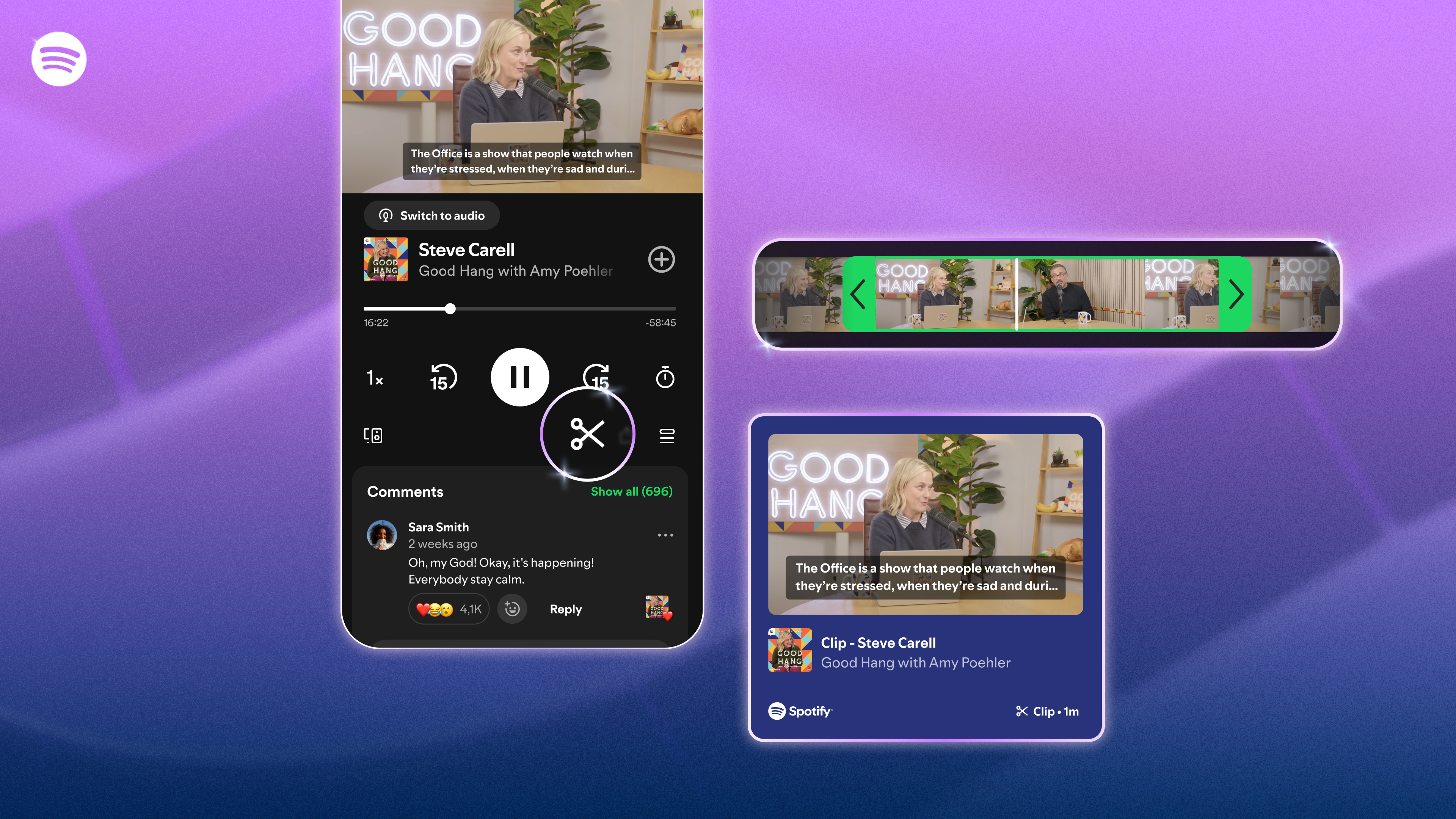
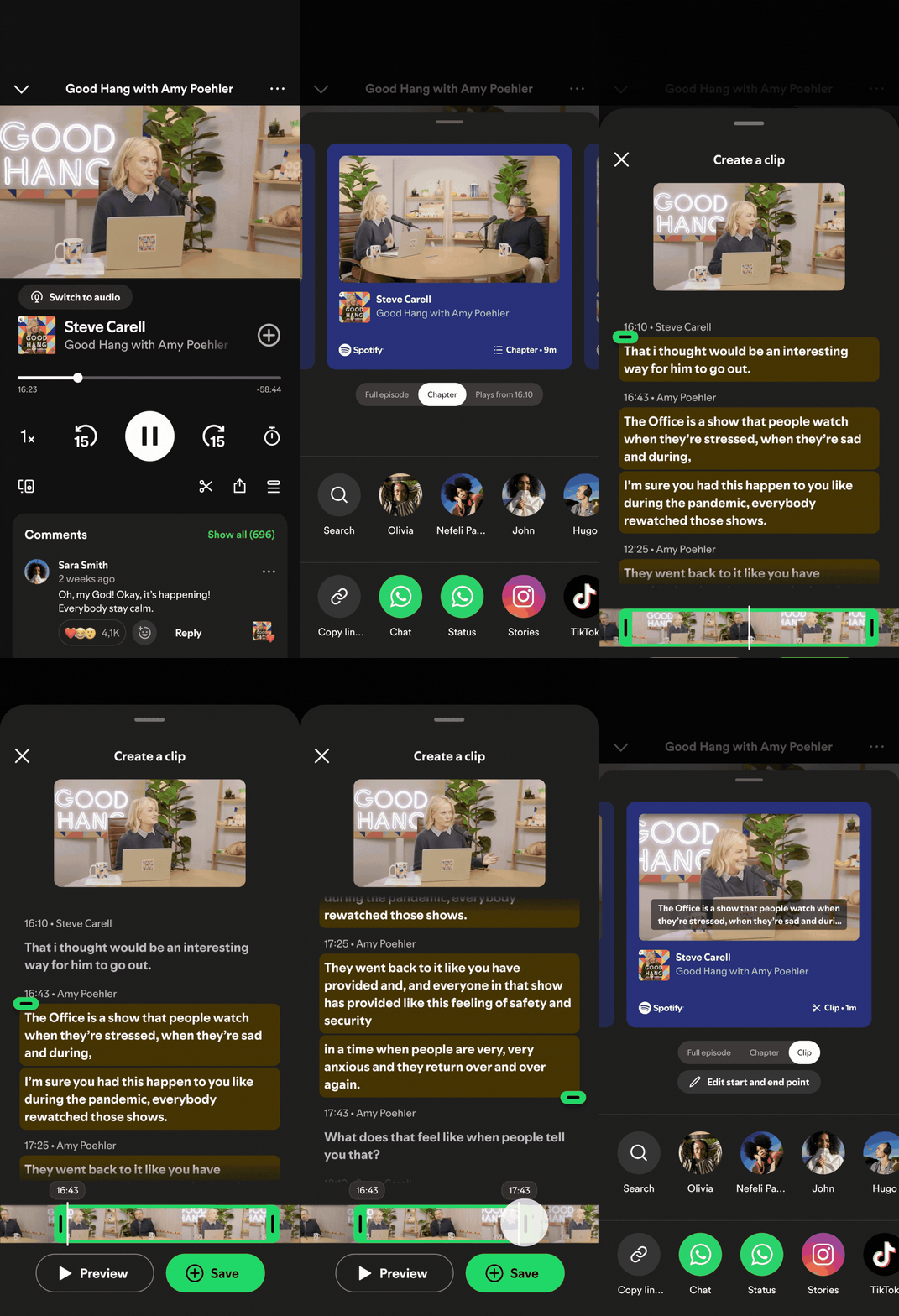
3 images showing the user experience for the new podcast clips feature on Spotify, set against a purple/blue gradient backdrop

The best podcast moments deserve more than just a mental note. That’s why today, we’re making those moments easier to save and share with clips.

Whether it’s a piece of advice that reframes how you think, a conversation that makes you laugh, or a segment you know a friend needs to hear, those moments are often what turns a casual listener into a devoted fan. 

With clips, listeners can now capture, revisit, and share the exact moments from podcasts that resonate most, without having to search through an entire episode to find them.

Clips also come with an upgraded sharing experience. The updated sharing menu gives you more ways to share what you’re hearing, whether it’s a full episode, a chapter, a timestamp, or a clip—all accessible directly from the share icon.

Moments worth coming back to

When listeners hold onto those moments, they come back for more. Your saved clips have a dedicated space in Your Library and can also be added to podcast playlists, so the moments that matter don’t get lost.

Chapters, which launched earlier this year, are already being saved and playlisted more than 2 million times a month. Early testing has also shown that podcast saving increases when clips are enabled. For creators, a saved or shared clip can be a new entry point for potential fans, turning a single moment into a discovery or deeper connection.

How it works

    • While listening, tap the scissor icon in the Now Playing view to capture the moment you want to keep. Trim it to fit, then hit Save or Share.
    • For more sharing options, tap the share button and choose your format—full episode, chapter, timestamp, or clip—then send it directly to friends via Spotify Messages or any supported platform.
    • All clips are saved in Your Library, ready to revisit or add to a podcast playlist whenever you want.


Clips for podcasts are starting to roll out globally to Free and Premium users on mobile, with availability expanding across more shows over time. Look for the clip icon next time you’re listening and start saving the moments that matter.

Introducing Verified by Spotify, a Signal of Authenticity and Trust for the Artists Behind the Music

A Visual of Ravyn Lenae's Spotify profile, displaying "Verified by Spotify" text with a green check mark

Music is evolving, and so are the ways you discover and connect with artists. In the AI era, it’s more important than ever to be able to trust the authenticity of the music you listen to. At Spotify, our focus is providing you with more context about artists and their music, so you can build more meaningful connections with them.

Today, we’re introducing a new Verified by Spotify badge, as well as additional details about artists’ activity (in beta) on Spotify. These updates build on recent song-level context features like SongDNA, expanded song credits, About the Song, and AI credits, all designed to give you more insight and transparency into the music and artists you’re discovering.

A clearer signal on artist profiles

Artist profiles are a key place to learn more about music and artists. The new Verified by Spotify badge shows an artist profile has been reviewed and meets Spotify’s criteria for authenticity and trust. And with Artist Profile Protection (currently in beta), artists now have greater control over what appears on their profile, which helps to ensure the music you see is coming from them.

Artists who receive this badge have:

    • Consistent listener activity and engagement over time: We focus our review on artist profiles that listeners are actively and intentionally seeking out over a sustained period of time, not just those experiencing one-time spikes in engagement. These criteria also make it feasible to conduct thorough reviews across millions of artist profiles. 
    • Good standing with Spotify’s platform policies: This means the artist and their content comply with our platform rules.
    • Signals of a real artist represented in the profile: We look for an identifiable artist presence both on and off-platform, like concert dates, merch, and linked social accounts on their artist profile. At launch, profiles that appear to primarily represent AI-generated or AI-persona artists are not eligible for verification. In today’s music landscape, the concept of artist authenticity is complex and quickly evolving, and we’ll continue to develop our approach over time.

We’ll pair these standards with human review and judgment to identify real artists behaving in good-faith, not just filtering out bad actors, giving you a more reliable signal of the authentic artistry behind the music.

Rolling out over time

You’ll begin seeing the new badge appear on artist profiles and next to artist names in search over the coming weeks. It will be marked by “Verified by Spotify” text and a light green checkmark icon. Because Spotify is home to millions of uploaders and artist profiles, reviews and verification will happen on an ongoing basis to ensure accuracy and consistency. Not seeing the badge on an artist profile doesn’t mean they won’t receive it in the future.

At launch, we have ensured that more than 99% of the artists Spotify listeners actively search for will be verified, representing hundreds of thousands of artists—the majority independent—spanning genres, career stages, and geographies. This means prioritizing artists with active fan interest, or who have made important contributions to music culture and history, rather than functional music creators and content farms whose content is primarily designed for passive or background listening.

More context about the artist

We’re also introducing a new section (in beta) across all artist profiles—regardless of Verified by Spotify status—that highlights key artist details like career milestones, release activity, and touring activity, helping you better understand and connect with the artist beyond the music. 

Much like nutrition facts offer a quick, reliable snapshot on what’s inside packaged food, these details—based on Spotify’s platform data—give meaningful signals of an artist’s authentic activity on Spotify, even for those who haven’t yet met our Verified by Spotify criteria.

You’ll begin seeing this in the About section on mobile across artist profiles in the coming weeks, as well as by clicking “Verified by Spotify” in the banner for verified artists.

Two phone screens showing the Verified Artist UX - Del Water Gap

Looking ahead

In a landscape that’s complex and rapidly evolving, we know we won’t get everything right from day one. We’ve designed this new verification program thoughtfully with listeners and artists in mind, and we’ll continue to evolve this program over time. Our goal is to make it easier for you to trust and understand the human artistry behind the music you listen to on Spotify, and develop long-term, meaningful connections with the artists and music you love.

Introducing a Smarter, Smoother Experience for Tablets

Adaptive Tablet Layout screens

At Spotify, we want your experience to feel intuitive and personal across every moment of the day. Whether you’re streaming your favorite playlist while you work or browsing new recommendations on the go, Spotify should feel familiar and easy to use. With tablets—which are often used on the sofa or at a kitchen counter and offer more screen space to browse—we saw an opportunity to give the Spotify experience a little refresh.

Today we’re introducing a new app experience tailored for your tablet, designed to make listening, watching, and discovery feel more natural on larger screens.

A smarter, more responsive design

The refreshed tablet layout, available on iOS and Android devices, is designed to create a more seamless experience across screens where you use Spotify. Rather than simply scaling up mobile components, we designed the tablet experience to take advantage of the extra space, so you can browse and discover new favorites right alongside what you’re already playing. In addition, improvements we make to mobile can reach tablet users faster.

“From TV to desktop to the car, we’ve been designing Spotify to feel native to each screenand now we’re bringing that same experience to tablets,” said Nicole Burrow, Head of Design, Consumer Experience, Spotify. “Tablets give you more room to explore, so we designed it to let you browse and discover new favorites alongside what’s already playing. The goal was simple: Wherever you open Spotify, it should feel unmistakably like Spotify.”

What’s new

    • Adaptive orientation: The interface now reconfigures—not just resizes—as you switch between portrait and landscape, so it feels balanced and intentional in both views.
    • A collapsible sidebar: The new sidebar lets you browse and discover alongside your playback, or expands for deeper focus. It also includes interactive, scrollable content so you can explore without leaving what’s playing.
    • An enhanced video experience: The “Switch to Video” toggle is now front and center, making it simpler to move into a more immersive viewing experience.
    • Parallel browsing: Keep music or video playing on one side of the screen while you explore your library or recommendations on the other.
    • A familiar feel: The core navigation stays the same, so the experience still feels like a natural extension of the mobile app. The bottom navigation bar keeps your main pages within easy reach, while the collapsible side drawer gives you quick access to your profile and settings.

With this update, your tablet becomes an even better place to discover music, podcasts, audiobooks, and video. It’s another step toward a more unified Spotify experience, one that can keep evolving across the devices you use today and the ones you’ll use tomorrow.

Meet SongDNA, a New Beta Feature That Reveals the Creative Connections Behind Your Favorite Tracks

Behind every great song is a complex web of people, stories, and inspirations that span genres and decades. Today, we’re bringing those relationships to the forefront of the listening experience by revealing the intricate network of people and creative connections behind the music you love. 

Now rolling out to Premium users globally, SongDNA is our new, immersive music experience that’s built right into the Now Playing view. By simply tapping the SongDNA card, you can explore the writers, producers, and collaborators behind a song, see samples and interpolations that shaped its sound, and browse the covers it inspired. But it doesn’t stop there. You can tap into any of those creators to discover the other artists they’ve worked with, then explore those collaborators in turn. It’s an interactive way to follow the connections between tracks and see how artists, eras, and genres intersect, giving you a deeper understanding of how what you’re listening to came together.

Here’s how it works:

    1. While listening to a song in the Spotify mobile app, open the Now Playing view.
    2. Scroll down to find the SongDNA card on supported tracks.
    3. Tap in to see the song’s collaborators, samples, interpolations, and covers, and then follow the links to discovery.  

Empowering the creative community

For artists and the wider creative community of songwriters, producers, composers, and engineers, SongDNA offers a new way for fans to engage with their work by putting collaborations and influences front and center.

The connections you see in SongDNA are powered by a combination of information we receive from artists and their teams, supplemented by community-sourced data. As we continue to evolve this experience in beta, eligible artist and label teams can review and manage the components of SongDNA in Spotify for Artists, ensuring they have a direct hand in how their musical story is told.

“SongDNA is designed to make a song’s creative lineage more transparent so fans can easily explore the people and influences behind the music they love,” said Jacqueline Ankner, Spotify’s Head of Songwriter & Publisher Partnerships. “By bringing collaborators, samples, and covers together in one place, we’re making it easier for fans to discover new music and see how songs connect and come to life—while giving songwriters, producers, and rightsholders meaningful recognition for the role they play in creating it.”

A new dimension of discovery

SongDNA complements existing features like About the Song to give listeners a deeper understanding of the music they love. Where About the Song helps you understand the story behind a specific track, SongDNA turns a song into an immersive, exploratory experience:a world fans can step into.

SongDNA is another way we’re bringing fans closer to the artists they love while ensuring that everyone who works on a song gets the recognition they deserve. The feature is now rolling out in beta for Premium users globally on iOS and Android mobile devices, and will become broadly available to all Premium users throughout April.

Spotify’s BTS Music Quiz Celebrates ‘ARIRANG’ and Puts ARMY Knowledge to the Test

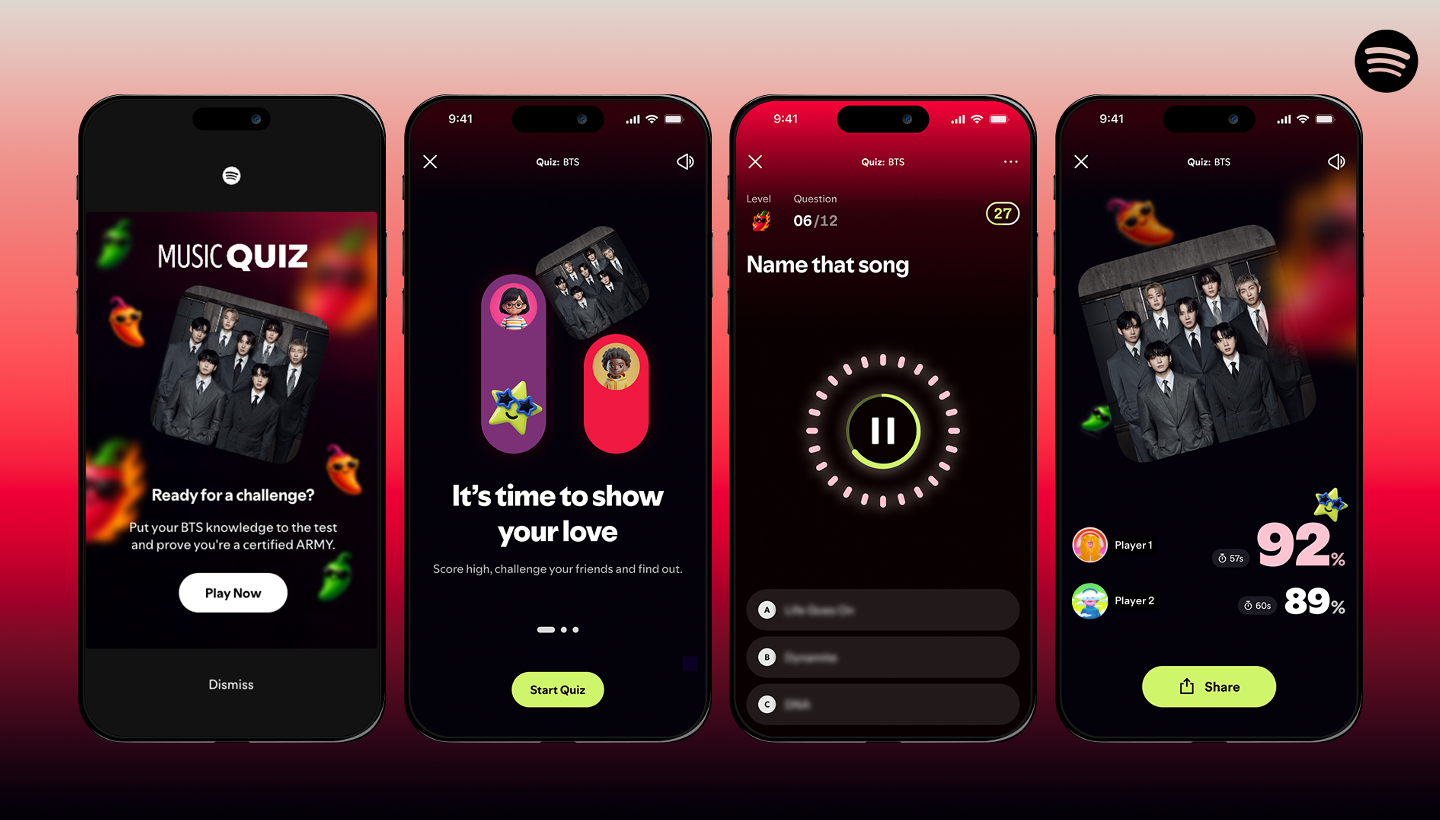
Four phone screens showing the UI interaction of the on-platform BTS Music Quiz on Spotify

BTS’ long-awaited fifth studio album, ARIRANG, is finally here. To celebrate the comeback of the decade, Spotify has partnered with the pop royalty to bring ARMY the BTS Music Quiz.

Starting today, Premium users globally can put their BTS knowledge to the test. Inspired by the journey reflected in ARIRANG, the BTS Music Quiz invites ARMY to revisit some of the defining moments that have shaped BTS’ artistic legacy through a series of questions. 

Here’s how it works:

    1. Update your Spotify app: Make sure you’re on the latest version and logged into your Premium account.
    2. Find the BTS Music Quiz: Play any BTS track, then scroll down in the Now Playing view to find the Music Quiz banner. Tap “Play quiz” to start.
    3. Take the quiz: Answer questions about BTS music, milestones, and defining moments.
    4. Share your score: After you’ve completed the quiz, tap “Share” to post your score on social media.
    5. Challenge a friend: Tap “Challenge a friend” to invite your ARMY besties to take the BTS Music Quiz. Once they’ve completed it, you’ll both get a scorecard with your results via Your Updates on Spotify, which you can also share on social media.

The BTS Music Quiz is available for Premium listeners globally in English, Indonesian, Korean, Japanese, Portuguese, and Spanish.

Stream ARIRANG on Spotify now.

3 Prompts to Try Using Prompted Playlist, Expanding in Beta to the UK, Ireland, Australia, and Sweden

Prompted Playlist UX

Prompted Playlist is expanding in beta to Premium listeners in the U.K., Ireland, Australia, and Sweden, giving more fans a new way to curate the right music for the right moment: by simply describing it in their own words.

With Prompted Playlist, you can type just about anything in English—from a specific mood or memory to a hyper-specific aesthetic or cultural moment—and Spotify will turn it into a personalized playlist. You can be as broad or detailed as you like, referencing anything from eras and genres to activities, lyrics, instruments, or even a playlist inspired by your favorite TV show. 

Prompted Playlist draws on your full listening history and combines it with what’s happening across the world of music and culture right now, so the result reflects both your old favorites and what’s trending. Each track also includes a short one-liner explaining why it fits.

Fine-tune your results by editing the prompt or start fresh whenever you want. If you want your playlist to evolve with you, you can set it to refresh daily or weekly.

Where will your words take you?

The best way to see what the feature can do is to try it for yourself. Just tap “Create” and select Prompted Playlist to get started. To get your creative juices flowing, here are a few prompts you can take for a spin—or use as inspiration to write your own.

To curate a nostalgia-fueled mix of 2000s British pop

Prompt: Make a playlist of British pop bangers from the ‘00s that made me the diva I am today. Add the top tracks I’ve replayed and fill the gaps with era-defining hits I might have missed.

To explore emerging and First Nations artists from Australia 

Prompt: Create a list of Australian artists that I haven’t heard before. Focus on newer and emerging artists and make sure First Nations artists are included in your recommendations.

To go deep on one new-to-you artist

Prompt: Find one artist I haven’t listened to yet but would probably love, or an artist I’ve only heard one or two songs from, and introduce me to them. Build a playlist of songs that’ll give me an overview of their catalog so it feels like I’m getting to know them. Put the songs you think I’ll like most in the top five spots.

As we continue to expand Prompted Playlist in this beta phase, some aspects of the experience may evolve. Usage limits are in place, and these may also change as we test and learn from listener feedback. Any scheduled updates to your Prompted Playlists will also be subject to these usage limits.

With nearly 9 billion playlists on Spotify, our listeners have proven to be endlessly creative. Now, with Prompted Playlist, you can steer the algorithm and use simple language to create something uniquely yours.

25 Ways Spotify Leveled Up Your Listening in 2025

Spotify Features listed on a graphic background

From crisper Lossless audio and immersive music videos in beta to new Audiobooks+ plans, custom transitions between tracks, and in-app Messages, we keep leveling up the way people experience Spotify.

It was a standout year of bold new features, reimagined favorites, and fresh ways of bringing listeners even closer to the artists and creators they love. After a record-breaking Wrapped and countless delightful moments of discovery across music, podcasts, and audiobooks, here’s a look at 25 things Spotify delivered in 2025.

Effortlessly discover your next favorite song or podcast

1. DJ requests: DJ now takes requests (by voice or by text)! Ask DJ X in English or DJ Livi in Spanish to get music that matches any mood or moment.

2. AI Playlist expansion: Our AI Playlist feature rolled out in beta to Premium listeners in more than 40 new markets, giving you one more way to turn your ideas into the perfect playlist.

3. Improved podcast discovery: We made it easier than ever to discover new shows on Home. We also added an “In this episode” section, allowing creators to link out to other content on Spotify and helping users dive deeper into each episode.

4. A feed for what’s new: We debuted Following feeds for music and podcasts, creating a dedicated space to find the latest tracks and episodes the moment they drop.

5. Upcoming Releases hub: The new Upcoming Releases hub became a go-to place for soon-to-be-released albums we think you’ll love based on your listening history.

6. A refreshed Discover Weekly: With an updated look and new controls, you can guide your mix by choosing up to five genre options, personalized based on your listening history.

Unlock new ways to listen, watch, and explore 

7. Lossless audio arrived: One of our most highly-anticipated features (finally) rolled out. Premium listeners in select markets now have access to higher quality, Lossless audio, unlocking greater detail across nearly every song on Spotify.

8. Upgrades to the Free experience: Our Free experience is even better now that listeners can search and play any song with a single tap.

9. Managed Accounts expansion: We expanded family plan controls with Managed Accounts, giving young listeners their own space to explore, with parents and guardians still at the helm.

10. Spotify + ChatGPT: Free and Premium users can now bring Spotify into their ChatGPT conversations for personalized music and podcast recommendations right in the chat.

11. Audiobook Recaps: We launched audiobook Recaps that help you jump back into stories after time away.

12. Audiobooks+ plans: Our add-on plan options give booklovers a new way to extend their listening time.

13. Music videos in beta: We expanded music videos in beta to Premium listeners in the U.S. and Canada, giving fans a new way to experience their favorite songs on Spotify. 

14. Shuffle updates: An updated Shuffle means you have more control over how your playlists serve up tracks.

Take control over your sound

15. Smooth mix transitions: We introduced new ways to mix up your playlists. You can now seamlessly transition between tracks, customize how they flow together, and enhance mixes like a pro.

16. Taste Profiles got sharper: The option to exclude songs from your Taste Profile means one-off listens don’t throw off your recommendations.

17. More controls for discovery: Upgraded queue controls and smarter Hide and Snooze options give you more ways to fine-tune recommendations and curate your playlists.

18. Better playlist tools: We made it easier to Add, Sort, and Edit playlists. We also launched custom cover art and the ability to turn filtered Liked Songs into full playlists in select markets.

19. Smart Filters: We launched Smart Filters in Your Library so you can sort saved music, podcasts, and audiobooks by activity, mood, or genre.

20. Playlist transfer tool: With our latest TuneMyMusic integration, we made it simple to transfer playlists from other streaming services into your Spotify library.

Get closer to the stage

21. Find concerts near you: Our new personalized playlist highlights artists performing near you, making it fun and easy to discover upcoming shows and new artists.

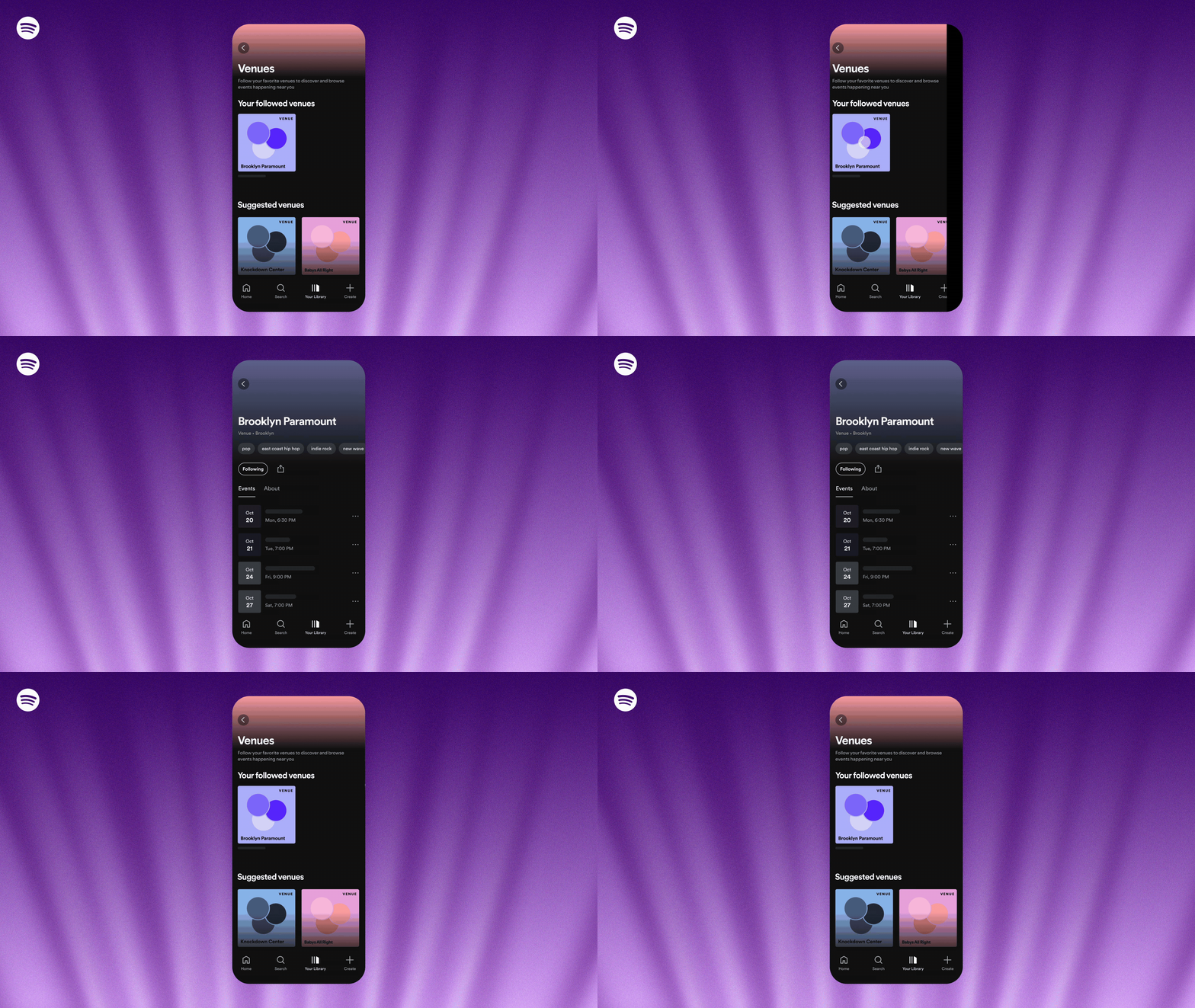
22. Search and follow venues: You can now follow your favorite venues, discover new spots nearby, and explore upcoming lineups, all in the Spotify app.

See your stats and sync with friends

23. Listening stats: The new weekly listening snapshot shows you your top songs and artists every week, perfect for tracking trends between Wrapped.

24. Wrapped: For 2025, Wrapped went bigger than ever with more layers, stories, and connection than ever before.

25. In-app Messages: You can now share music, podcasts, and audiobooks you’re excited about with friends and family right inside Spotify.

The momentum of 2025 has us inspired for what’s ahead in the new year. We’re excited to carry that energy into 2026 as we explore new ways to strengthen the connection between listeners, artists, and creators and bring you even more moments worth pressing play on. Thanks for listening!

You’re in Control: Spotify Lets You Steer the Algorithm

Spotify bug on a purple background

For the first time, Spotify is giving users the power to steer the algorithm. Gustav Söderström, Spotify’s Co-President, CPO, and CTO, shares the vision behind Prompted Playlist, and how a new era of listener control is taking shape.

Spotify is entering its next chapter, and it felt worth pausing for a moment to look at how far we’ve come and what comes next. With 713 million listeners, 90% of whom say Spotify is essential to their day, we’re standing on the edge of something big. Equally important is our dedication to delivering real innovation and growth for the artists who leverage the power of Spotify to connect with their fans.

That means pushing ourselves again. Stretching the boundaries of what listening can be. And moving into a new era: one that gives you – the user – more control than ever before.

The next evolution of your Spotify

From the start, we’ve tried to make listening feel personal. You’ve seen that in Discover Weekly and Release Radar, which quietly predict what you might love. You’ve also seen it in the tools that let you shape and refresh your own playlists with precision, such as Smart Shuffle, Playlist song suggestions, and Mixing Tools.

But now we’re entering a moment where you don’t just listen to Spotify, you control it.

Imagine a Spotify that doesn’t just passively learn from you but literally listens to you. One you can steer and shape with your own words. For the first time, your ideas, your logic, and your creativity can actually power the Spotify algorithm, directing how it thinks, adapts, and responds to you.

Introducing Prompted Playlist, where your words bring your playlist to life

Starting December 11, Premium listeners in New Zealand will get early access to our latest beta feature: Prompted Playlist. It’s the first feature that puts control of the algorithm and the broader Spotify experience directly in your hands.

Prompted Playlist lets you describe exactly what you want to hear and set the rules for your personalized playlist. And unlike anything before it, this feature taps into your entire Spotify listening history, all the way back to day one. Each playlist reflects not only what you love today, but the full arc of your taste. Spotify then curates and keeps it fresh based on your listening patterns and world knowledge.

You could ask for “music from my top artists from the last five years,” then push it further with “and feature deep cuts I haven’t heard yet.” Or you could request “high-energy pop and hip-hop for a 30-minute 5K run that keeps a steady pace before easing into relaxing songs for a cool-down,” and layer on something like “include music from this year’s biggest films and most-talked-about TV shows that match my taste.” You choose how broad or specific you want to go.

You can fine-tune the results by editing the prompt, or start fresh whenever you want. And for each song, we’ll include descriptions and context that tell you the story behind the recommendation so the playlist feels alive and crafted specifically for your prompt and your taste.

You can also set it to refresh daily or weekly so your playlist always stays new and in sync with your world. Consider this your chance to curate your next Discover Weekly, exactly the way you want it. Need a little help getting started? Tap “Ideas” to pick from prompts like “songs from artists who are headlining major tours right now,” and get a playlist tailored to your taste.

For even more inspiration, our music editors and culture experts have crafted a set of fun and inventive prompts and English language algorithms that will show up as personalized playlists on Home. And because this is a beta, the experience will evolve as we scale to more listeners. We’re excited to see what we learn along the way.

Why it matters

We believe that technology is only as good as the humans behind it. Spotify listeners have created nearly 9 billion playlists, which is proof that human curation is still the heartbeat of the platform. But until now, unless you were a developer at Spotify and could write your own playlist algorithm, your best ideas might have stayed in your head.

Prompted Playlist brings those ideas to life using just the English language. There’s no longer a tradeoff between control and convenience. You finally get both.

And for artists, this unlocks smarter, more inspired discovery, surfacing their music for the right listeners and opening new ways to deepen their fan bases. 

What’s next: More control for you

This new feature is part of a broader shift in how we think about personalization and what we think consumers will expect from their services in the future. Our goal is to make Spotify more personal, more responsive, more intelligent, and more aware of the world and culture around it, in order to bring greater value to listeners, artists, and creators.

This is just the beginning of a new phase where listeners take the lead and make even more of every minute.

2026 is going to be epic for fans and artists alike. We can’t wait to share what’s coming next. Stay tuned.