
Tag: Update

Spotify’s Free Experience Is Even Better—Here’s How to Make the Most of It

Four cartoon people sharing headphones with each other in a circle

Every day, millions of people around the world turn to Spotify to enjoy the audio they love. We’re continually improving the service to help you discover music with Premium-only features like Lossless, AI Playlist, and Mix; features that work across the free and paid experience, like Messages and daylist; and playlists curated by our leading global music editorial team. It’s all designed to help listeners get closer to the artists they love and connect them with their next favorite songs. 

Today, we’re sharing ways the Free experience, where the majority of users start their Spotify journeys, is getting even better. We’re rolling out updates globally, making it easier (and more fun) than ever to listen, connect, and share music for free.

Whether you’ve previously tried Spotify or you’re a long-time streamer with our free experience, there’s a lot to love about these enhancements. You now have more control over how you listen: Search and play any track or jump right into something your friend just shared.

Our goal is to help you get the most out of your music. We’re continuing to invest in making Spotify the best place for fans and creators to meet—no matter how they listen.

So, if you’re ready to check out all the new features, here are some tips to help you dive in deeper and enjoy everything Spotify has to offer.

More control: Freedom to play, search, and share

We’ve made it as simple as possible to enjoy music and podcasts on our free experience, helping you discover new music or listen to an artist you love. Now you can:

    • Pick & Play Got a nagging earworm? Hit play in the Spotify app, and you can pick and play any song you want.
    • Search & Play Type in your favorite track and start listening instantly.
    • Share & Play Love sharing your favorite tracks with friends? Has an artist shared a new track on social that you want to hear? Tap to listen right away.

Your assignment: Discover the power of playlists

You can listen to songs you love for free via personalized playlists, through editorial playlists curated by our in-house music experts, or by making your own. It’s quick and easy to get started. Simply select your own title, then choose a few tracks to add. In the meantime, we’ll start recommending songs for you to add with the tap of a button.

And here’s the best part: The more music and podcasts you enjoy, and the more you tell us what you like, the more Spotify can personalize recommendations to help you discover even more songs, artists, and podcasts.

That’s so you: Personalize your playlist covers

So you’ve mastered the art of curating incredible playlists . . . now what? You can design your own playlist cover right on Spotify. Available in 128 Spotify markets around the world, this feature lets you add your stamp to your playlist covers with unique images, colors, text effects, and graphic elements that match the distinct vibe of your playlists. 

Whether you’re on iOS or Android, just head to our mobile app (reminder to make sure it’s up-to-date) and select a playlist you’ve created to get started. Then tap the three-dot menu and choose “create cover art.”

Pro tip: You can only save one custom cover art per playlist at a time, and each new cover you create will override the previous one for that specific playlist.

Soundtrack your daily mood with daylist

As you develop daily listening habits on Spotify, you’ll be able to discover music that suits a specific moment using daylist. This one-of-a-kind playlist understands and reflects what types of music you like to listen to during particular moments in the day, or on specific days of the week. Users on our free experience around the world will find their daylists regularly updating with different songs and titles. If, for example, you’re looking for songs that match your mood from sunup to sundown, daylist has you covered.

Pro tip: When you love a specific daylist playlist, you can copy and save it by tapping the three-dot menu, scrolling down to “Add to playlist,” and tapping “New playlist.” It will be available to revisit whenever you like.

Expand your musical horizons

Searching for your next favorite song but not quite sure where to start? You can easily discover new sounds with playlists like Discover Weekly. It brings you a fresh mix of personalized recommendations every week based on what you’ve been listening to, and the more you use Spotify, the better we get at finding just the right tracks, artists, and genres for you. Or check out Release Radar, which delivers the latest drops from the artists you follow. Even more, for the first time, clicking through and listening to the exact track your favorite artist just shared on their socials is easier than ever.

Lyrics: Your listening session copilot

With lyrics, you can connect to the song and artist you’re listening to on a deeper level and explore the meaning behind each song. 

When listening to a song with available lyrics, you can swipe up from the bottom of the Now Playing View in the Spotify mobile app to display the track’s lyrics, which scroll line by line in real time as the song plays.

Pro tip: See lyrics you want to share? You can send them straight from the app to friends on Instagram, WhatsApp, and more. It’s a simple way to share how you’re feeling through the music.

Lossless Listening Arrives on Spotify Premium With a Richer, More Detailed Listening Experience

The Spotify bug appearing on a purple background. The background moves as if it was part of a booming speaker

Lossless on Spotify Premium is here. 

Lossless audio has been one of the most anticipated features on Spotify and now, finally, it’s started rolling out to Premium listeners in select markets. Premium subscribers will receive a notification in Spotify once Lossless becomes available to them. Whether you’re diving into a new album or revisiting old favorites, lossless delivers the highest music audio quality on Spotify.

“The wait is finally over; we’re so excited lossless sound is rolling out to Premium subscribers,” said Gustav Gyllenhammar, VP Subscriptions, Spotify. “We’ve taken time to build this feature in a way that prioritizes quality, ease of use, and clarity at every step, so you always know what’s happening under the hood. With Lossless, our premium users will now have an even better listening experience.”

Lossless is part of our commitment to continually improve Spotify Premium so fans can discover and enjoy the music they love. This highly requested feature takes your Premium experience to the next level. Together with popular features like DJ, Jam, AI Playlist, brand-new Mix, and daylist, as well as playlists curated by our leading global music editorial team, the world’s most popular audio streaming subscription service continues to get better.

With Lossless, you can now stream tracks in up to 24-bit/44.1 kHz FLAC, unlocking greater detail across nearly every song available on Spotify. So you can enjoy new releases and your favorite tracks, in the highest quality, while being immersed in the music.

Your device, your music, your listening experience, your choice

We know everyone listens differently, so we’re giving you custom settings for Wi-Fi, cellular, and downloads. Choose between Low, Normal, High, Very High, and now Lossless music quality to provide maximum flexibility and control. You’ll be able to see how much data each of these requires to make choosing easier.

Lossless is available on mobile, desktop, and tablet, as well as on many devices that support Spotify Connect, including Sony, Bose, Samsung, Sennheiser, and more. Support for additional devices, including those from Sonos and Amazon, arrives next month.

How to enable Lossless

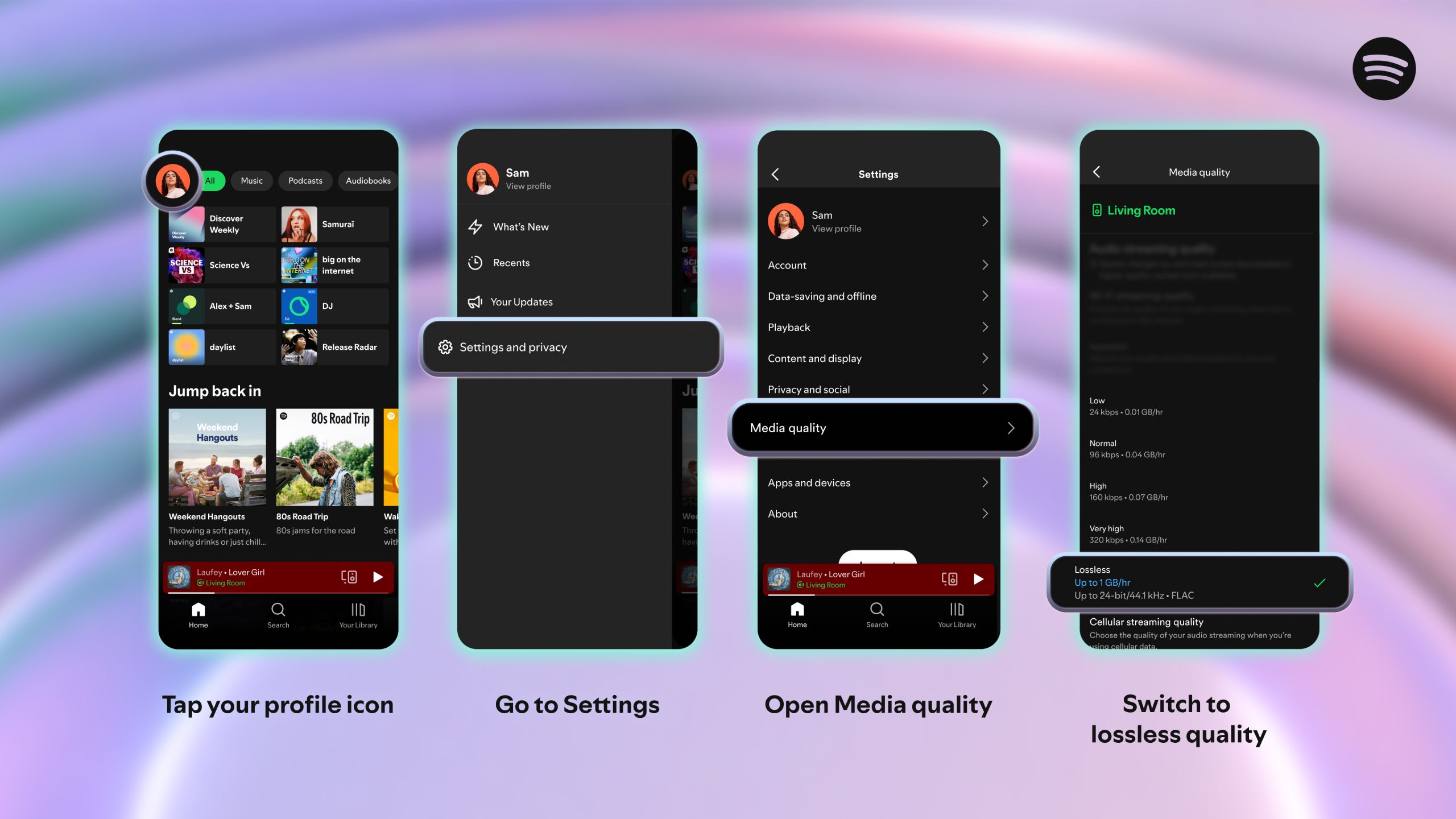
To turn on lossless audio in the Spotify app:

    1. Tap your profile icon in the top left.
    2. Go to Settings & Privacy → Media Quality.
    3. Select where you want to enable lossless audio: Wi-Fi, cellular, downloads.

And just to note: You’ll need to enable Lossless manually on each device. You’ll know Lossless is on because the Lossless indicator will appear in the Now Playing view or bar, and via the Connect Picker.

For the smoothest and best listening experience, we recommend streaming lossless music on Wi-Fi using wired headphones or speakers on a non-Bluetooth connection, like Spotify Connect. Currently, Bluetooth doesn’t provide enough bandwidth to transmit lossless audio, so the signal has to be compressed before being sent.

Lossless gives listeners every detail of the music, which means the audio files can be larger. As users enable lossless on their devices, it may take a moment for the track to play. But once it’s cached and loaded, you are ready to listen.

When can I start listening?

Lossless is rolling out gradually to more than 50 markets through October. Premium subscribers in Australia, Austria, Czechia, Denmark, Germany, Japan, New Zealand, the Netherlands, Portugal, Sweden, the US, and the UK have already started to get access.

*Update as of October 6, 2025: Lossless is now available to Premium users in more than 50 markets.

Upcoming Changes to Spotify Premium Subscriptions

Spotify logo over a blue, yellow, and grey abstract background

At Spotify, we’re committed to delivering a world-class, personalized experience for every user. To continue to innovate on our product offerings and features and bring users the best experience, we occasionally update our prices. 

Over the next month, Premium subscribers in multiple markets across South Asia, the Middle East, Africa, Europe, Latin America, and the Asia-Pacific region will receive an email explaining what this update means for their subscriptions (see example image below). New subscribers can find the latest pricing by visiting spotify.com/premium.Email from Spotify Premium explaining the change in subscription price.

We offer a range of subscription plans to choose from. Visit spotify.com/premium to see your locally available plans.

Discover Weekly Turns 10: Celebrating 100 Billion+ Tracks Streamed and a Decade of Personalized Discovery

There’s nothing quite like the magic of finding music that feels made just for you. Creating that sense of excitement, curiosity, and instant urge to share is what makes Spotify more than just an app. Ten years ago, it inspired us to launch Discover Weekly, a playlist that updates every Monday to spark those unforgettable “first listens.” 

With more than 100 billion tracks streamed, Discover Weekly is the playlist that makes Mondays something to look forward to, connecting listeners with their next favorite artists or songs. Every week, the playlist ignites more than 56 million new artist discoveries, with 77% coming from emerging artists.


Over the years, Discover Weekly has become a Monday ritual for millions of listeners—a discovery journey into songs and artists handpicked just for them. As Spotify’s first personalized playlist, it ushered in a wave of innovations, like
Release Radar, Blend, daylist, DJ, and AI Playlist, each building on the idea that music discovery should feel effortless and personal. Through it all, Discover Weekly has remained a trusted source for helping listeners find their next favorite songs.

Here’s a closer look at the impact Discover Weekly has made over the years:

More control, more discovery, and a fresh new look

To mark this milestone, we’re upgrading Discover Weekly with a refreshed look. The playlist’s vibrant new design reflects its ever-evolving nature and the dynamic energy of weekly discovery, bringing users something new every Monday.

But this isn’t just a visual refresh—we’re also making Discover Weekly even more personal. Starting today and rolling out on mobile over the coming weeks, new controls at the top of your playlist let you guide the vibe with a simple tap. Choose from up to five genre options, personalized based on your listening history, and you’ll get a fresh 30-track playlist inspired by your selection.

Whether you’re in the mood for something familiar or want to switch things up, your playlist will instantly adapt to match your mood, helping you discover new favorites and deep cuts from artists you already love. These controls are currently rolling out to Spotify Premium users, with plans to bring them to more listeners soon. 

Here’s to a decade of discovery! Head to the Made For You hub and hit play on your Discover Weekly to see what you find.

All the Ways It’s Even Easier To Discover Your Next Favorite Podcast on Spotify

Spotify is all about bringing you closer to the voices and stories you love. That means that finding your next favorite podcast should feel as effortless and personal as getting a top recommendation from a friend. And it’s why we’re also helping creators share their unique shows with people around the world.

Building on that vision, we’ve started rolling out new mobile features that make it even easier to find, follow, and fall in love with the latest podcasts, audio, and video. This is a win for creators, too, as it gives them new ways to reach even more audiences around the globe.

Unlock your next podcast find on Home 

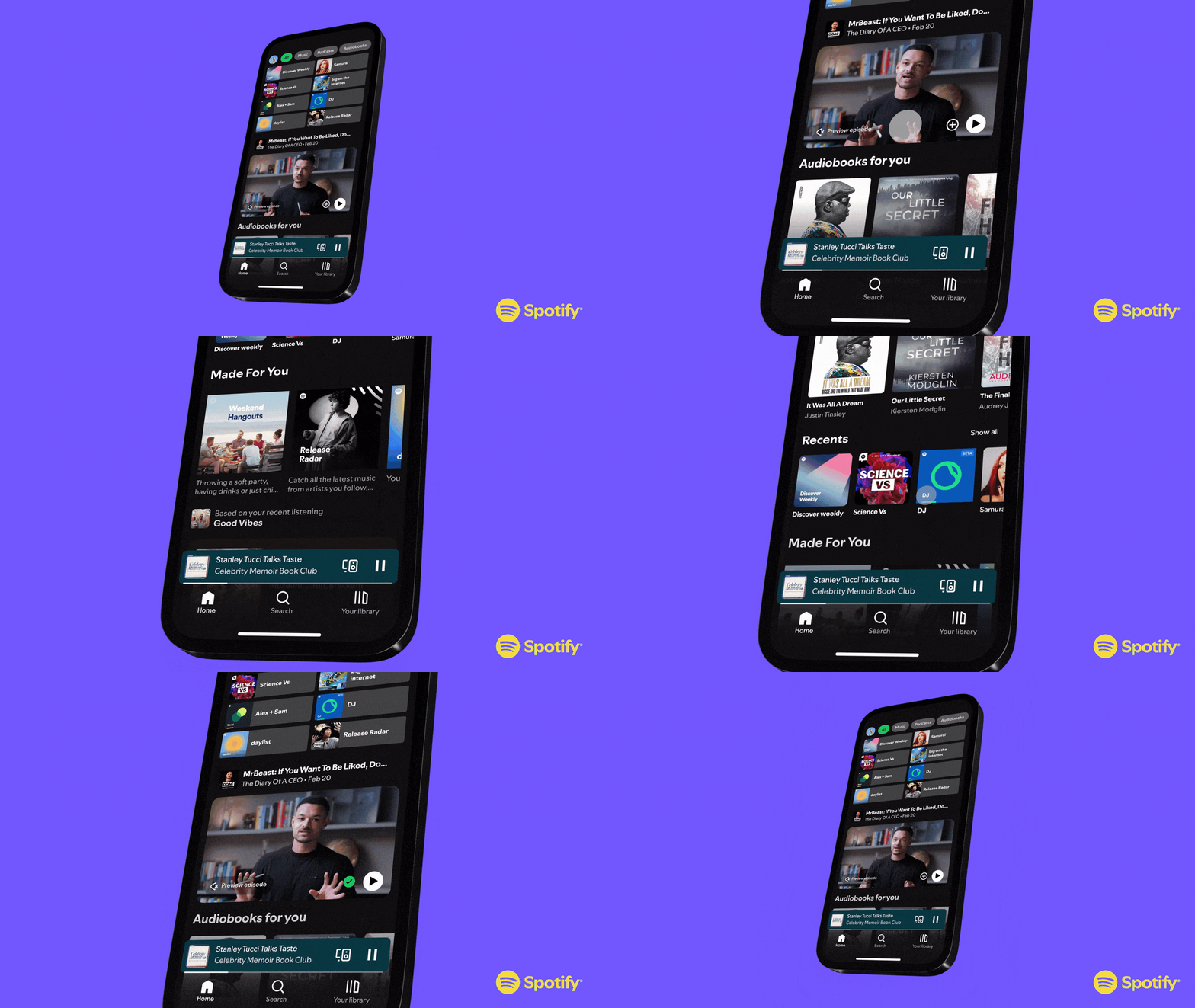
One of our top-requested features from podcast listeners is the ability to find new podcasts they’ll love. That’s why we’re bringing discovery front and center on Home for users who love podcasts. Just below your shortcuts, you’ll start seeing recommendations for podcasts and video podcasts ready to be played or saved, making exploring new shows and episodes easier and more immersive. And for some recommendations, we might even add a quick note on why we think it’s a good fit for you, to help make bold picks feel more accessible.

It’s all designed to help you strike the perfect balance between what you already love and what you’ll love next while giving creators more chances to connect with listeners like you. We’ve already begun rolling out these updates globally, and early feedback shows that more users are engaging, saving, and liking, telling us that they’re discovering new podcasts they enjoy.

Stay on top of the shows you love

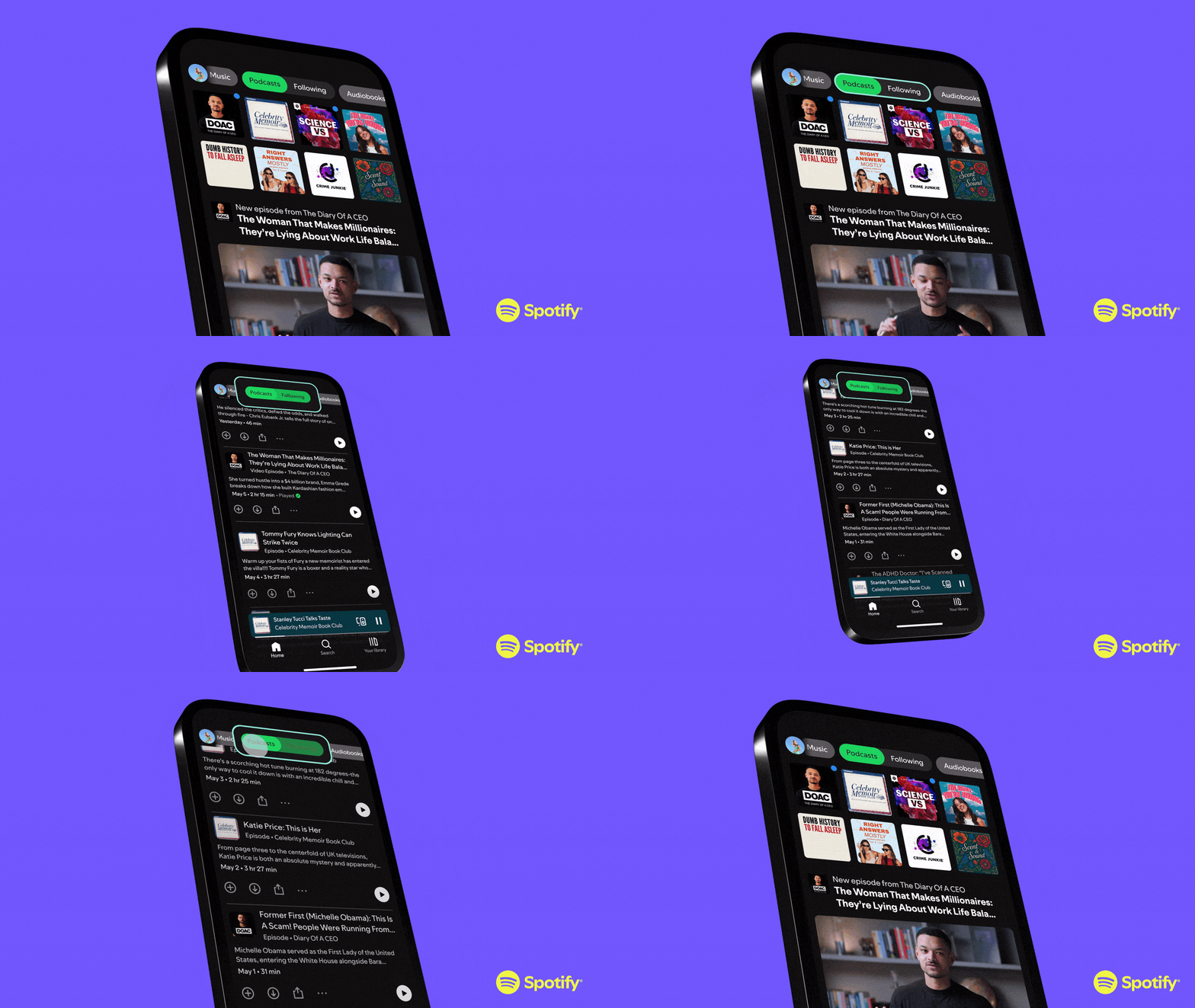
Ever find yourself searching different parts of Spotify to find the latest episodes from the podcasts you follow? We know this has proved to be challenging. So we’ve made it simpler: We’re bringing all of your favorite podcast episodes from the shows you follow into one place within the Podcasts Following feed. With this new update, you can effortlessly stay plugged in and up-to-date with the creators you love most. 

This feature gives you a dedicated place to catch all the latest releases from the podcasts you follow—all in one easy-to-access feed within your main Podcast feed on Home. We’ll continue to explore new ways to make this space even better. So whether you’re tuning in for entertainment, inspiration, or discovery, there’s always something fresh and relevant waiting for you.

More ways to dive deeper and engage

Spotify is the platform with your favorite music, podcasts, and (where available) audiobooks all in one place. Have you ever watched a podcast and wanted to save that song they just mentioned or that book the host recommended? Or maybe you were listening to your favorite author talk about the music or books that inspired them, and wanted to save those for later. Now we’re making it easier to explore across formats, too.

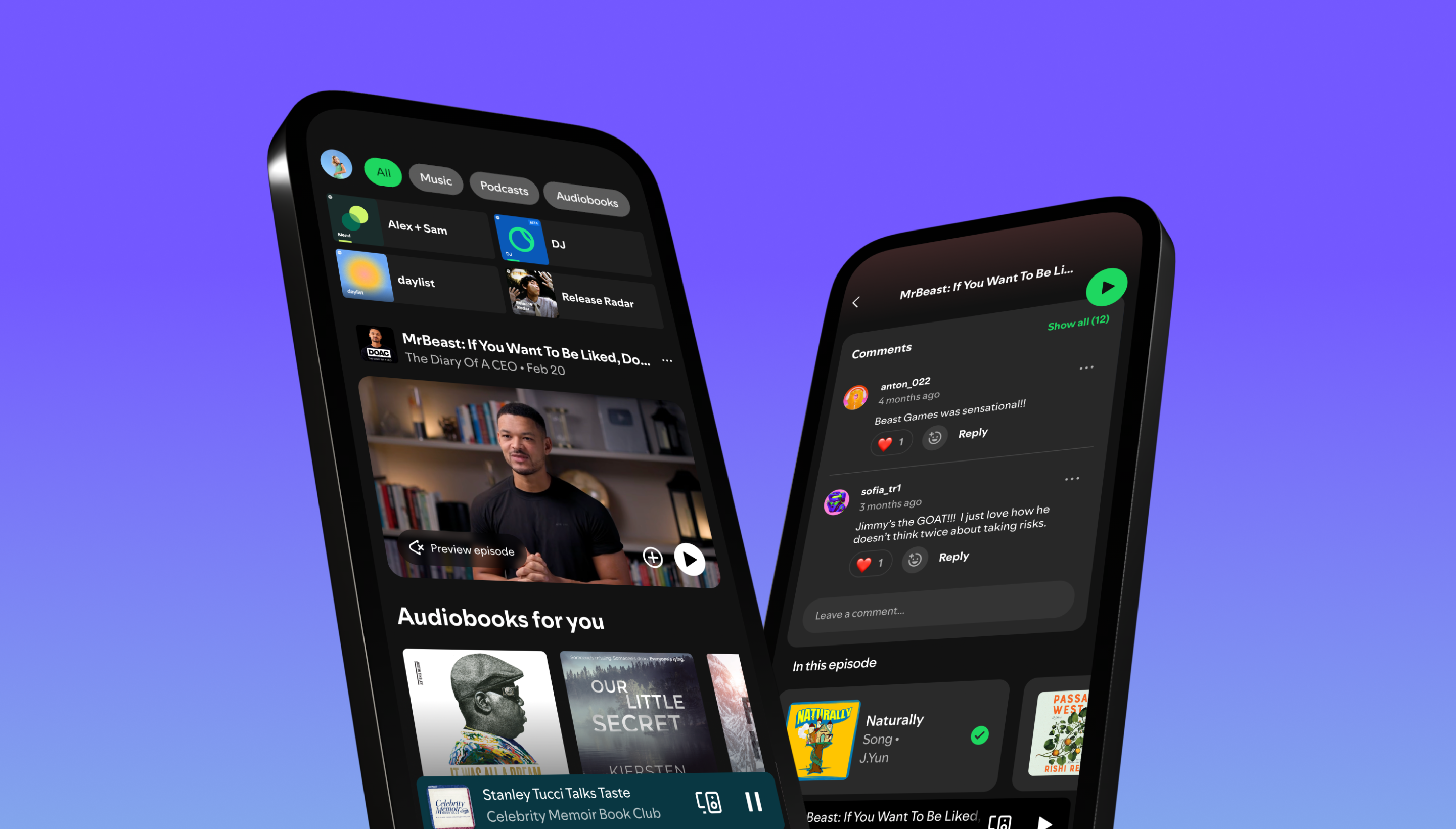
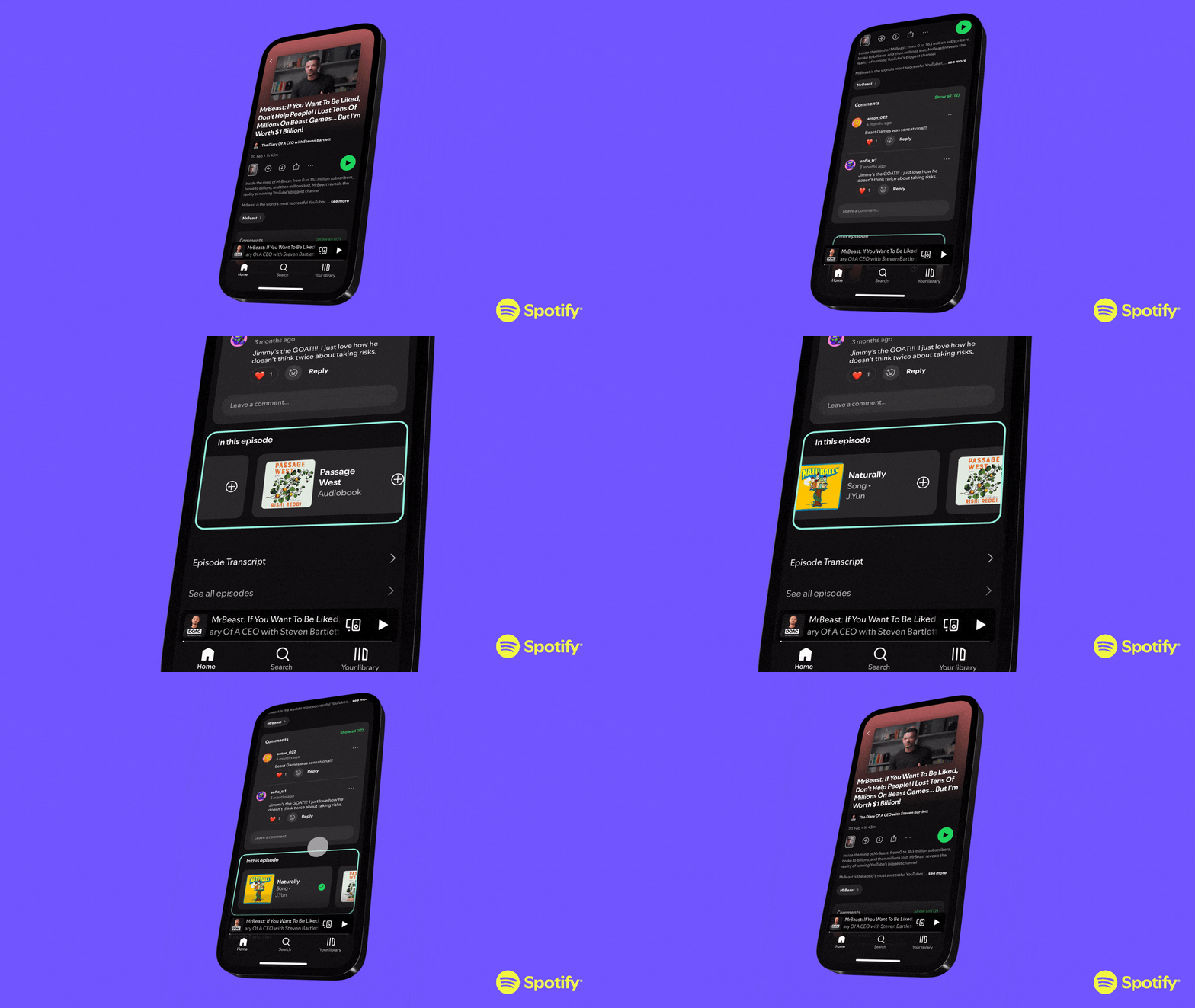
Rolling out globally in the coming weeks, the new “In this episode” section lets creators link directly to other content they mention in their podcasts that’s also on Spotify—from other podcasts and songs to audiobooks, playlists, and more—all in one place on the episode page. It’s perfect for fans who want to dive deeper and for creators working across formats. 

But wait, there’s more. We’re enhancing our comments experience with threads based on your feedback. Creators can now deepen conversations with users with threaded replies and easily express themselves with emoji reactions. They’ll continue to be able to control the experience through their Spotify for Creators account, where they can select their preferred settings on which comments appear or opt out of their shows or specific episodes from the experience.

Every update is designed to bring fans and creators closer together through discovery, conversation, music, podcasts, and audiobooks that resonate. We’re excited to keep building features that help you find, follow, and fall in love with the shows, while giving creators more ways to grow and connect with their communities. 

Spotify Rolls Out 11 New Languages to Users Around the World

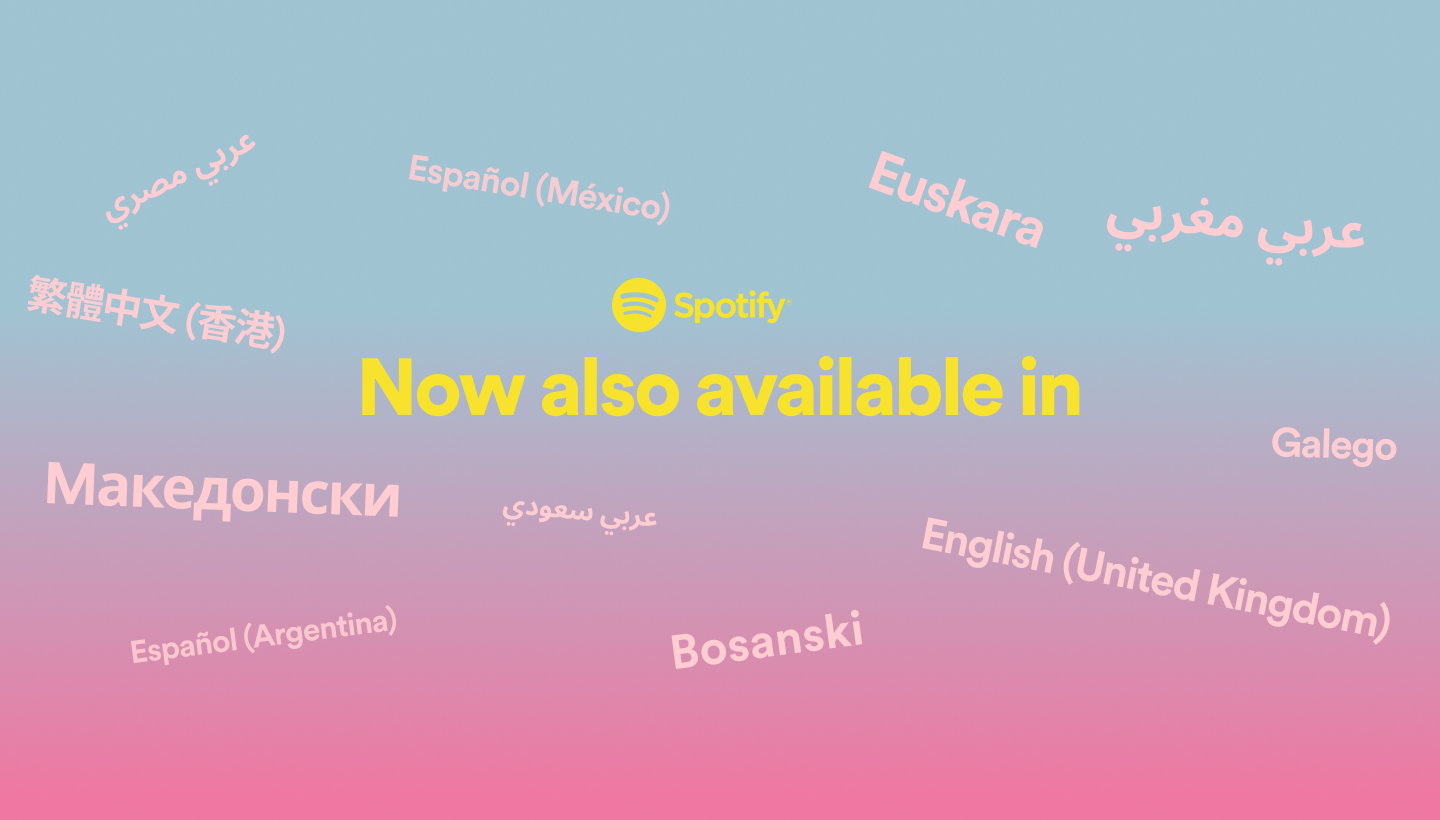
At Spotify, we’re committed to bringing the best in audio to our users around the world. That means ensuring our experience is accessible in the languages our users speak, no matter where they are. Beginning today, Spotify will be supporting 11 new languages and dialects across mobile, bringing the total number of languages on Spotify to 74. 

So, in addition to the 27 languages we originally launched with and the 36 languages we rolled out in 2021, Spotify’s mobile app will now also support: 

  • Spanish – Argentina
  • Spanish – Mexico
  • Traditional Chinese – Hong Kong
  • Arabic – Egypt
  • Arabic – Saudi Arabia
  • Basque
  • Bosnian
  • English – U.K.
  • Galician
  • Macedonian
  • Arabic – Morocco

This expansion will unlock an even more personal experience for our users, giving them the ability to access Spotify in their native or local tongue. And the more people who can use Spotify, the more connections we can foster between creators and their audiences.

For guidance on how to change your Spotify language settings, head to: https://support.spotify.com/us/article/change-language/

Here’s a full list of available languages:

  • Afrikaans
  • Amharic
  • Arabic (Egypt)
  • Arabic (Modern Standard)
  • Arabic (Morocco)
  • Arabic (Saudi Arabia)
  • Azerbaijani
  • Basque
  • Bengali
  • Bhojpuri
  • Bosnian
  • Bulgarian
  • Catalan
  • Chinese (Simplified)
  • Chinese (Traditional)
  • Chinese (Traditional) Hong Kong
  • Croatian
  • Czech
  • Danish
  • Dutch
  • English
  • English (United Kingdom)
  • Estonian
  • Filipino
  • Finnish
  • French (Canada)
  • French (France)
  • Galician
  • German
  • Greek
  • Gujarati
  • Hebrew
  • Hindi
  • Hungarian
  • Icelandic
  • Indonesian
  • Italian
  • Japanese
  • Kannada
  • Korean
  • Latvian
  • Lithuanian
  • Macedonian
  • Malay
  • Malayalam
  • Marathi
  • Nepali
  • Norwegian
  • Odia
  • Persian
  • Polish
  • Portuguese (Brazil)
  • Portuguese (Portugal)
  • Punjabi (East)
  • Punjabi (West)
  • Romanian
  • Russian
  • Serbian
  • Slovak
  • Slovenian
  • Spanish (Argentina)
  • Spanish (Latin America)
  • Spanish (Mexico)
  • Spanish (Spain)
  • Swahili
  • Swedish
  • Tamil
  • Telugu
  • Thai
  • Turkish
  • Ukrainian
  • Urdu
  • Vietnamese
  • Zulu

Spotify Policy Update

Spotify recently shared a new policy around hate content and conduct. And while we believe our intentions were good, the language was too vague, we created confusion and concern, and didn’t spend enough time getting input from our own team and key partners before sharing new guidelines.

It’s important to note that our policy had two parts. The first was related to promotional decisions in the rare cases of the most extreme artist controversies. As some have pointed out, this language was vague and left too many elements open to interpretation. We created concern that an allegation might affect artists’ chances of landing on a Spotify playlist and negatively impact their future. Some artists even worried that mistakes made in their youth would be used against them.

That’s not what Spotify is about. We don’t aim to play judge and jury. We aim to connect artists and fans – and Spotify playlists are a big part of how we do that. Our playlist editors are deeply rooted in their respective cultures, and their decisions focus on what music will positively resonate with their listeners. That can vary greatly from culture to culture, and playlist to playlist. Across all genres, our role is not to regulate artists. Therefore, we are moving away from implementing a policy around artist conduct.

The second part of our policy addressed hate content. Spotify does not permit content whose principal purpose is to incite hatred or violence against people because of their race, religion, disability, gender identity, or sexual orientation. As we’ve done before, we will remove content that violates that standard. We’re not talking about offensive, explicit, or vulgar content – we’re talking about hate speech.

We will continue to seek ways to impact the greater good and further the industry we all care so much about. We believe Spotify has an opportunity to help push the broader music community forward through conversation, collaboration and action. We’re committed to working across the artist and advocacy communities to help achieve that.

Share The Song or Podcast You’re Listening To on Instagram

Say goodbye to tedious screenshot uploads and say hello to a fast and elegant new way to share what you’re listening to — and allow friends to listen too. Thanks to Spotify’s new integration with Instagram and Facebook, it’s now easier to share what you’re listening to at any point in the day.

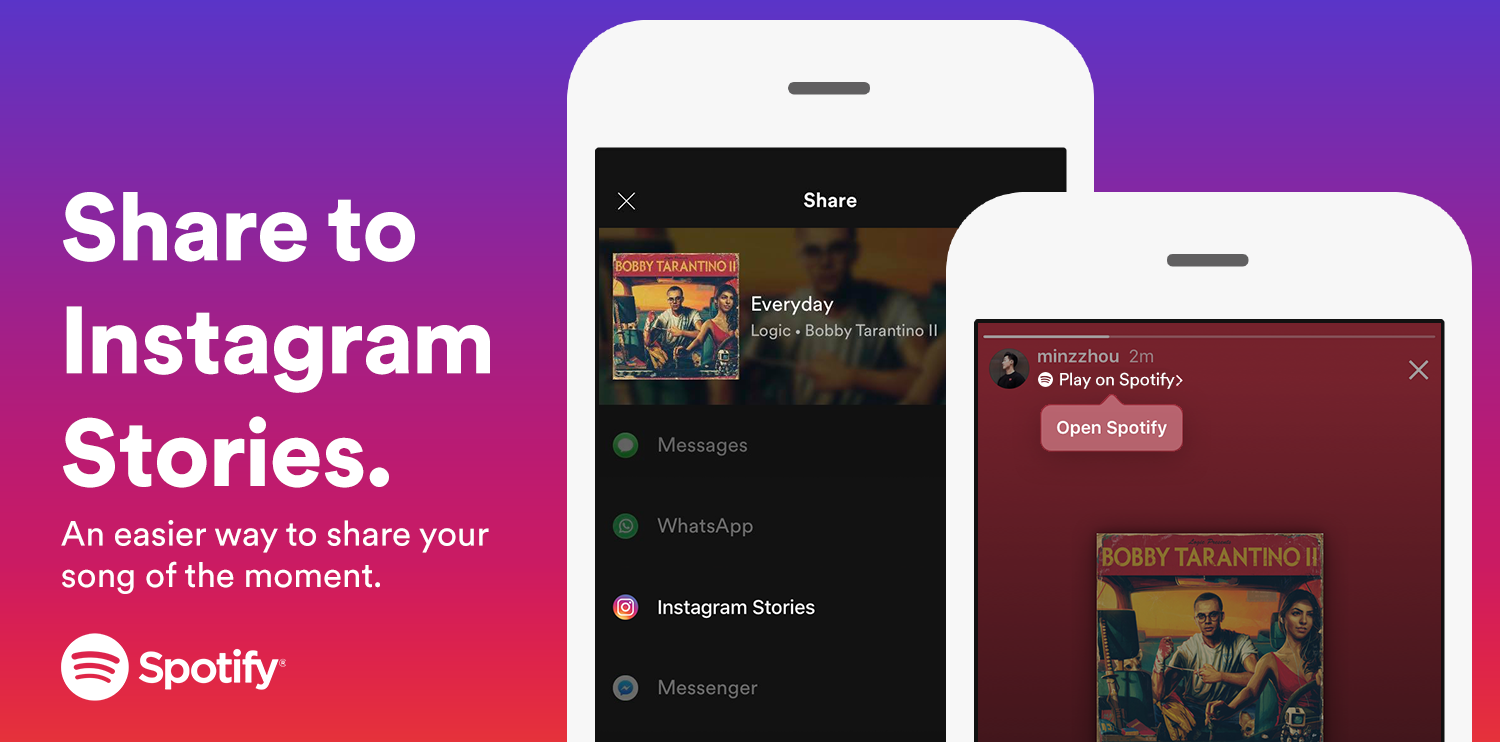
Through Spotify’s new share to Instagram Stories feature, you can now easily post whatever you’re listening to on Spotify to your Instagram Story or to friends via Instagram Direct. When listening to a song or podcast on Spotify, simply tap Instagram Stories from the “share” menu, and the app will unlock custom cover art stickers for every song, album, playlist, podcast, or artist on Spotify. Use Instagram’s editing tools to beautify your pic with fun stickers and captions, before sharing with friends. It’s easy to use—and you don’t even have to connect your accounts between apps.

When your friends check out your Story, they’ll be able to tap a “Play on Spotify” button in the top left corner to listen to the music in the Spotify app or sign-up right away. It adds a whole new level to music and podcast discovery since friends will be able to get a glimpse of what you’ve been listening to—and you can do the same with them.

Look out for the Instagram Stories option in the “share” menu on the Spotify mobile app, now available globally on iOS and Android, and start listening, sharing and connecting.