

Tag: dj

Your Personalized DJ Experience Is Expanding With 4 New Languages and More Markets

A hand holding a phone displaying the AI DJ UI screen on a gradient background

Since launching in 2023, DJ (beta) has helped shape a more personalized listening experience for 94 million Spotify Premium users. Today, we’re bringing this popular feature to new markets and introducing four new language options: French, German, Italian, and Brazilian Portuguese.

For those who haven’t met DJ yet, it offers a personalized mix of music and commentary to help you discover new favorites and connect more deeply with the artists you love. Based on your listening history, it lines up songs you’ll enjoy—bringing together your favorite tracks, songs you haven’t heard in years, and new releases to keep things feeling fresh.

When you have a specific vibe in mind or just want to switch things up, DJ requests take it a step further. You can ask DJ to update your personalized listening session based on what you want to hear in the moment, whether you’re setting the mood for date night or looking for high-energy tracks for a party. 

We’re now rolling DJ out to Premium users in Austria, Brazil, France, Germany, Italy, Portugal, South Korea, Switzerland, and more, growing its presence to over 75 markets worldwide.

Meet your new DJs

To keep the experience authentic across languages and cultures, we worked with our local teams around the world to create unique, expressive voices for each language. These four new DJ personas each bring their own distinct personality:

Maïa (French)

Effortlessly cool and treats every listener like a friend who already has great taste.

Ben (German)

The kind of voice that makes listening feel intentional: warm and present, without trying too hard.

Alex (Italian)

Warm and grounded: the voice that bridges the gap between knowing music and truly feeling it.

Dani (Brazilian Portuguese)

Always one song ahead of the moment: eclectic and genuinely excited to share what’s next.

How to find and customize your DJ experience

DJ is available on your Spotify home page—just tap to start a personalized session, or search “DJ” to jump in. From there, you can let DJ guide you or make a request via voice or text by tapping the DJ button. To switch between languages, simply tap the three-dot menu (…) within the DJ card and select your preferred language.

This feature is still in beta, and we’ll keep evolving it over time. Make sure your app is up to date to access the latest.

Deine persönliche Spotify DJ Experience ist jetzt in vier neuen Sprachen und weiteren Märkten verfügbar

A hand holding a phone displaying the AI DJ UI screen on a gradient background

Seit dem Start im Jahr 2023 hat DJ (Beta) das personalisierte Hörerlebnis von 94 Millionen Spotify Premium-Nutzer*innen bereichert. Ab sofort ist das beliebte Feature in weiteren Märkten verfügbar – ergänzt um vier neue Sprachen: Deutsch, Französisch, Italienisch und Brasilianisches Portugiesisch.

Das Feature bietet eine kuratierte Auswahl an Songs sowie Kommentare zu Künstler*innen und Tracks – alles auf deinen persönlichen Musikgeschmack zugeschnitten. Es hilft dir, neue Lieblinge zu entdecken und eine tiefere Verbindung zu den Künstler*innen aufzubauen, die du liebst. Auf Basis deines Hörverlaufs stellt DJ eine Mischung aus deinen Lieblingstracks, länger nicht gehörten Songs und neuen Releases zusammen. So bleibt deine Spotify Erfahrung immer abwechslungsreich.

DJ Requests geht noch einen Schritt weiter: Hast du eine bestimmte Stimmung im Kopf oder möchtest einfach etwas Neues ausprobieren, kannst du deinen DJ direkt bitten, deine Session anzupassen – ob für einen Abend zu zweit oder energiegeladene Tracks für die nächste Party.

DJ ist nun auch für Premium-Nutzer*innen in Brasilien, Deutschland, Frankreich, Israel, Italien, Österreich, Portugal, der Schweiz und Südkorea verfügbar. Insgesamt ist das Feature damit in über 75 Märkten vertreten. 

Triff deine neuen DJs

Um ein authentisches Erlebnis in jeder Sprache und Kultur zu schaffen, hat Spotify gemeinsam mit lokalen Teams einzigartige, ausdrucksstarke Stimmen entwickelt. Jede der vier neuen DJ-Personas bringt dabei ihre ganz eigene Persönlichkeit mit:

Ben (Deutsch) 

Eine Stimme, die dich im Moment ankommen lässt: warm, präsent und angenehm locker.

Maïa (Französisch) 

Mühelos cool – und behandelt jede*n Hörer*in wie ein*e Freund*in mit ohnehin gutem Musikgeschmack.

Alex (Italienisch) 

Warm und geerdet: eine Stimme, die Musikwissen und Hörerlebnis miteinander verbindet.

Dani (Brasilianisches Portugiesisch)

Dem Moment immer einen Song voraus: vielseitig in der Auswahl und aufrichtig begeistert, dir den nächsten Track vorzustellen.

So findest du deinen DJ und passt ihn an

DJ ist auf deiner Spotify Startseite verfügbar – tippe einfach darauf, um eine personalisierte Session zu starten, oder gib DJ“ in der Suchleiste ein. Von dort aus kannst du dich von DJ leiten lassen oder den DJ-Button antippen, um eine Anfrage per Sprache oder Text zu stellen. Um zwischen den Sprachen zu wechseln, tippe auf das Drei-Punkte-Menü (…) in der DJ-Karte und wähle deine bevorzugte Sprache aus.

Das Feature befindet sich weiterhin in der Beta-Phase – wir entwickeln es kontinuierlich weiter. Halte deine App aktuell, um immer die neueste Version zu nutzen.

3 New Ways to Dive Deeper Into the Music You Love

spotify logo

A song that captures a moment can feel like magic. But when you uncover the story behind it—who made it, what inspired it, and the meaning woven into the lyrics—it becomes something even deeper. That’s why we’ve been building new ways to help you go beyond the surface of your favorite tracks. Here are three new features designed to bring you closer to the music you love.

About the Song: The stories behind the music

Every track has a story, and About the Song brings that context right into your listening experience. This beta feature delivers short, swipeable story cards—summarized from third-party sources—that cover the inspiration behind a track, behind-the-scenes moments, and the cultural context around it. It’s available to Premium users in U.S., U.K., Canada, Ireland, Australia, New Zealand, Indonesia, Singapore, Nigeria, and South Africa.

How to find About the Song:

    • Open the Now Playing view while listening in the Spotify mobile app
    • Scroll down to find the About the Song card on supported tracks
    • Swipe through to explore

Ask DJ: Your personal music expert, now even smarter

DJ is one of our most popular features, built around personalized listening sessions and music requests. Now you can have a conversation with DJ as you listen, getting recommendations, music facts, or context about what’s playing, right from your Spotify homepage. The rollout begins in English for Premium users ages 18 and over in the U.S., Ireland, and Sweden.

Need inspiration? Try asking things like “Start a session with new releases for my Sunday” or “When was this song first released?”

This updated DJ experience is in beta and won’t always get it right, and responses may not always be accurate or complete. We’re continuing to improve the experience over time, and listener feedback will help shape what comes next.

SongDNA: Trace a song’s creative roots

Every track is connected to the songs, samples, and artists that came before it. SongDNA makes those connections visible in an interactive map inside your Now Playing view.

Powered by WhoSampled (now part of Spotify), SongDNA lets Premium listeners explore the creative network behind a track while helping ensure the people who contributed get recognized. Follow the thread from a sample to its source, discover a cover you didn’t know existed, or trace a producer’s fingerprint across decades of recordings.

These three features are part of our ongoing work to bring you closer to the music, podcasts, and audiobooks you love. We’ll keep building on each experience based on how listeners use the features, and continue exploring new ways to unlock discovery.

3 Easy Ways to Discover Music That Fits Your Moment on Spotify

Spotify Bug on a gradient background

Music discovery should feel intuitive and personal. That’s why we’re continuing to give you more control, so you can ask for what you want, shape what you hear, and get to the right music faster. This is part of how we’re making discovery feel more natural over time, whether you’re exploring something new or finding the perfect sound for a moment or mood.

Request your vibe, right from your Home screen

Since its launch three years ago, DJ has become one of Spotify’s most popular features. With the addition of requests in 2025, we gave DJ listeners a more intuitive way to switch up the vibe and decide what comes next.

Now, Premium users can instantly start a personalized session—or make a request by text or voice—using a new, dedicated DJ button on the Spotify Home screen, located just under Shortcuts. Whether you’re in the mood for “upbeat hits for a workout” or “tracks like my top songs from 2025,” DJ serves up a curated mix of music and commentary tailored to you.

DJ on Home is rolling out in English in the U.S., Canada, U.K., Australia, Sweden, and Ireland.

Design your own discovery with Prompted Playlist

When you know exactly what you want to listen to—a mood, a memory, a moment—building the perfect playlist from scratch can feel daunting. That’s where Prompted Playlist comes in.

Currently in beta, Prompted Playlist puts you in control by letting you describe what you want to hear using your own words, then turning that into a personalized playlist. What makes this feature special is the depth behind it: Spotify brings your idea to life by drawing from your entire listening history and what’s trending across music and culture right now.

Not sure where to start? Try out prompts like these to discover music you’ll love:

    • “Find one artist I haven’t listened to yet but would probably love, or an artist I’ve only heard one or two songs from, and introduce me to them. Build a playlist of songs that’ll give me an overview of their catalog so it feels like I’m getting to know them. Put the songs you think I’ll like the most in the top five spots.”
    • “Make me a playlist of songs I’ve saved to my Library (playlists or Liked Songs) that I either haven’t played yet or have only listened to once. The goal is to round up those songs I found, saved, and then totally forgot to revisit. Give me a chance to finally hear what I’ve been missing.”

Just tap “Create” and select Prompted Playlist to get started. You can tap “Ideas” for quick suggestions, refine your prompt anytime, set your playlist to refresh daily or weekly so it evolves with your world, or start fresh whenever inspiration hits.

Prompted Playlist is available in beta for Premium users in New Zealand, the U.S., and Canada.

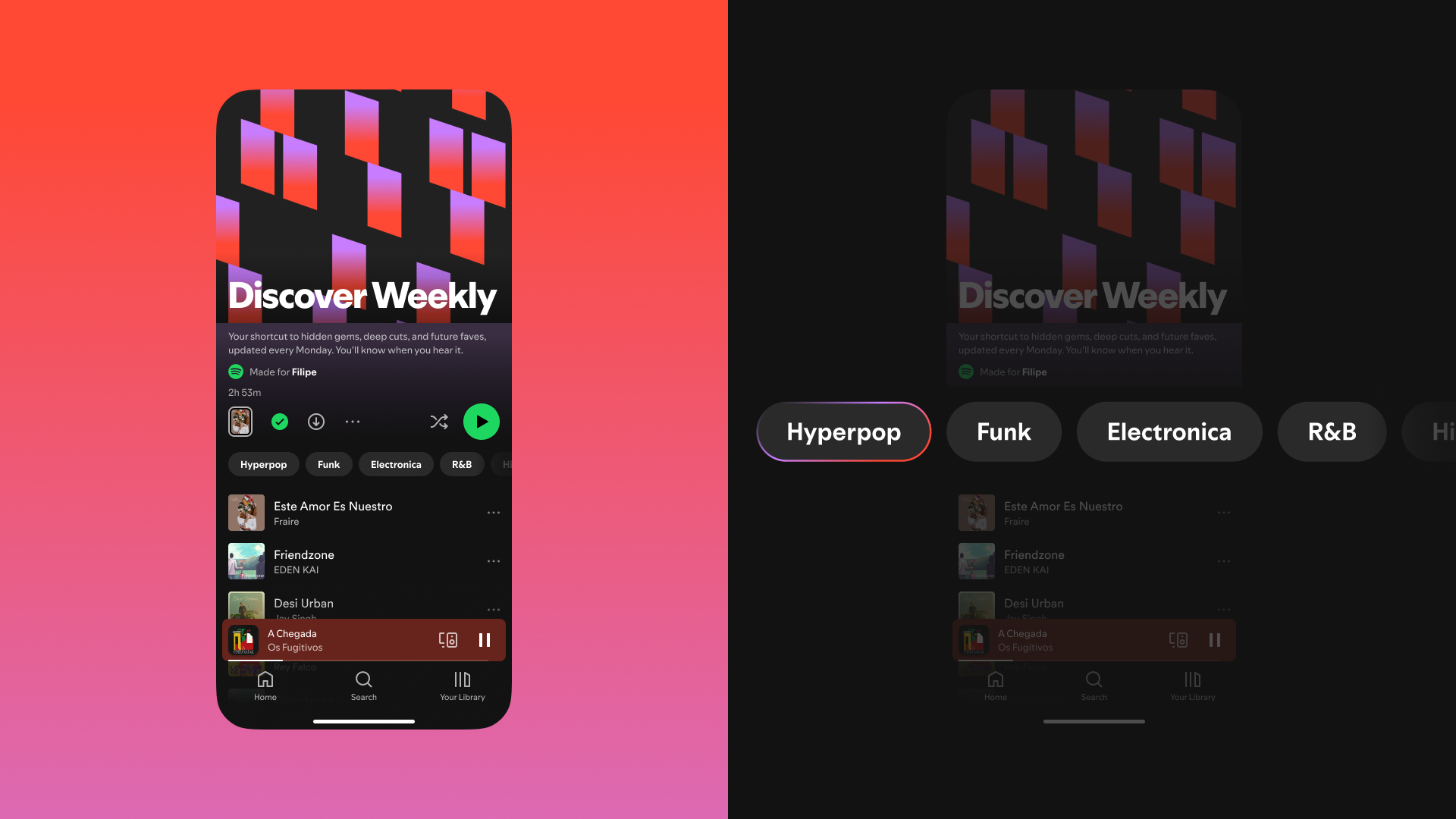
Fine-tune your Discover Weekly with genre controls

A Monday ritual for millions, Discover Weekly has been connecting listeners with their next favorite music for more than a decade. As Spotify’s original personalized playlist, it’s a trusted source for finding new favorites and deep cuts from artists you already love.

After a refresh last year, Discover Weekly became even more personalized. For Premium users, controls at the top of your playlist let you choose from up to five genres to shape a fresh 30-track playlist.

Together, these features make it easier to find the right music, right when you want it.

DJ evoluciona con solicitudes en español, peticiones por texto y recomendaciones personalizadas

Las personas recurren a DJ para vivir una experiencia de escucha personal, dinámica y con un toque de magia, ya sea para empezar el día, relajarse por la noche o simplemente buscar música que se adapte a su estado de ánimo. Gracias a las recomendaciones de nuestros editores expertos, potenciadas con IA, DJ te ayuda a descubrir nuevas canciones, redescubrir tus favoritas y conectar profundamente con la música que amas.

Desde que presentamos las solicitudes por voz en inglés a principios de este año, la escucha de DJ ha aumentado, demostrando cuánto disfrutan los fans interactuar y dar forma a sus sesiones. Ahora lanzamos nuevas funciones diseñadas para darte aún más control. A partir de hoy, los usuarios Premium pueden hacer solicitudes a DJ en español, enviar solicitudes por texto y recibir sugerencias personalizadas para crear el ambiente perfecto.

Solicitudes musicales en español

DJ Livi ahora acepta solicitudes musicales en español, ofreciendo a millones de oyentes hispanohablantes una nueva forma de crear el ambiente de sus sesiones en tiempo real. Ya sea que quieras clásicos de reggaetón de los 2000 o canciones tranqui para desconectarte, ahora puedes pedirle a DJ música que se adapte a cualquier estado de ánimo o momento, en español.

Solicitudes por texto

Lo pediste, lo traemos para ti. Ahora puedes hacer tus solicitudes musicales en español, usando tu voz o esribiéndolas (una de las funciones más solicitadas por los fans en redes sociales). Ya sea que estés en movimiento o en un lugar silencioso, DJ se adapta a tus necesidades y pone tu experiencia de escucha en tus manos.

¿Necesitas un poco de inspiración? DJ ahora ofrece tres sugerencias personalizadas para iniciar tu sesión, como reggaeton beats para una tarde con energía o surf rock refrescante para un descanso a medio día. Es una forma fácil de hacer que la música empiece a fluir, sin importar tu estado de ánimo.

Cómo pedirle música a DJ

Estas nuevas funciones se están lanzando en inglés y español para los usuarios Premium en más de 60 mercados alrededor del mundo. Así es como puedes hacer una solicitud:

    1. Busca “DJ” en Spotify.
    2. Presiona reproducir y DJ te ofrecerá una mezcla curada de música y comentarios personalizados.
    3. Para cambiar el ambiente, toca el botón de DJ en la esquina inferior derecha y haz tu solicitud por voz o texto.

Como recordatorio, DJ puede responder a combinaciones de género, estado de ánimo, artista o actividad. Por ejemplo, puedes intentar con “pon música folk acogedora para el otoño” o “ponme canciones tenebrosas para mi fiesta de Halloween.” Desde el lanzamiento de las solicitudes, los fans han pedido de todo: desde música para hacer ejercicio hasta canciones relajadas, siendo el country, el hip-hop y el rock algunos de los géneros más populares.

Estas últimas mejoras están pensadas para ofrecer a los oyentes más formas de interactuar con DJ y hacer que cada sesión sea verdaderamente suya.

DJ Levels Up With Spanish-Language Requests, Text Requests, and Personalized Prompts

People turn to DJ for a listening experience that feels personal, dynamic, and just a little bit magical, whether they’re getting ready for the day, winding down at night, or simply looking for music that fits their mood. Serving up suggestions with insights from our global editorial experts and leveled up using AI, DJ helps you uncover new tracks, rediscover old favorites, and connect deeply with the music you love.

Since introducing voice requests earlier this year, DJ listening has increased, showing just how much fans love interacting with and shaping their sessions. Now, we’re rolling out new features designed to give you even more control. Starting today, Premium users can ask DJ for music in Spanish, send text requests, and get personalized suggestions to help set the perfect vibe.

Music requests in Spanish

DJ Livi now accepts music requests, giving millions of Spanish-speaking listeners a new way to curate the vibe of their sessions in real time. Whether you want “clásicos de reggaetón de los 2000” or “canciones tranqui para desconectarte,” you can now ask DJ for music to match any mood or moment, en español.

Text requests

You asked, we delivered. In addition to using your voice, you can now type your music request in both English and Spanish, one of the most-requested Spotify features on social media from fans. Whether you’re commuting or in a quiet space, DJ adapts to your needs and puts your listening in your hands.

Need a little inspiration? DJ now offers three personalized prompt suggestions to kickstart your session, like “reggaeton beats for an energetic afternoon” or “refreshing surf rock for a midday break.” It’s an easy way to get the music flowing, no matter your mood.

How to request music with DJ

These new features are rolling out in English and Spanish for Premium users in more than 60 markets worldwide. Here’s how to make a request:

    1. Search “DJ” on Spotify. 
    2. Press play and DJ will serve up a curated mix of music and commentary tailored to you.
    3. To switch up the vibe, tap the DJ button in the bottom-right-hand corner and give DJ your request via voice or text. 

As a reminder, DJ can handle a combination of genre, mood, artist, or activity-related requests. For example, you could try “play some cozy folk music for fall” or “give me spooky tunes for my Halloween party.” Since DJ requests launched, fans have asked for everything from workout music to chill vibes, with country, hip-hop, and rock among the most popular genres.

These latest enhancements are all about giving listeners more ways to interact with DJ and make each session their own.

Spotify Premium Integrates With Leading DJ Software in 51 Markets

For DJs, there’s nothing quite like the thrill of mixing tracks and building the perfect set. Now, Spotify Premium users will be able to access their entire libraries and playlists directly within desktop DJ software from rekordbox, Serato, and djay. These integrations are available in 51 markets, making it faster and easier than ever before to experiment and blend your music to create the most unforgettable set.

With Premium, you can effortlessly mix songs from Spotify using supported DJ software, curating your sets to build momentum or create mood shifts between tracks. Just log in to access Spotify’s entire music catalog, including your own playlists and Spotify’s editorial selections. It’s a seamless way to take creative control and make every set uniquely yours.

How to access Spotify Premium within rekordbox, Serato, and djay

    1. Open your preferred DJ software (rekordbox, Serato, or djay) on desktop.
    2. Log in to your Spotify Premium account within the DJ software.
    3. Pull up your favorite playlist or tracks from Spotify to mix.
    4. Start mixing in real time using your DJ software’s built-in tools.

This integration follows the launch of our new feature that lets Premium users mix track-to-track transitions in their own playlists. Whether you’re curating the perfect party playlist or taking your first steps behind the decks, these enhancements are designed to empower music fans to explore their sound.

Spotify Premium is the ultimate destination for fans to enjoy the music they love. We’re always evolving the experience and introducing new features that elevate how you listen.

For the latest information on supported DJ software, availability, and device compatibility, visit our landing page.

*Update as of December 11, 2025: Premium users can now access Spotify’s music catalog for mixing in rekordbox on iOS/Android and djay on iOS/Android, in addition to desktop.

7 Ways Spotify’s New User Controls Put You in Charge of Your Listening

Your listening habits are as unique as you are—and this year, Spotify has introduced a wave of new features to help you personalize your experience. From playlist sorting and recommendation fine-tuning to voice-powered DJ sessions and new ways to switch up your Discover Weekly, it’s never been easier to play exactly what you’re in the mood for.

Here are seven new controls to try right now:

Explore Your Library with Smart Filters

Smart Filters in Your Library let you instantly sort your saved content by activity, mood, or genre. Here’s how it works:

    • Tap the filter icon in the top left of Your Library.
    • The Smart Filters menu will appear with options tailored to your saved content, organized by activity, mood, or genre.
    • Select a filter, and Your Library will update to match your choice.

Whether you’re queuing up a playlist for a run, searching for a podcast to unwind to, or picking an audiobook for your road trip, Smart Filters make exploring Your Library effortless.

Smart Filters are rolling out now and will be available for Premium users in the coming weeks on mobile and tablet devices in Australia, Canada, Ireland, New Zealand, South Africa, the UK, and the US.

Hide songs you don’t want to hear

Not feeling the vibe of a certain track? Tap the three dots at the top of the Now Playing view and select “Hide in this playlist” to skip it next time.

Snooze tracks for 30 days

Need a break from a song you usually love? The new Snooze feature, available for Premium users, lets you pause tracks from appearing in your recommendations for 30 days.

Refresh your Discover Weekly with genres

Discover Weekly is now more customizable than ever. Tap personalized genre buttons like pop, funk, or R&B at the top of the playlist to get a fresh 30-track mix based on your listening history. Whether you want to switch it up or stick with what you love, your playlist will instantly adapt to help you discover new favorites.

Take control of your queue

Premium users can enjoy a redesigned queue with upgraded controls that make it easier to shuffle, Smart Shuffle, repeat, or add a Sleep Timer. Once your queue ends, you’ll see Spotify recommendations you can keep or skip. Want full control? You can switch off Autoplay and Smart Shuffle in your settings.

Customize your playlist experience

For those looking to make playlists their own, we’ve upgraded the tools so you can easily Add, Sort, and Edit tracks to build your perfect sequence. It’s also easier to change your playlist title and create custom cover art to match the vibe. In select markets, you can generate new playlists from your Liked Songs by filtering them by genre or mood.

Talk to your DJ

Premium users can now ask DJ for a request by using their voices. Just tap and hold the DJ button and ask for any mood, genre, or vibe you want to hear. DJ will update your session, helping you uncover new tracks and reconnect with old favorites.

Wherever you listen, these new controls put you in charge of your experience. Head to Spotify now to customize your next listening session.

Spotify’s DJ Now Takes Requests, Enhancing Real-Time Music Discovery

People all over the world love DJ. At the gym, at home, whenever and wherever you want a deeper experience with great music, DJ is the answer. In fact, DJ listener engagement has nearly doubled over the past year—it’s like having a personal musical friend who just gets you.

We also know that listeners have asked for more ways to interact with DJ and enjoy more control over their listening sessions. That’s why we’re excited to share that DJ is now taking music requests, giving Premium users in more than 60 markets an entirely new way to curate the vibe of their listening sessions in real time. Serving up suggestions using AI and insights from our global editorial experts, DJ helps you uncover new tracks, rediscover old favorites, and connect deeply with the music you love.

By simply using your voice, you can now ask DJ to update your personalized listening session based on the music you want to hear at that moment, whether you’re looking for something to set the mood for date night or need some high-energy tracks to get you hyped for a party.

DJ can handle a combination of genre, mood, artist, or activity-related requests. For example, you could try, “Surprise me with some indie tracks I’ve never heard before,” or “Give me some electronic beats for a midday run.” You could even request something like, “Play me some cry-in-the-car songs.”

Listeners have come to know and love the personality and voice of our AI English-speaking DJ, modeled after Spotify’s Xavier “X” Jernigan. Now you can actually talk to DJ X and ask for music to match any mood or moment. It’s a two-way street, taking personalization to a whole new level.

Start requesting music with DJ

DJ requests will be available in English for Premium listeners in more than 60 markets where DJ is currently available. Here’s how to make a request:

    • Head to the search tab on Spotify and search “DJ.”
    • Press play and DJ will serve up a curated mix of music and commentary tailored to you.
    • Whenever you want to change up the vibe, press and hold the DJ button in the right-hand corner. You’ll hear a beep when DJ is ready.
    • Use your voice to ask for the kind of music you want to hear at that moment. 
    • Just like that, DJ will update your session based on your request, listening history, music preferences, and more.
    • Want to mix things up? Hold the DJ button to switch up the vibe or make a new request.
    • If you want to change the vibe but don’t have a specific request, you can skip to the next section with a quick tap of the DJ button.

We should note that while requests with DJ are designed to be fun, the feature is still in beta and won’t produce results for non-music-related requests, like audiobooks or podcasts. 

We’re excited to give our listeners even more control and to continue evolving the DJ experience. So get creative, make some requests, and let DJ take you on a personalized musical journey.

*Update as of September 23, 2025: DJ now takes requests on Android Auto. Premium users can interact with DJ by simply tapping the “Talk to DJ” button on their car’s Android Auto screen. Whether you’re commuting to work or on a weekend getaway, effortlessly steer your DJ session on the road with voice requests like, “Play some new indie tracks.” This new integration lets drivers seamlessly change the vibe wherever the road takes them.

In order to access the “Talk to DJ” button in your car, make sure you’ve first given DJ microphone access on your phone.

Make This Year’s Spotify Wrapped Even More About You With These AI Experiences

2024 Wrapped is here, and Spotify is celebrating the passionate fans and artists who made this year one to remember. 

This year, we’re taking your personalized Wrapped experience to the next level and bringing fans closer to the artists they love by enhancing two of our popular AI features, AI DJ and AI Playlist, and adding a new one: Your Spotify Wrapped AI podcast.

Through the combination of Spotify’s powerful personalization technology and generative AI, we’ve created hyper-personalized Wrapped experiences that connect millions of listeners worldwide with the music and audio they love. 

Your Spotify Wrapped AI podcast 

This year, for the first time ever, Spotify is unveiling an AI podcast about your 2024 Spotify Wrapped music listening, built with Google’s NotebookLM. With this personalized Audio Overview, you can dive deeper into your top songs, artists, and genres—all delivered by two dynamic AI podcast hosts. 

Your Spotify Wrapped AI podcast will be available in English for eligible Free and Premium users for a limited time across the U.S., U.K., Australia, New Zealand, Canada, Ireland, and Sweden.

For more on how to listen to Your Spotify Wrapped AI podcast, check out our For the Record post here.

DJ: Wrapped

As a fan-favorite feature for premium subscribers, DJ: Wrapped brings even more context into the Wrapped experience, providing commentary about your year alongside the music that soundtracked it. 

Also available in Spanish this year, DJ will tell you about your year in music listening, bring in expertise from our editors about the top tracks and artists of 2024, and tell you about your relationship with the DJ this year. 

Wrapped AI Playlist

With the new AI Playlist feature, Premium users in select markets can turn their ideas into a personalized playlist. This year, AI Playlist will be a part of the Wrapped experience, so users can go beyond their Wrapped results by entering prompts like “my top 5 genres” or “artists similar to my top 5” to create a personalized playlist. 

These features are an example of how we’re enhancing the shared cultural experience of Wrapped, reflecting how artists and creators have shaped our lives one note, one voice, one idea at a time.

Explore your personalized 2024 Wrapped and learn more about this year’s campaign and experience on our 2024 Wrapped hub.

Spotify presenta AI DJ en español para los fans de la música en todo el mundo

Cuando lanzamos AI DJ en inglés el año pasado, ofrecimos a los usuarios una nueva forma de conectar y descubrir música en Spotify. DJ es una guía de IA personalizada que te conoce a ti y a tus gustos musicales tan bien que puede elegir qué reproducir para ti. Combina una selección curada de canciones con una voz impulsada por IA y complementa la experiencia con datos e información relevantes sobre las canciones y artistas que te recomienda. Todo esto se crea a través de la poderosa mezcla entre la tecnología de personalización de Spotify, la IA generativa en manos de nuestros editores expertos en música y una voz de IA real y cercana.

Y ahora es momento de llevar nuestro AI DJ, en versión beta, a los usuarios de Spotify Premium de habla hispana en todo el mundo.

Desde el debut de AI DJ, hemos aprendido la importancia de darle contexto a nuestros usuarios sobre lo que están escuchando. Cuando los oyentes reciben comentarios junto con sus recomendaciones musicales personalizadas, es más probable que escuchen una canción que de otro modo se habrían saltado. A los usuarios Premium les encanta DJ. El oyente medio de DJ pasa más tiempo escuchando DJ que los oyentes de cualquier otro set recomendado. 

Ya sea que aprendas algo nuevo sobre tu artista favorito o recuerdes un buen momento mientras escuchas una canción nostálgica, AI DJ agrega momentos divertidos a tu experiencia auditiva que te harán volver por más. Los usuarios Premium que escuchan DJ, escuchan más Spotify. Observamos un aumento de las escuchas la semana siguiente a la primera vez que un usuario escucha DJ en comparación con la semana anterior.

Quizás conozcas a Xavier Jernigan (sus amigos lo llaman “X”) como el primer modelo de voz de DJ con IA, en inglés.

X es el Head of Cultural Partnerships de Spotify y ha sido host de numerosos podcasts en Spotify durante los últimos años. Su personalidad y voz resonaron entre nuestros oyentes, por lo que fue la opción elegida. X no irá a ninguna parte, pero los usuarios que conocen y aman la voz en inglés ahora tienen la opción de elegir escuchar DJ en español.

El impacto del español dentro de la cultura musical es innegable: desde la popularidad de los artistas latinos en nuestra plataforma hasta el poder de la música para romper las barreras del idioma. Tenemos millones de oyentes de habla hispana en Spotify, muchos de los cuales han utilizado las redes sociales para preguntar sobre AI DJ. De hecho, en los últimos meses, hemos visto un aumento de más del 215 % en las conversaciones en social media sobre AI DJ en español. Lanzar AI DJ en español fue el siguiente paso natural en la evolución del producto y estamos emocionados de que el mundo conozca a Livi, la voz de AI DJ en español.

Presentamos a DJ Livi

Para crear el modelo de voz para AI DJ en español, colaboramos con nuestra propia editora senior, Olivia “Livi” Quiroz Roa, quien está basada en la Ciudad de México y ha dedicado toda su carrera a esta industria.

En su día a día, Livi se encarga de la curaduría de playlists populares en la plataforma y ha desempeñado un papel fundamental en el lanzamiento de nuestro programa EQUAL en México.

Después de un extenso casting internacional, la voz de Livi fue la que más resonó entre los usuarios. Los usuarios que evaluaron realmente sintieron que era una voz cercana y era como escuchar recomendaciones de música de una amiga.

Cómo empezar a utilizar AI DJ en español

La voz en español estará disponible para los oyentes Premium en los países donde AI DJ está disponible actualmente. Además, la función ahora se está expandiendo a usuarios Premium en España y en países seleccionados de Latinoamérica, incluidos Argentina, Bolivia, Chile, Colombia, Costa Rica, República Dominicana, Ecuador, El Salvador, Guatemala, Honduras, México, Nicaragua, Panamá, Paraguay, Perú, Uruguay y Venezuela.

Cuando utilices Spotify Premium en un país donde AI DJ esté disponible, así es como puedes encontrarlo:

  • Ve a la pestaña Buscar en Spotify.
  • Busca “DJ”.
  • Ponle play y deja que tu DJ personalizado haga el resto.
  • Para cambiar de idioma, simplemente toca el menú de tres puntos dentro de AI DJ y elige entre inglés o español.

En esencia, AI DJ se trata del descubrimiento y la conexión. Al darte un contexto relevante sobre tus recomendaciones musicales, estamos creando conexiones aún más profundas entre los artistas y sus fans. Con Livi como la voz de AI DJ en español, ahora tenemos la oportunidad de llegar a millones de oyentes de habla hispana en nuestra plataforma y ofrecerles una forma completamente nueva de escuchar Spotify.

Spotify Brings AI DJ to Spanish-Speaking Music Fans Around the World

When we launched our AI DJ in English last year, it gave listeners a new way to connect with and discover music on Spotify. DJ is a personalized AI guide that knows you and your musical tastes so well it can choose what to play for you. It combines a curated lineup of songs with an AI-powered voice that provides commentary about those recommendations. This is all created through the powerful combination of Spotify’s personalization technology, generative AI in the hands of our expert music editors, and a real and relatable AI voice. 

Now it’s time to bring our AI DJ, in beta, to Spanish-speaking Spotify Premium users around the world.

Since the debut of the AI DJ, we’ve learned the importance of context for our users. When listeners hear commentary alongside personal music recommendations, they’re more likely to listen to a song they may have otherwise skipped. Premium users love DJ. The median DJ listener spends more time listening to DJ than listeners of any other recommended set. 

Whether you learn something new about your favorite artist or evoke a fond memory while listening to a nostalgic track, DJ brings playful moments to your listening experience that keep you coming back for more. Premium Users who listen to DJ listen to more Spotify. We see an increase in listenership the week after a user first listens to the DJ compared to the week before.

You may know Xavier Jernigan (his friends call him “X”) as the very first AI voice model of DJ, in English. 

X is Spotify’s Head of Cultural Partnerships and has hosted numerous podcasts on Spotify over the years. His personality and voice resonated with our listeners, so he was a natural first pick. X isn’t going anywhere, but listeners who know and love the voice now have the option to choose to hear another DJ voice in Spanish.

The impact of the Spanish language within music culture is undeniable—from the popularity of Latin artists on our platform to the power of music in breaking down language barriers. We have millions of Spanish-speaking listeners on Spotify, many of whom have been taking to social media to ask about DJ. In fact, over the last few months, we’ve seen an over 215% increase in social conversation around DJ in Spanish. Rolling out DJ in Spanish was a natural next step in the evolution of the product, and we’re excited for the world to meet Livi, the voice of DJ in Spanish.

Introducing DJ Livi

To create the voice model for the DJ in Spanish, we enlisted our own Senior Music Editor, Olivia “Livi” Quiroz Roa, a Spotify music editor based in Mexico City who has spent her entire career in the music industry.

In her day job, Livi curates popular playlists on platform and has played an instrumental role in the launch of our EQUAL program in Mexico

After an extensive international casting call, Livi’s voice resonated the most with users. Testers really felt it was relatable and like they were hearing music recommendations from a friend. 

How to get started with DJ in Spanish

The Spanish-speaking voice will be available for Premium listeners in markets where DJ is currently available. It is expanding to Premium users in Spain and across select markets in Latin America, including Argentina, Bolivia, Chile, Colombia, Costa Rica, Dominican Republic, Ecuador, El Salvador, Guatemala, Honduras, Mexico, Nicaragua, Panama, Paraguay, Peru, Uruguay, and Venezuela.

As long as you’re using Spotify Premium in a market where DJ is available, here’s how you can find it:

  • Head to the Search tab on Spotify.
  • Search “DJ.”
  • Press play and let your personalized DJ do the rest.
  • To switch languages, simply tap the three-dot menu within the DJ card and choose between English or Spanish.

At its core, DJ is about discovery and connection. By providing context around your music recommendations, we’re creating even deeper connections between artists and fans. With Livi as the voice of DJ in Spanish, we now have the opportunity to reach millions of Spanish listeners on our platform and bring them an entirely new way to listen to Spotify.