Tag: Personalization

Spotify’s Discovery-Driven Playlists Keep Your Weekly Music Rotation Feeling Fresh

The Spotify logo appearing in front of a patterned, purple background

Discovery has always been a core part of the Spotify experience. Whether you’re diving into curated editorial playlists like Artists To Watch or using personalization features like DJ, there’s always something new to explore.

Playlists that refresh weekly—including Release Radar, New Music Friday, Fresh Finds, and Discover Weekly—take discovery even further, helping listeners stay on top of new releases, find breakout tracks before they go mainstream, and simply switch up their rotation with music that fits the moment.

This month, we’re giving Release Radar a little update with new controls and a new look—all in the spirit of giving listeners more ways to find their next favorite song. 

Release Radar

Every Friday, Release Radar delivers the latest drops from artists you love, alongside new singles picked just for you based on your taste. Reaching nearly 9 million listeners every single week, Release Radar has become a global destination for new music discovery.

This month, we’re introducing refined session controls that give you a new way to shape your listening experience. With these controls, you can adjust the playlist so that it narrows in on a specific genre, focuses exclusively on new-to-you artists, or only serves up other personalized options tailored to your taste. Choose from up to five options, such as ‘Discover new artists’, ‘Editors’ picks, ‘Pop,’ and more. The new controls are now rolling out across both mobile and desktop, and you can find them right at the top of your Release Radar playlist.


And that’s not all. We’re making Release Radar even more relevant with sharper, more personalized recommendations to make sure you see tracks that best fit your taste. Plus, the playlist is getting a fresh look with new cover and header art that captures the classic energy of Release Radarreflecting a continuous scan for new music to ensure your Friday drop looks as good as it sounds.

Look for Release Radar in the Fresh New Music shelf on Home every Friday, or find it anytime in the Made For You hub 

New Music Friday

Every week, millions of listeners around the world turn to New Music Friday to discover the hottest new releases.

Last month, we took the playlist a step further by introducing editor-led video recommendations. These curated insights from our editorial team highlight standout songs, spotlight rising artists, and explore the stories behind the tracks everyone’s buzzing about.


With a blend of expert perspectives and hand-picked selections, New Music Friday continues to be a go-to destination for music fans who want to stay ahead of what’s new, now, and next.

Fresh Finds

For over a decade, Fresh Finds playlists have served as a launchpad for emerging independent artists, helping them break through and connect with new audiences. Best New Artist winners including Japanese Breakfast, Ice Spice, Omar Apollo, Doechii, and Wet Leg were all featured across Fresh Finds before earning their nominations. 


Along with the flagship playlist, Fresh Finds also includes more than a dozen genre-specific lists spanning styles from country and rock to jazz and hip-hop.

Behind the scenes, more than 30 Spotify editors curate each playlist, helping listeners around the world find exciting new names every week.

Discover Weekly

If a certain orange cat with a fondness for lasagna used Discover Weekly, we think he’d hate Mondays a little less.

Spotify’s first-ever personalized playlist revolutionized how people find new music, making it both effortless and personal. Since its debut over a decade ago, listeners have collectively streamed more than 100 billion tracks from the playlist. 


Last year, we leveled up this fan favorite by adding customizable options that let listeners select up to five genres based on their streaming history. With these upgrades, Discover Weekly continues to guide listeners’ music journeys, helping them uncover their next favorites.

With playlists like Release Radar, New Music Friday, Fresh Finds, and Discover Weekly, Spotify is helping keep listeners’ music rotations fresh, personal, and exciting every single week.

A New Era of Personalization: Shape Your Taste Profile on Spotify

Spotify has always been built around your taste. More than 80% of listeners say personalization is what they love most about us. Now we’re taking that even further by giving you more visibility and control over how your taste shapes your experience.

On stage at SXSW, our Co-CEO Gustav Söderström announced our next evolution in this space: the ability to review and directly shape your Taste Profile. This new beta feature will begin rolling out to Premium listeners in New Zealand in the coming weeks.


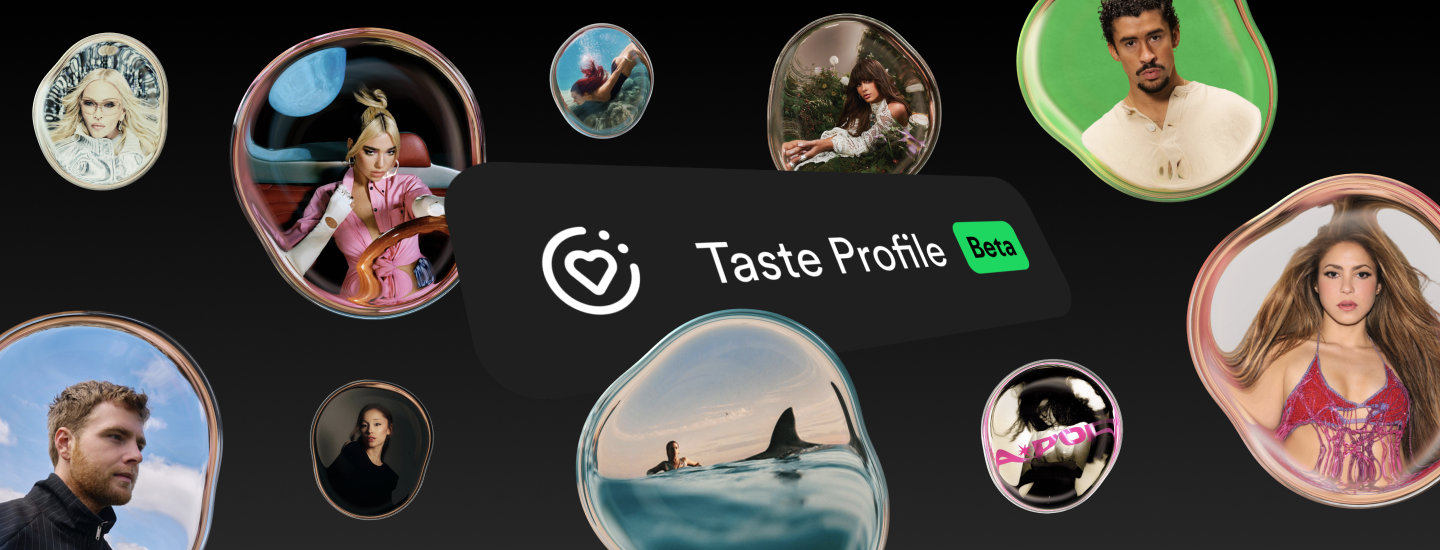
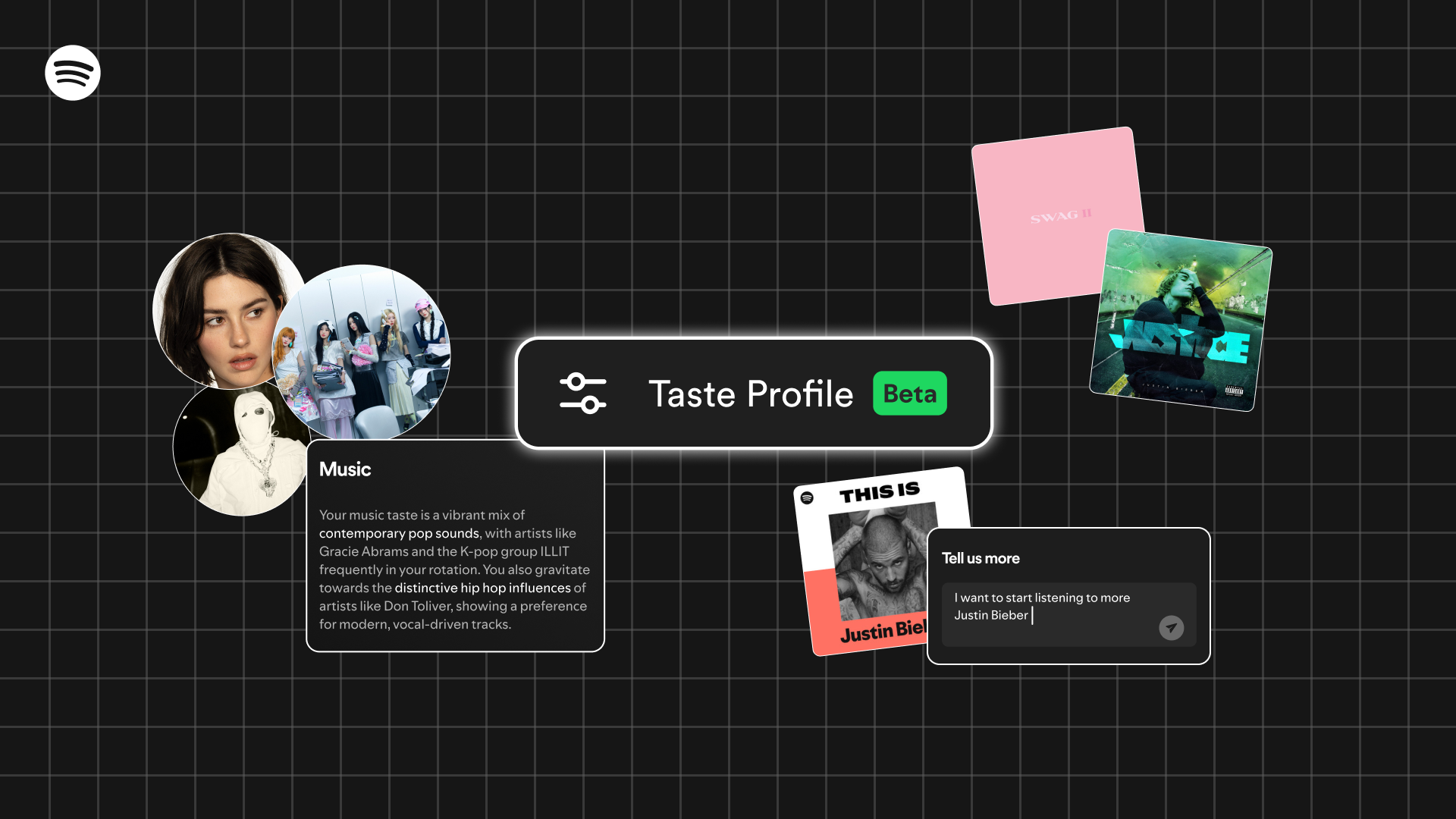
Taste Profile lets you see how Spotify understands your taste and shape it yourself, giving you the ability to steer what you see on the Spotify homepage. It brings together what you listen to across music, podcasts, and audiobooks, from the artists and genres you love to the habits that define your day. You might see that you’re starting to explore ’90s alternative rock, or gravitating toward hip-hop with distinctive influences.

If something doesn’t feel quite right, you can tell us by flagging when your profile misses the mark—asking for more or less of a certain vibe, or simply sharing what you’re in the mood for. Your input helps determine what gets prioritized, what gets dialed back, and what you discover next on the Spotify homepage.

Beyond listening patterns, Taste Profile is designed to capture new dimensions of your taste, like your current interests and habits. Maybe you’re training for a marathon and want more upbeat tracks for morning workouts, or maybe you like to listen to news podcasts during your weekday commute. These signals allow for even deeper personalization. You can shape your Taste Profile as much as you’d like, or leave it and enjoy Spotify as usual. 

This is the next step in our vision to make personalization more transparent, responsive, and truly yours. It joins our latest beta launch, Prompted Playlist, which lets you steer the algorithm by creating playlists that tap into your full listening history or anything else you’re in the mood for. As we continue building the future of Spotify, we’re excited to help you shape an experience that grows and evolves alongside you.

Spotify’s DJ Now Takes Requests, Enhancing Real-Time Music Discovery

People all over the world love DJ. At the gym, at home, whenever and wherever you want a deeper experience with great music, DJ is the answer. In fact, DJ listener engagement has nearly doubled over the past year—it’s like having a personal musical friend who just gets you.

We also know that listeners have asked for more ways to interact with DJ and enjoy more control over their listening sessions. That’s why we’re excited to share that DJ is now taking music requests, giving Premium users in more than 60 markets an entirely new way to curate the vibe of their listening sessions in real time. Serving up suggestions using AI and insights from our global editorial experts, DJ helps you uncover new tracks, rediscover old favorites, and connect deeply with the music you love.

By simply using your voice, you can now ask DJ to update your personalized listening session based on the music you want to hear at that moment, whether you’re looking for something to set the mood for date night or need some high-energy tracks to get you hyped for a party.

DJ can handle a combination of genre, mood, artist, or activity-related requests. For example, you could try, “Surprise me with some indie tracks I’ve never heard before,” or “Give me some electronic beats for a midday run.” You could even request something like, “Play me some cry-in-the-car songs.”

Listeners have come to know and love the personality and voice of our AI English-speaking DJ, modeled after Spotify’s Xavier “X” Jernigan. Now you can actually talk to DJ X and ask for music to match any mood or moment. It’s a two-way street, taking personalization to a whole new level.

Start requesting music with DJ

DJ requests will be available in English for Premium listeners in more than 60 markets where DJ is currently available. Here’s how to make a request:

    • Head to the search tab on Spotify and search “DJ.”
    • Press play and DJ will serve up a curated mix of music and commentary tailored to you.
    • Whenever you want to change up the vibe, press and hold the DJ button in the right-hand corner. You’ll hear a beep when DJ is ready.
    • Use your voice to ask for the kind of music you want to hear at that moment. 
    • Just like that, DJ will update your session based on your request, listening history, music preferences, and more.
    • Want to mix things up? Hold the DJ button to switch up the vibe or make a new request.
    • If you want to change the vibe but don’t have a specific request, you can skip to the next section with a quick tap of the DJ button.

We should note that while requests with DJ are designed to be fun, the feature is still in beta and won’t produce results for non-music-related requests, like audiobooks or podcasts. 

We’re excited to give our listeners even more control and to continue evolving the DJ experience. So get creative, make some requests, and let DJ take you on a personalized musical journey.

*Update as of September 23, 2025: DJ now takes requests on Android Auto. Premium users can interact with DJ by simply tapping the “Talk to DJ” button on their car’s Android Auto screen. Whether you’re commuting to work or on a weekend getaway, effortlessly steer your DJ session on the road with voice requests like, “Play some new indie tracks.” This new integration lets drivers seamlessly change the vibe wherever the road takes them.

In order to access the “Talk to DJ” button in your car, make sure you’ve first given DJ microphone access on your phone.

Experience a New Dimension of Music Discovery With More Controls and Enhanced Tools

Discovering music should feel effortless and fun. That’s why Spotify continuously innovates to bring our users features and tools for seamless discovery, intuitive playlist curation, and a uniquely personal listening experience.

Starting today, we’re gradually rolling out a new suite of features and tests that put you in the driver’s seat and offer you more control over your listening and discovery. Our latest updates give you even more tools to curate playlists, refine your recommendations, and shape your music journey.

Optimize your listening sessions

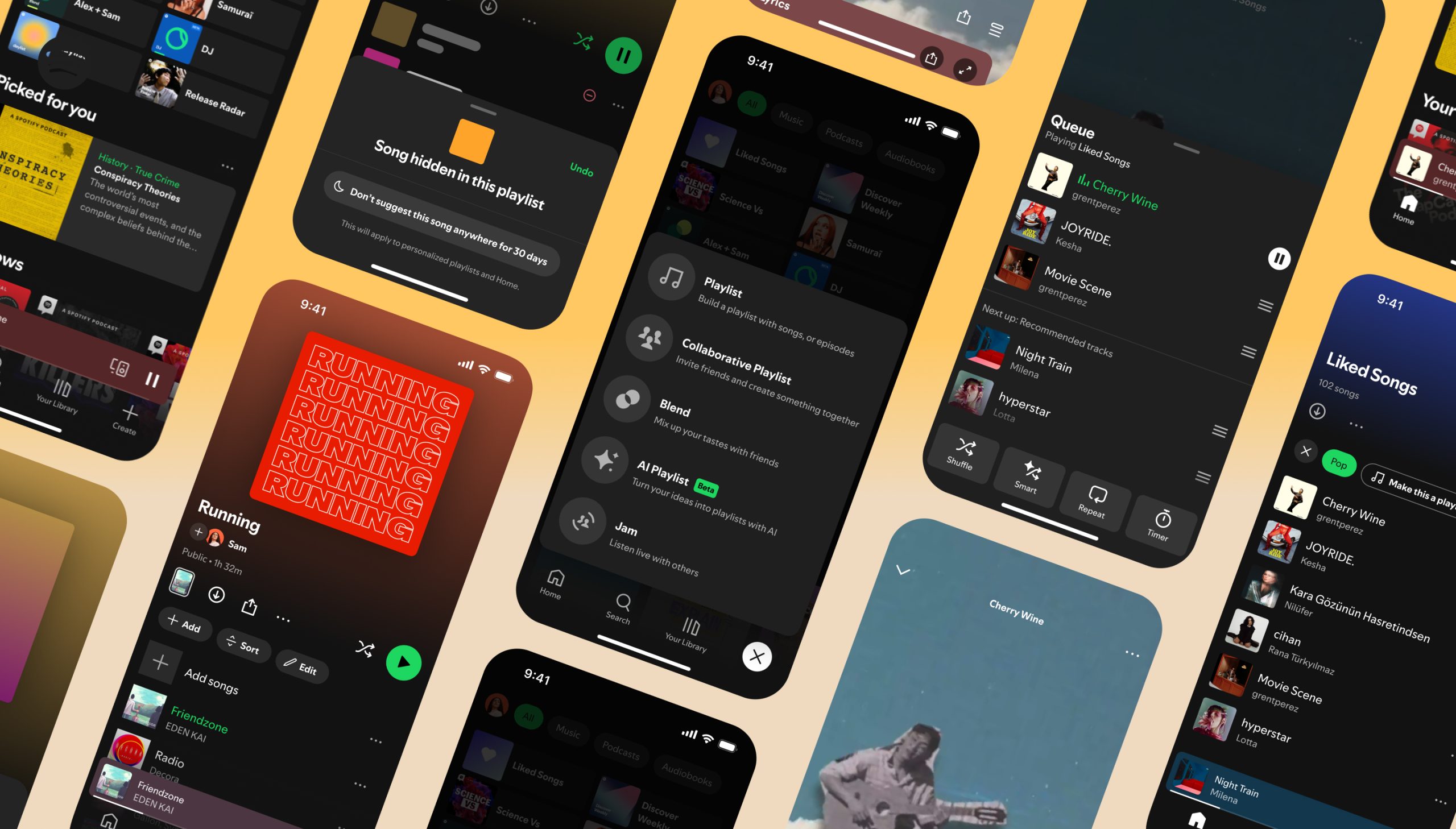
Good news for Premium users: Queue, those three lines at the bottom of your Now Playing view, just got an upgrade. The new design is easier to use and includes controls like Shuffle, Smart Shuffle, Repeat, and Sleep Timer. Plus, Premium users will also start seeing which songs Spotify recommends after your queued-up tracks end, so you can decide what makes it into your queue. Prefer to stick with your own picks during your listening sessions? You can easily switch Autoplay and Smart Shuffle off in your settings for full control.

We’re also making it easier to shape your musical journey with an updated Hide button and the new Snooze feature. Hear a track that just doesn’t fit the vibe? The refreshed Hide button is now more intuitive, and when you tap it, the track will be hidden from that playlist across all devices, so we won’t play it again in that playlist. And if you need more of a break from a song, keep an eye out for our new 30-day Snooze feature. This option allows you to temporarily remove a track from your recommendations, so you can keep things fresh while leaving the door open for a future reunion. We’re starting to test this for Premium users and are planning to bring it to more listeners soon.

Customize your playlist listening experience

We’re introducing new mobile playlist management tools that will help you customize your creations. Now, at the top of all your playlists, you’ll find easy access to Add, Sort, and Edit to build your track list, change your playlist title, create custom cover art, and perfectly sequence each song. 

If you’re always adding to your Liked Songs, there’s good news: listeners in Australia, Canada, Ireland, New Zealand, South Africa, the U.K., and the United States can now use this tracklist to build playlists. Try it out by filtering by genre and tapping “turn into a playlist.”

Curate and collaborate with ease

Whether you’re looking to dive deeper into the music you love or discover your next favorite artist, we wanted to simplify access to our music-curation tools. Now, by tapping the Create button “+” at the bottom-right side of your mobile app, you’ll be able to easily create your playlist, collaborate with friends, and join a Blend. If you’re a mobile Premium user in a supported market, the Create button will also provide quick access to Jam for real-time listening with friends, and AI Playlist, where you can turn your most creative ideas into playlists. And with our recent expansion of AI Playlist to more markets, even more listeners can bring their creativity to the next level. 

Looking for Your Library to access all your personalized content and creations? It’s still there, we just moved it slightly. On mobile, you’ll see it as the third option at the bottom of your app.

4 Tips To Supercharge Your Discovery on Spotify in 2025

Personalized listening is key to unlocking your perfect soundtrack for 2025. It’s about more than just hearing your favorites, and at Spotify, we want to help you discover new artists and tracks we think you’ll love based on how you listen. 

Every day we connect millions of listeners with their favorite artists, powering nearly 2 billion music discoveries every 24 hours. And we’re constantly innovating to make this experience even easier and more enjoyable.

Discovering new music can come in many forms depending on your familiarity with different artists and genres, or even how you use Spotify playlists and features. From algorithmically personalized to expertly curated by our editors—and even synergistic blends that unite the best of both—we have playlists for every mood, moment, or discovery need.

We’ve curated some essential Spotify tips to help you find your next favorite track or artist.

Find your daily dose of discovery

If you’re looking to seamlessly blend your favorite tracks with new and exciting sounds, head to the Made for You hub and try out some personalized playlists like daylist or Mixes. daylist, which is available globally to both Free and Premium users, will perfectly soundtrack your day, updating frequently and evolving with your listening habits to offer more opportunities to discover new artists. 

Get your weekly fix

Ready to step outside your comfort zone? Try Discover Weekly. Every Monday, discover 30 new tracks tailored to your taste. This personalized playlist is filled with new music we think you’ll love—blending songs you might have missed over the years with recent releases. It’s an easy way to find artists and genres that are similar to what you’ve been listening to lately.

Stay ahead of the curve

Spotify offers a variety of curated playlists from our team of global editorial experts—like New Music Friday or Fresh Finds—each providing a great way to discover emerging artists and different genres. These playlists help you stay in tune with the latest trends and find what’s next in music. And once you discover a new artist, check out Release Radar, a personalized playlist that keeps you updated on your favorite artists’ new releases.

Supercharge your recommendations

Want even more personalized discovery? Engaging with Spotify helps fine-tune your recommendations. Liking songs, following artists, and saving tracks to your playlists all provide signals that help us understand your taste, leading to even better discoveries and more relevant recommendations. Explore genre hubs, artist pages, and our expert-curated playlists to further expand and refine your musical journey.

This year, make musical exploration a priority. Who knows? Your next favorite artist might be just a tap away.

Your Playlist In a Bottle Is Ready! It’s Time To Unlock the 2024 Playlist You Created

Quick pulse check: What are your mood, your inspiration, and your mindset as you kick off 2025? Do they match your feelings from a year ago? 

Two years ago we introduced “Playlist in a Bottle,” giving listeners a chance to capture the songs that resonated with them at that moment in time and seal them away for one year. The interactive in-app experience is the perfect time capsule to remember and reflect on the music you loved and how your taste may have evolved over the past 365 days. If you’re one of the Spotify listeners who participated in January 2024, today is the day to unlock your “Playlist in a Bottle” from last year. 

Here’s how

  • Visit spotify.com/playlistinabottle on your mobile device.
  • Choose “Claim Your Playlist” to see which songs were sealed in your musical time capsule. 
  • Save and listen to your complete 2024 Playlist in a Bottle. You only have until January 31!

Playlist in a Bottle is available in Argentina, Australia, Brazil, Canada, Chile, Colombia, Czech Republic, Denmark, Egypt, France, Germany, Hong Kong, India, Indonesia, Italy, Japan, Kenya, Malaysia, Mexico, Morocco, Netherlands, New Zealand, Nigeria, Philippines, Poland, Portugal, Saudi Arabia, Singapore, South Africa, South Korea, Spain, Sweden, Taiwan, Thailand, Turkey, U.K., UAE, U.S., and Vietnam.

And you can find Playlist in a Bottle in the following languages: English, English-GB, Portuguese, Portuguese-BR, French-CA, Spanish-LATAM, Dutch, German, French, Italian, Polish, Spanish-ES, Turkish, Japanese, Czech, Thai, Vietnamese, Chinese-Traditional, Korean, and Bahasa Indonesia.

The Art and Science Behind Spotify Wrapped

Spotify Wrapped is officially here, and with it comes your highly personal look back at how you soundtracked your year. 

We know your year in review evokes all the feels, but perhaps you’d like a bit more insight into all the ways your listening and our lists come together. From the skilled team of music editors who help develop Wrapped to the ace engineers who are evolving our tools to better fit your listening habits, it’s truly art and science working side by side. 

We caught up with JJ Italiano, Spotify’s Head of Global Music Curation and Discovery, and Molly Holder, Spotify’s Senior Director of Personalization, to reveal more about the magic behind Wrapped.

Happy Wrapped launch to you both! First, how does our annual experience highlight the work of both our brilliant tech team and the expertise of our editorial team? 

JJ: The work of Spotify’s editorial experts is grounded in a deep understanding of music culture. We are always working as a global team of music editors to identify and amplify trending songs, stories, and artists to the user—and, crucially, to contextualize those moments in curated playlists or other editorial offerings to help users form a deep, lasting connection to the track or artist. 

Spotify Wrapped gives listeners a chance to look back at the artist and track connections they’ve made over the course of the year through their personalized Wrapped list while also exploring some of the songs and artists that helped define the year in music culture more broadly through our editorial end-of-year Wrapped playlists.

Molly: The beauty of Wrapped is how much it reflects each individual user. Whether it’s your top song, total minutes listened, or favorite artist, 2024 Wrapped celebrates how you listened this year. 

We believe that great personalization fuels discovery: We’re powering nearly 2 billion music discoveries every day, connecting listeners with artists and genres they might never have found otherwise.

In addition to the work JJ and his team are doing, we’re excited to launch several brand-new personalized Wrapped features this year. From innovations like Your Music Evolution to the expansion of our AI-driven tools (such as AI DJ, AI Playlist, and Wrapped AI Podcast), users will have even more ways to explore the songs that defined their year.

JJ, can you share more about how the work of Spotify’s editorial team influences what users discover throughout the year, culminating in what shows up in their Wrapped? 

JJ: Over the course of the year, our editors around the world are constantly monitoring new music and cultural trends to identify important rising tracks and artists. We look at a vast range of qualitative and quantitative signals both on- and off-platform which inform our editorial decisions. 

We also continuously monitor in-playlist performance to understand what tracks and artists users are responding to. This helps signal what tracks should be added to more playlists. Your Wrapped may be comprised of artists that you’ve discovered anywhere on Spotify, including our editorial surfaces.

Molly, building on that, how do Spotify’s algorithms use those editorial selections to enhance personalized recommendations outside of Wrapped to ensure our users are discovering new music all year round? 

Molly: Spotify personalization is a mix of giving you what you like while pushing you a bit outside your comfort zone, too. We learn about what you like based on the ways you interact with Spotify, and our personalization technology takes into account a number of signals that you, as users, provide. For example, as you add songs to a playlist, listen to an entire song, skip a song, or engage with an artist, it sends us clear signals that help us tailor our programming to your taste.

But it’s also our job to determine when we should introduce you to something new. That’s when we consider certain additional factors, such as signs of popularity and how other users are engaging with tracks. We also rely on our editorial team, who play a crucial role in curating playlists and, through their knowledge, intuition, and expertise, help teach our machines. 

Recommendations are shaped by a number of signals, each contributing to the decision of whether a track should be suggested to a user. While these signals are weighted differently, listener satisfaction is always a priority, and we only recommend music we think listeners will want to hear. For more information on the most significant inputs that drive our personalization, you can learn more here.

How does Spotify use both human curation and algorithms to combat repetitiveness in recommendations?

Molly: Finding the right balance between familiarity and discovery is incredibly difficult. One reason is that music is different from other formats. On other platforms, you may consume a piece of content once and then never revisit it again. On Spotify, you can listen to the same song dozens of times, so we know that some repetitiveness is good.

But we don’t just paint by numbers. We listen to our users and the descriptive way they are saying they’d like to see us better balance familiarity with discovery, new with old, music with podcasts and audiobooks. We take that qualitative feedback to heart just as much as we weigh the quantitative signals when we make decisions about what to tweak in our algorithms. 

Can you share how human expertise and algorithms have worked together to propel a song or artist to success on Spotify?

JJ: One of this year’s most compelling examples would be Charli xcx’s BRAT album and the associated cultural moment, “brat summer.” Our editors were able to hear the album early and identified it as one of the top stories of the summer to come. As the album rollout and cultural conversation accelerated and branched off into new tracks and trends, our editors worked to reflect each moment rapidly and participate in the conversation holistically throughout our editorial surfaces.

BRAT not fitting neatly into any one genre gave us the opportunity to stretch our genre remits and work collaboratively to support her across multiple playlists and destinations on platform. Not only did Charli land on the cover of our New Music Friday playlist on album release day, but also on the covers of hot girl walk, Party Hits, and hyperpop, which helped us target the music to audiences outside of her traditional genre lanes. Watching the data allowed us to find more places for BRAT to be discovered on platform, and served to the right users.

Molly: As I mentioned, recommendations are powered by data. But there are instances—like when an artist releases a new track—where there’s little to no listening data available.

In those cases, we look at additional factors, such as signs of growing popularity. For example, if a song is climbing the charts, it becomes a valuable signal for our recommendation algorithms. 

Another key factor is input from JJ’s team, whose cultural expertise helps identify songs they believe our users will enjoy. And this year, we’ve seen some amazing breakout success from artists all over the world. Check out our 2024 Wrapped top lists to see what our listeners have deemed the songs, artists, and albums of the year! 

Explore your personalized 2024 Wrapped and learn more about this year’s campaign and experience on our 2024 Wrapped hub.

2024 Wrapped Is Here! Experience Your Year in Listening Like Never Before

A brightly colored GIF visual displaying the words "2024 Wrapped"

There’s nothing quite like the joy of looking back at what soundtracked your year. That’s where the Spotify Wrapped experience comes in, offering fans a personalized recap of their year in listening packed with immersive features.

Think of 2024 Spotify Wrapped as a celebration of the fans, artists, and creators who made this such an amazing year. We’re giving fans even more ways to indulge in what they love, from showing them how their taste in music evolved throughout the year to special messages from their favorite artists and podcasters.

More than ever, Wrapped is everywhere on Spotify—a massive effort showcasing the hard work and creativity involving hundreds of Spotify team members each year. New this year, fans can uncover more listening insights dotted across the Spotify experience. The “share” functionality for music and podcasts on Spotify has been given a Wrapped spin. By tapping “share,” Spotify will reveal whether the content you’re streaming stacks up in your top 100 songs, top 20 artists, or top five podcasts.

And reminder: Make sure your Spotify iOS or Android app is up-to-date to get your own 2024 Wrapped. You can access the experience via the Wrapped feed on your Home screen, which serves as your one-stop spot for all things Wrapped.

Three phone screens showing the 2024 Wrapped experience.

Fresh ways to celebrate your year on Spotify

As you relive the artists, songs, albums, and podcasts that made this year truly special, look out for some new and returning features in this year’s personalized experience for eligible users:

    • Your Music Evolution: Your tastes and moods change throughout the year—and so does the music you listen to. This new data story reveals the musical phases that uniquely defined your year. You may receive up to three musical phases, which will be displayed with descriptors, genres, and artists.
    • Your Music Evolution Playlist: Your Music Evolution will also come to life in a personalized playlist that can be found in the Wrapped feed on Home. Tracks within the playlist include both familiar favorites and new songs we think you’ll love—all related to your musical phases throughout the year.
    • Your Top Artist Reimagined: You will now get to see the artist you enjoyed most this year with “Longest Listening Streak,” plus the fan favorite “Top Listeners,” which reveals what percentage of listeners you’re in for your favorite artist.
    • Your Music Videos Playlist: In markets where music videos in beta are available, Premium users will receive a personalized playlist that brings together music videos from your most-loved artists of this year.
    • Your Artist Clips: Loyal fans will get to hear directly from some of their top artists within the Wrapped experience. Clips will include artists like Peso Pluma, ROSÉ, Billie Eilish, USHER, Sabrina Carpenter, KAROL G, and thousands more.
    • Your Podcaster Clips: You’ll also be able to enjoy short messages from some of your favorite podcast creators, including the ones behind shows like Anything Goes with Emma Chamberlain, Crime Junkie, Distractible, Diary of a CEO with Steven Bartlett, and more.
    • More Editorial Playlists & Insights: Curated by Spotify’s music editors, users can find more curated playlists in their Wrapped hubs, which include insights that contextualize and spotlight the biggest stories in music and culture in 2024.

Are You Wrapped-Ready? First Make Sure Your Spotify App Is Up-to-Date

Wrapped is almost here and Spotify is starting to drop hints at what this year’s campaign is all about: the fans. To get ready for the big reveal, Spotify is uniquely positioning its logo to capture the essence of 2024’s biggest musical moments during Wrapped.  

And one of the keys to getting the best Wrapped experience is making sure your Spotify app is up-to-date. If your phone isn’t set to automatically update the app and you haven’t manually updated it in a while, you may be missing out on some pretty great features.

An up-to-date app means you’re getting a fully optimized Wrapped experience. When the time comes for the big reveal of your personalized 2024 listening trends, you want to be ready. You’ll also be able to easily share your unique finds or fun tidbits from your yearlong listening with friends on social media.

There are reasons beyond Wrapped why it’s wise to update your Spotify app. With the latest version of Spotify on hand, you’ll have access to new features and enhanced experiences that our teams work hard to roll out. 

And finally, Spotify has many integrations across other apps, like TikTok and Instagram. To make your experience between the apps seamless, it’s important that you’re using the latest versions.

How to update your app

Updating your app is easy:

  1. Visit the Apple App Store if you have an iPhone or the Google Play Store if you have an Android.
  2. Search and find your Spotify app.
  3. Once it appears, you will see whether you have the latest version or the option to hit the “Update” button.
  4. Hit “Update” and you’re all set.

Now’s the time. Check out your Spotify app and make sure it’s up-to-date. Don’t worry, we will wait.

AI Playlist Is Rolling Out in Beta in the US, Canada, Ireland, and New Zealand—Get Started With These Pro Tips

In April, Spotify introduced AI Playlist in beta, providing our Premium subscribers in the U.K. and Australia with another tool to fuel discovery and music curation. Now we’re expanding the feature, giving more users another opportunity to express themselves through the music they love. Starting today, AI Playlist in English is rolling out in beta to Premium users on Android and iOS devices in the U.S., Canada, Ireland, and New Zealand.

AI Playlist combines Spotify’s powerful personalization technology with generative AI so users can turn their most creative ideas into playlists. Whether you’re totally new to the game or a prolific playlist creator, this feature offers a fun, easy way to create and curate that perfect musical mix, just for you.

Playlists on Spotify are hotbeds for discovery, fostering deep relationships between artists and fans. In fact, there are over 22 billion new artist discoveries a month on Spotify, with two billion of these turning into more lasting connections between fans and artists. 

It didn’t take long for AI Playlist to make its mark after launching in the U.K. and Australia—to date, users have created millions of playlists that they keep coming back to. With AI Playlist, you can flex your creative muscles, crafting the ideal vibe for any particular moment or mood.

The magic of AI Playlist

Creating a playlist with AI Playlist is as easy as entering a unique prompt into the chat, like “upbeat pop music for my European summer vacation” or “a romantic playlist for date night at home.” Spotify will then offer a personalized selection of songs that match the vibe you’re going for, which you can revise and refine by typing in additional prompts.

The more specific you can be, the better. The most successful playlists are generated with prompts that contain a mix of genres, moods, artists, or decades, so get creative! You can also reference places, animals, activities, movie characters, colors, and even emojis.

With AI Playlist hitting four new markets, For the Record asked a few of the Spotify bandmates behind the feature about the prompts they use to create the AI-powered soundtracks to their lives.

Frankie Shlain, On-Platform Marketing Lead

“I prompted AI Playlist to give me a playlist of rom-com soundtracks from the ’90s and ’00s, and it delivered! My playlist was made up of tracks from some of my favorite movies from back in the day, proving AI Playlist definitely understood the assignment.”

Erick Morales, Product Marketing Lead

“I went on holiday to Tulum, and as I was packing and preparing for my trip, I asked for chilled electronic music to manifest my dream life in the Caribbean. AI Playlist helped me create a Caribbean Dreams playlist with some pretty sweet music I had never listened to before, along with some personal favorites.”

Annabelle Rolland, Senior Data Scientist

“Prompt: ‘Give me some funky and upbeat songs to help me unpack my boxes in my new home.’ The resulting playlist was called Energized Unpacking Grooves, and I also created another playlist that day called Moving Day Melodies. We had just moved into our new home and I needed an upbeat playlist to give me some energy to unpack a mountain worth of boxes!”

Renato Gamboa, Senior iOS Engineer

“Driving through the desert roads of Joshua Tree National Park in California was an unforgettable experience. To relive those magical moments, I used the prompt, ‘Desert house music for driving through Joshua Tree.’ I knew AI Playlist nailed it when it suggested some of my favorite tracks. Wanting to hear some fresh desert house tracks, I refined my prompt to include only tracks released within the last month. Now I’m back on those desert drives with brand-new hits, making the journey feel even more special!”

Get started with AI Playlist

Head to the Spotify mobile app and search “AI Playlist” to bring up the feature. You can also select “Your Library” at the bottom-right corner of your screen, and from there, tap the “+” button at the top-right corner and select “AI Playlist.”

    • Next, select one of the suggested prompts or type your own. Remember, get creative and be specific!
    • Just like that, Spotify will curate a personalized playlist featuring the tracks, artists, and genres we think you’ll like.
    • From there, you can easily manage the selection of songs by previewing and deleting tracks, or ask Spotify to refine the playlist with additional prompts.
    • Tap “Create,” and your new playlist will be saved automatically in Your Library.

While AI Playlist is designed to be fun, this feature is still in beta and won’t produce results for non-music-related prompts, like current events or specific brands. We also have measures in place around prompts that are offensive, so please prompt responsibly.

With this expansion, we’re excited to bring AI Playlist to more users so they can express themselves in creative ways and explore new music. We’ll keep iterating and innovating on this experience to better serve our listeners, so stay tuned for so much more to come.

Spotify presenta AI DJ en español para los fans de la música en todo el mundo

Cuando lanzamos AI DJ en inglés el año pasado, ofrecimos a los usuarios una nueva forma de conectar y descubrir música en Spotify. DJ es una guía de IA personalizada que te conoce a ti y a tus gustos musicales tan bien que puede elegir qué reproducir para ti. Combina una selección curada de canciones con una voz impulsada por IA y complementa la experiencia con datos e información relevantes sobre las canciones y artistas que te recomienda. Todo esto se crea a través de la poderosa mezcla entre la tecnología de personalización de Spotify, la IA generativa en manos de nuestros editores expertos en música y una voz de IA real y cercana.

Y ahora es momento de llevar nuestro AI DJ, en versión beta, a los usuarios de Spotify Premium de habla hispana en todo el mundo.

Desde el debut de AI DJ, hemos aprendido la importancia de darle contexto a nuestros usuarios sobre lo que están escuchando. Cuando los oyentes reciben comentarios junto con sus recomendaciones musicales personalizadas, es más probable que escuchen una canción que de otro modo se habrían saltado. A los usuarios Premium les encanta DJ. El oyente medio de DJ pasa más tiempo escuchando DJ que los oyentes de cualquier otro set recomendado. 

Ya sea que aprendas algo nuevo sobre tu artista favorito o recuerdes un buen momento mientras escuchas una canción nostálgica, AI DJ agrega momentos divertidos a tu experiencia auditiva que te harán volver por más. Los usuarios Premium que escuchan DJ, escuchan más Spotify. Observamos un aumento de las escuchas la semana siguiente a la primera vez que un usuario escucha DJ en comparación con la semana anterior.

Quizás conozcas a Xavier Jernigan (sus amigos lo llaman “X”) como el primer modelo de voz de DJ con IA, en inglés.

X es el Head of Cultural Partnerships de Spotify y ha sido host de numerosos podcasts en Spotify durante los últimos años. Su personalidad y voz resonaron entre nuestros oyentes, por lo que fue la opción elegida. X no irá a ninguna parte, pero los usuarios que conocen y aman la voz en inglés ahora tienen la opción de elegir escuchar DJ en español.

El impacto del español dentro de la cultura musical es innegable: desde la popularidad de los artistas latinos en nuestra plataforma hasta el poder de la música para romper las barreras del idioma. Tenemos millones de oyentes de habla hispana en Spotify, muchos de los cuales han utilizado las redes sociales para preguntar sobre AI DJ. De hecho, en los últimos meses, hemos visto un aumento de más del 215 % en las conversaciones en social media sobre AI DJ en español. Lanzar AI DJ en español fue el siguiente paso natural en la evolución del producto y estamos emocionados de que el mundo conozca a Livi, la voz de AI DJ en español.

Presentamos a DJ Livi

Para crear el modelo de voz para AI DJ en español, colaboramos con nuestra propia editora senior, Olivia “Livi” Quiroz Roa, quien está basada en la Ciudad de México y ha dedicado toda su carrera a esta industria.

En su día a día, Livi se encarga de la curaduría de playlists populares en la plataforma y ha desempeñado un papel fundamental en el lanzamiento de nuestro programa EQUAL en México.

Después de un extenso casting internacional, la voz de Livi fue la que más resonó entre los usuarios. Los usuarios que evaluaron realmente sintieron que era una voz cercana y era como escuchar recomendaciones de música de una amiga.

Cómo empezar a utilizar AI DJ en español

La voz en español estará disponible para los oyentes Premium en los países donde AI DJ está disponible actualmente. Además, la función ahora se está expandiendo a usuarios Premium en España y en países seleccionados de Latinoamérica, incluidos Argentina, Bolivia, Chile, Colombia, Costa Rica, República Dominicana, Ecuador, El Salvador, Guatemala, Honduras, México, Nicaragua, Panamá, Paraguay, Perú, Uruguay y Venezuela.

Cuando utilices Spotify Premium en un país donde AI DJ esté disponible, así es como puedes encontrarlo:

  • Ve a la pestaña Buscar en Spotify.
  • Busca “DJ”.
  • Ponle play y deja que tu DJ personalizado haga el resto.
  • Para cambiar de idioma, simplemente toca el menú de tres puntos dentro de AI DJ y elige entre inglés o español.

En esencia, AI DJ se trata del descubrimiento y la conexión. Al darte un contexto relevante sobre tus recomendaciones musicales, estamos creando conexiones aún más profundas entre los artistas y sus fans. Con Livi como la voz de AI DJ en español, ahora tenemos la oportunidad de llegar a millones de oyentes de habla hispana en nuestra plataforma y ofrecerles una forma completamente nueva de escuchar Spotify.

Spotify Brings AI DJ to Spanish-Speaking Music Fans Around the World

When we launched our AI DJ in English last year, it gave listeners a new way to connect with and discover music on Spotify. DJ is a personalized AI guide that knows you and your musical tastes so well it can choose what to play for you. It combines a curated lineup of songs with an AI-powered voice that provides commentary about those recommendations. This is all created through the powerful combination of Spotify’s personalization technology, generative AI in the hands of our expert music editors, and a real and relatable AI voice. 

Now it’s time to bring our AI DJ, in beta, to Spanish-speaking Spotify Premium users around the world.

Since the debut of the AI DJ, we’ve learned the importance of context for our users. When listeners hear commentary alongside personal music recommendations, they’re more likely to listen to a song they may have otherwise skipped. Premium users love DJ. The median DJ listener spends more time listening to DJ than listeners of any other recommended set. 

Whether you learn something new about your favorite artist or evoke a fond memory while listening to a nostalgic track, DJ brings playful moments to your listening experience that keep you coming back for more. Premium Users who listen to DJ listen to more Spotify. We see an increase in listenership the week after a user first listens to the DJ compared to the week before.

You may know Xavier Jernigan (his friends call him “X”) as the very first AI voice model of DJ, in English. 

X is Spotify’s Head of Cultural Partnerships and has hosted numerous podcasts on Spotify over the years. His personality and voice resonated with our listeners, so he was a natural first pick. X isn’t going anywhere, but listeners who know and love the voice now have the option to choose to hear another DJ voice in Spanish.

The impact of the Spanish language within music culture is undeniable—from the popularity of Latin artists on our platform to the power of music in breaking down language barriers. We have millions of Spanish-speaking listeners on Spotify, many of whom have been taking to social media to ask about DJ. In fact, over the last few months, we’ve seen an over 215% increase in social conversation around DJ in Spanish. Rolling out DJ in Spanish was a natural next step in the evolution of the product, and we’re excited for the world to meet Livi, the voice of DJ in Spanish.

Introducing DJ Livi

To create the voice model for the DJ in Spanish, we enlisted our own Senior Music Editor, Olivia “Livi” Quiroz Roa, a Spotify music editor based in Mexico City who has spent her entire career in the music industry.

In her day job, Livi curates popular playlists on platform and has played an instrumental role in the launch of our EQUAL program in Mexico

After an extensive international casting call, Livi’s voice resonated the most with users. Testers really felt it was relatable and like they were hearing music recommendations from a friend. 

How to get started with DJ in Spanish

The Spanish-speaking voice will be available for Premium listeners in markets where DJ is currently available. It is expanding to Premium users in Spain and across select markets in Latin America, including Argentina, Bolivia, Chile, Colombia, Costa Rica, Dominican Republic, Ecuador, El Salvador, Guatemala, Honduras, Mexico, Nicaragua, Panama, Paraguay, Peru, Uruguay, and Venezuela.

As long as you’re using Spotify Premium in a market where DJ is available, here’s how you can find it:

  • Head to the Search tab on Spotify.
  • Search “DJ.”
  • Press play and let your personalized DJ do the rest.
  • To switch languages, simply tap the three-dot menu within the DJ card and choose between English or Spanish.

At its core, DJ is about discovery and connection. By providing context around your music recommendations, we’re creating even deeper connections between artists and fans. With Livi as the voice of DJ in Spanish, we now have the opportunity to reach millions of Spanish listeners on our platform and bring them an entirely new way to listen to Spotify.